Powerline WPA8631P V3 extenders - Base lights off, not appearing on TPplc app, but still working!

Powerline WPA8631P V3 extenders - Base lights off, not appearing on TPplc app, but still working!

Powerline WPA8631P V3 extenders - Base lights off, not appearing on TPplc app, but still working!
2025-09-02 09:41:53 - last edited 2025-10-16 11:44:00
Model: TL-WPA8630P KIT  
Hardware Version: V3
Firmware Version: 123

Hello


As above, the base adapter that connects to the modem has no lights, but the extenders do have the correct lights and appear to be working fine. I tested this by unplugging the extenders and testing speed vs the speed with them plugged in. Also the TPplc phone and macbook apps can't detect any of the WPA units at all, but they're clearly there and are clearly working.


Could someone please explain what this means? Are they working but only as signal repeaters?


Thank you.


  0      
  0      
#1
Options
1 Accepted Solution
Re:Powerline WPA8631P V3 extenders - Base lights off, not appearing on TPplc app, but still working!-Solution
2025-09-03 09:38:55 - last edited 2025-10-16 11:44:00

Hello@Shumon17 ,

Welcome to our community.


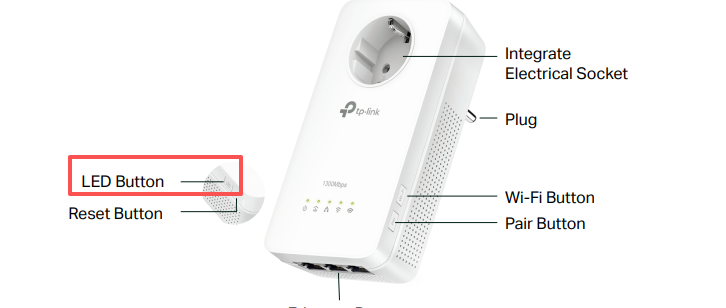
What is the model of your base adapter? Is it WPA8631P,  which has an LED button?


Press and hold the button for 1 second to turn all LEDs on or off. All LEDs are on by default. If you don’t feel like being bothered by the LED light at night, press and hold the button for 1 second to turn all LEDs off. The next morning, just press and hold the button again to turn them on.


Nice to Meet You in Our TP-Link Community. Check Out the Latest Posts: △Pre-release Firmware for Archer AX50 Introduces New Parental Control Features and Enhancements △Introducing AI QoS: Elevate Your Gaming Experience on the Archer GE800 Gaming Router △Connect TP-Link Archer BE550 to Germany's DS-Lite (Dual Stack Lite) Internet via WAN △Tether KidShield Test Recruitment - Safeguarding Children's Online Experience If you found the post or response helpful, please click Helpful. If an answer solves your problem, click "Recommended Solution" so that others can benefit from it.
Recommended Solution
  0  
  0  
#3
Options
2 Reply
Re:Powerline WPA8631P V3 extenders - Base lights off, not appearing on TPplc app, but still working!
2025-09-02 10:12:19

You can turn on/off the LEDs in the PC app.

  1  
  1  
#2
Options
Re:Powerline WPA8631P V3 extenders - Base lights off, not appearing on TPplc app, but still working!-Solution
2025-09-03 09:38:55 - last edited 2025-10-16 11:44:00

Hello@Shumon17 ,

Welcome to our community.


What is the model of your base adapter? Is it WPA8631P,  which has an LED button?


Press and hold the button for 1 second to turn all LEDs on or off. All LEDs are on by default. If you don’t feel like being bothered by the LED light at night, press and hold the button for 1 second to turn all LEDs off. The next morning, just press and hold the button again to turn them on.


Nice to Meet You in Our TP-Link Community. Check Out the Latest Posts: △Pre-release Firmware for Archer AX50 Introduces New Parental Control Features and Enhancements △Introducing AI QoS: Elevate Your Gaming Experience on the Archer GE800 Gaming Router △Connect TP-Link Archer BE550 to Germany's DS-Lite (Dual Stack Lite) Internet via WAN △Tether KidShield Test Recruitment - Safeguarding Children's Online Experience If you found the post or response helpful, please click Helpful. If an answer solves your problem, click "Recommended Solution" so that others can benefit from it.
Recommended Solution
  0  
  0  
#3
Options