
Tplink Archer modem bridge mode

Hello, does the Tp-link Archer Nx600 5G modem support passtrough mode (bridge mode)?
- Copy Link
- Subscribe
- Bookmark
- Report Inappropriate Content


Hi, if you purchase offline, such as from a local store, Deco X50-5G_V1 supports Bridge mode.
(The hardware version can be found on the product label of the box.)
Or NE200-outdoor would also be a good choice, which supports IP Passthrough, but it doesn't support WiFi:
https://www.tp-link.com/en/home-networking/5g-4g-router/ne200-outdoor/
Thank you very much.
Best regards.
- Copy Link
- Report Inappropriate Content
Hi, thank you very much for the feedback.
I'm afraid that Archer NX600 doesn't support 4G/5G bridge mode.
Best regards.
- Copy Link
- Report Inappropriate Content
Thanks for the reply! Since this function is really important to me, what tplink 5g modem support this mode?
- Copy Link
- Report Inappropriate Content
Hi, if you purchase offline, such as from a local store, Deco X50-5G_V1 supports Bridge mode.
(The hardware version can be found on the product label of the box.)
Or NE200-outdoor would also be a good choice, which supports IP Passthrough, but it doesn't support WiFi:
https://www.tp-link.com/en/home-networking/5g-4g-router/ne200-outdoor/
Thank you very much.
Best regards.
- Copy Link
- Report Inappropriate Content

Hi there,
I have a TP-Link Model: Archer NX600
Hardware Version: V2
Firmware Version: 1.2.0 3.0.0 v60ec.0 Build 250806 Rel.41198n
I would like to connect a secondary router to the NX660 configured in bridge mode.
I found in advanced configuration the choice "bridge" and I created a dedicated connection.
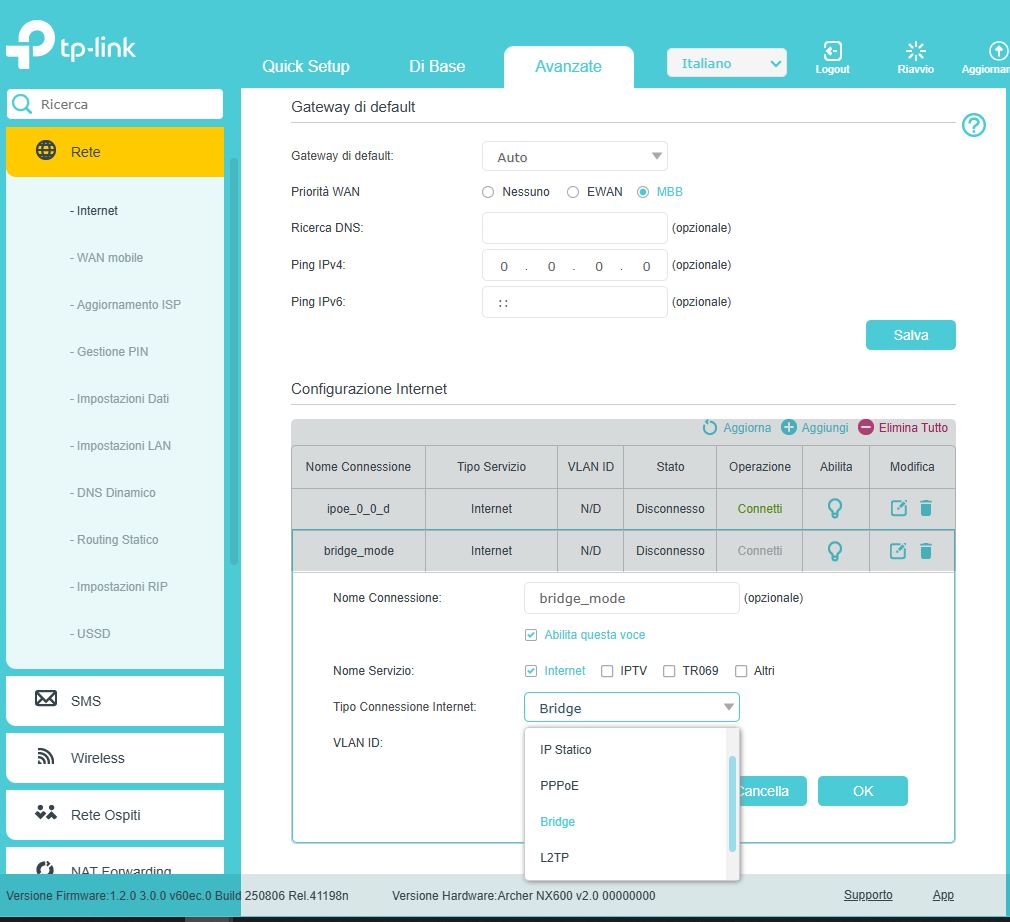
I wonder why it doesn't work.
No way to make the secondary router connect to ISP through NX600.
Any suggestion?
Thanks
- Copy Link
- Report Inappropriate Content
Information
Helpful: 1
Views: 1457
Replies: 4
Voters 0
No one has voted for it yet.