
Internet and WiFi unstable when plug-in both 10g port on my BE800

Internet and WiFi unstable when plug-in both 10g port on my BE800

Internet and WiFi unstable when plug-in both 10g port on my BE800
2025-10-14 16:45:41 - last edited 2 weeks ago
Model: Archer BE800  
Hardware Version: V1
Firmware Version: 1.2.4 Build 20250414 rel.18315(4153)

If I connect my ISP modem with 10gbs/SFP+ (Port 1) , and 10gbs (Port3) with my PC.

it just causing the whole internet and WiFi ( 2.4g 5g 6g all of them) speed low and "really really really unstable", and the ping are pretty high.


But if I switch my PC to 2.5G port, problems solved somehow.


Can anyone have any idea what's wrong with that?

  0      
  0      
#1
Options
1 Accepted Solution
Re:Internet and WiFi unstable when plug-in both 10g port on my BE800-Solution
2025-10-15 08:25:02 - last edited 2 weeks ago

Hello @JuneLJ ,


Thanks for contacting our community.


I'd like to know which of the following situations you are referring to when referring to port 1 and port 2?
If it is the second situation, please note that the combo port pairs an RJ45 port with an SFP+ port. Only one port in the pair can be used at a time.
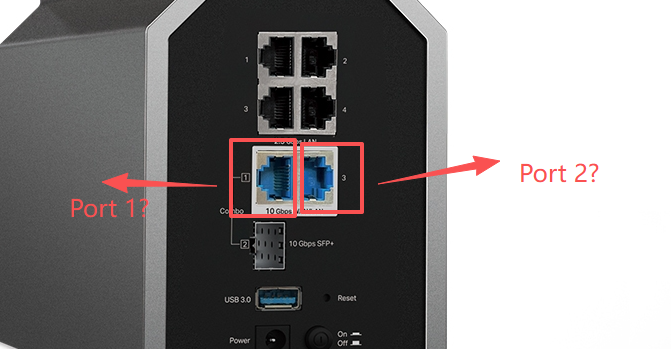
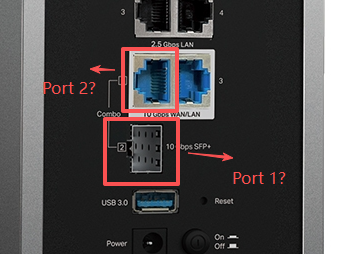


Also, please check whether your PC supports 10Gbps negotiation and the specifications of your Ethernet cable.


Nice to Meet You in Our TP-Link Community. Check Out the Latest Posts: △Pre-release Firmware for Archer AX50 Introduces New Parental Control Features and Enhancements △Introducing AI QoS: Elevate Your Gaming Experience on the Archer GE800 Gaming Router △Connect TP-Link Archer BE550 to Germany's DS-Lite (Dual Stack Lite) Internet via WAN △Tether KidShield Test Recruitment - Safeguarding Children's Online Experience If you found the post or response helpful, please click Helpful. If an answer solves your problem, click "Recommended Solution" so that others can benefit from it.
Recommended Solution
  0  
  0  
#2
Options
9 Reply
Re:Internet and WiFi unstable when plug-in both 10g port on my BE800-Solution
2025-10-15 08:25:02 - last edited 2 weeks ago

Hello @JuneLJ ,


Thanks for contacting our community.


I'd like to know which of the following situations you are referring to when referring to port 1 and port 2?
If it is the second situation, please note that the combo port pairs an RJ45 port with an SFP+ port. Only one port in the pair can be used at a time.


Also, please check whether your PC supports 10Gbps negotiation and the specifications of your Ethernet cable.


Nice to Meet You in Our TP-Link Community. Check Out the Latest Posts: △Pre-release Firmware for Archer AX50 Introduces New Parental Control Features and Enhancements △Introducing AI QoS: Elevate Your Gaming Experience on the Archer GE800 Gaming Router △Connect TP-Link Archer BE550 to Germany's DS-Lite (Dual Stack Lite) Internet via WAN △Tether KidShield Test Recruitment - Safeguarding Children's Online Experience If you found the post or response helpful, please click Helpful. If an answer solves your problem, click "Recommended Solution" so that others can benefit from it.
Recommended Solution
  0  
  0  
#2
Options
Re:Internet and WiFi unstable when plug-in both 10g port on my BE800
2025-10-15 11:40:16

  @Joseph-TP 


Sorry , my mistake 

Should be port 1 and Port 3 , like the first pic

  0  
  0  
#3
Options
Re:Internet and WiFi unstable when plug-in both 10g port on my BE800
2025-10-16 07:05:02

Hi @JuneLJ ,

Thanks for getting back to me.


Please confirm that you have set Port 1 as the WAN port in the Internet page:
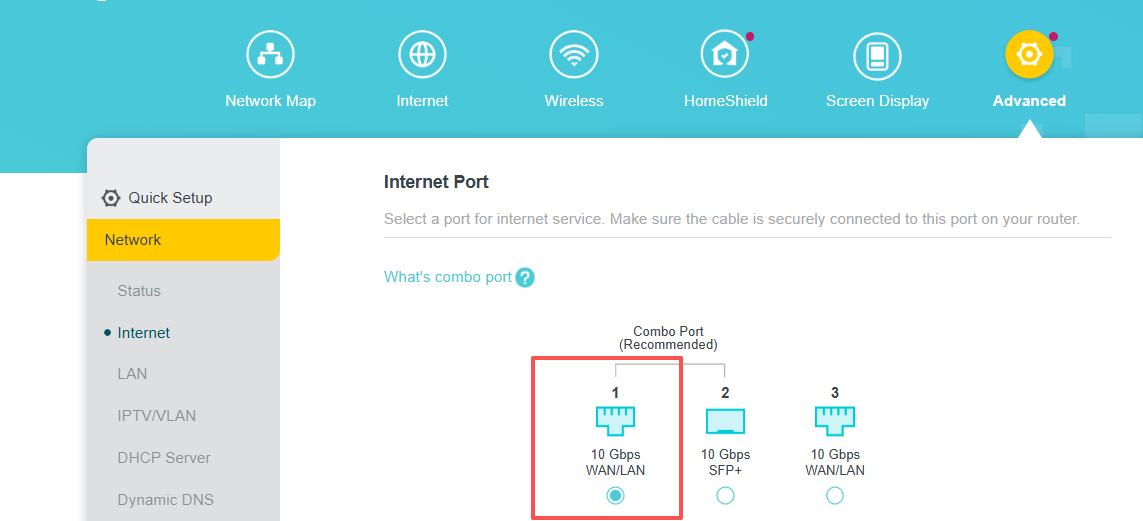
 

Is there a switch between the BE800 and wired clients? What are the models of the switch and clients?

Do the Ethernet cables, switch, and clients support 10G?


Nice to Meet You in Our TP-Link Community. Check Out the Latest Posts: △Pre-release Firmware for Archer AX50 Introduces New Parental Control Features and Enhancements △Introducing AI QoS: Elevate Your Gaming Experience on the Archer GE800 Gaming Router △Connect TP-Link Archer BE550 to Germany's DS-Lite (Dual Stack Lite) Internet via WAN △Tether KidShield Test Recruitment - Safeguarding Children's Online Experience If you found the post or response helpful, please click Helpful. If an answer solves your problem, click "Recommended Solution" so that others can benefit from it.
  0  
  0  
#4
Options
Re:Internet and WiFi unstable when plug-in both 10g port on my BE800
2025-10-16 07:25:51

  @Joseph-TP 

Yes, I did set the WAN to Port 1 on setting page.


Only modem >> BE800, nothing else between them.
 

The modem model is I-040GW made by Alcatel-Lucent , and the ISP provider are Taiwan CHT


All cables are 10G support.


  0  
  0  
#5
Options
Re:Internet and WiFi unstable when plug-in both 10g port on my BE800
2025-10-16 09:25:22

Hello@JuneLJ,

We would like to escalate your case to the support engineers, and they will follow up on it. If you are willing to conduct further analysis, please check your inbox and respond.    

Nice to Meet You in Our TP-Link Community. Check Out the Latest Posts: △Pre-release Firmware for Archer AX50 Introduces New Parental Control Features and Enhancements △Introducing AI QoS: Elevate Your Gaming Experience on the Archer GE800 Gaming Router △Connect TP-Link Archer BE550 to Germany's DS-Lite (Dual Stack Lite) Internet via WAN △Tether KidShield Test Recruitment - Safeguarding Children's Online Experience If you found the post or response helpful, please click Helpful. If an answer solves your problem, click "Recommended Solution" so that others can benefit from it.
  0  
  0  
#6
Options
Re:Internet and WiFi unstable when plug-in both 10g port on my BE800
2025-10-16 11:54:04

  @Joseph-TP 


Ok thanks for helping.


And I just noticed something, when I use the WiFI Tools package which development by TP-Link to test the ping, ipv6 packet loss are around 60-80% everytime.


  0  
  0  
#7
Options
Re:Internet and WiFi unstable when plug-in both 10g port on my BE800
2025-10-17 02:00:44

  @JuneLJ ,

Thanks for your supplement. I will also sync this info with the engineer.

Best Regards.

Nice to Meet You in Our TP-Link Community. Check Out the Latest Posts: △Pre-release Firmware for Archer AX50 Introduces New Parental Control Features and Enhancements △Introducing AI QoS: Elevate Your Gaming Experience on the Archer GE800 Gaming Router △Connect TP-Link Archer BE550 to Germany's DS-Lite (Dual Stack Lite) Internet via WAN △Tether KidShield Test Recruitment - Safeguarding Children's Online Experience If you found the post or response helpful, please click Helpful. If an answer solves your problem, click "Recommended Solution" so that others can benefit from it.
  0  
  0  
#8
Options
Re:Internet and WiFi unstable when plug-in both 10g port on my BE800
2025-10-24 18:40:51

  @Joseph-TP 


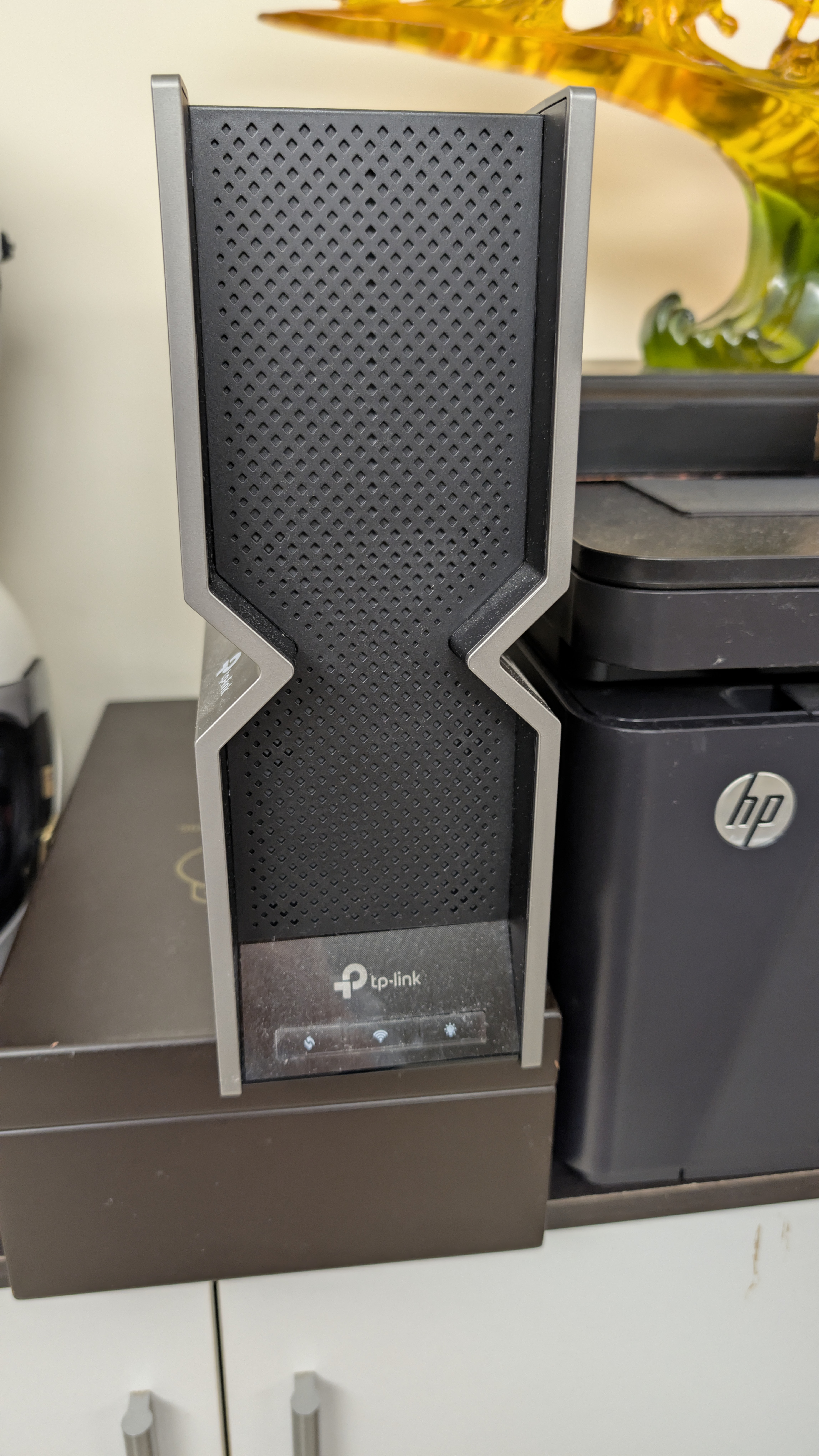
Somehow,after your tech help through TeamViewer, today the LED display having display issue like the photo.


And also I found that the BE800 just shutdown when I woke up this morning , got no idea with that
 

  0  
  0  
#9
Options
Re:Internet and WiFi unstable when plug-in both 10g port on my BE800
2025-10-28 02:27:53

Hello  @JuneLJ ,

Is the router back up and running? If not, please provide more details. We would recommend that you contact the engineer directly via a ticket.
I'll also pass your information along to the engineer.


Nice to Meet You in Our TP-Link Community. Check Out the Latest Posts: △Pre-release Firmware for Archer AX50 Introduces New Parental Control Features and Enhancements △Introducing AI QoS: Elevate Your Gaming Experience on the Archer GE800 Gaming Router △Connect TP-Link Archer BE550 to Germany's DS-Lite (Dual Stack Lite) Internet via WAN △Tether KidShield Test Recruitment - Safeguarding Children's Online Experience If you found the post or response helpful, please click Helpful. If an answer solves your problem, click "Recommended Solution" so that others can benefit from it.
  0  
  0  
#10
Options

