Enormous Bufferbloat problems for Archer BE230 BE3600

Enormous Bufferbloat problems for Archer BE230 BE3600

Enormous Bufferbloat problems for Archer BE230 BE3600
2025-10-31 13:36:40 - last edited 2025-12-05 01:46:39
Model: Archer BE230  
Hardware Version: V1
Firmware Version: 1.2.1 Build 20250804 rel.79639(4555)

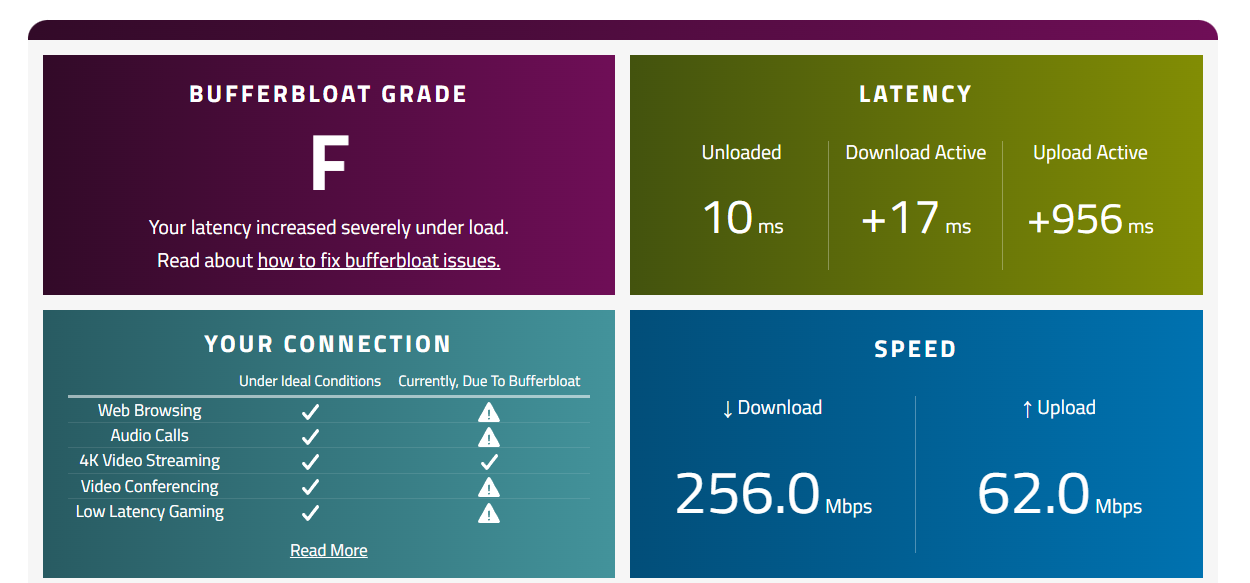
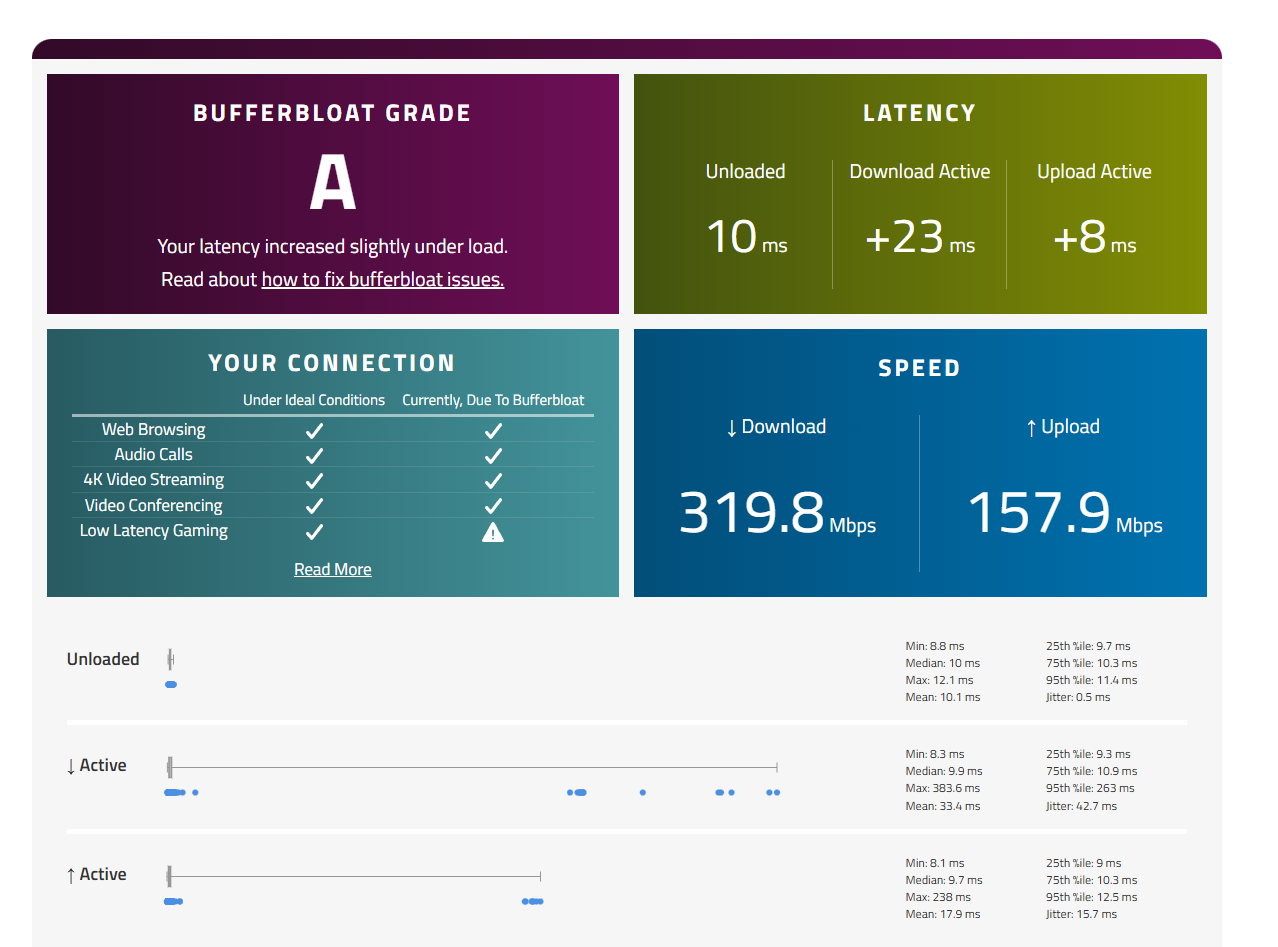
I get enormous Bufferbloat when I enable QoS on the router.


This is without QoS:
without_qos

This is with Qos:

1
1
#1
1 Accepted Solution
Re:Enormous Bufferbloat problems for Archer BE230 BE3600-Solution
2025-12-05 01:46:36 - last edited 2025-12-05 02:25:54

Hello @Serbian_Fantom ,

Regarding this unexpected behavior of the Archer BE230 V1/V1.20, we have released a beta firmware. Referring to What Can I Do If QoS Enabled Causes Buffer Bloat and High Latency on an Archer BE230 After a Firmware Update?

Please try the beta firmware and let me know if it can help.

Welcome to Our Community! Get the latest posts: △New Firmware for Archer GE550/GE650 V1 Introduces AI-QoS, EasyMesh IoT Expansion, and More! △New Firmware Releases for Archer BE805 V1/BE450 V1 to Support VPN Merge, New ECO Mode, and More! More posts, please see: △ Get the Ongoing Pre-release Firmware for Wi-Fi Routers Here— Subscribe for Updates! Urgent problems with your Wi-Fi Router, Range Extender, or DSL Modem? Please reach out via private Messages or @Joesph-TP in your new thread directly. Click Or ☆Recommended Solution if the post/answer helps.
Recommended Solution
2
2
#3
4 Reply
Re:Enormous Bufferbloat problems for Archer BE230 BE3600
2025-11-03 09:23:20

Hello @Serbian_Fantom, thank you for posting in the TP-Link community.


QoS prioritizes network traffic to ensure optimal performance for critical applications. It identifies and classifies traffic types (e.g., video streaming, gaming, web browsing) based on protocols, ports, or IP addresses, and assigns priority levels to each type. For example, video streaming might be given higher priority over general web browsing.


When checking for bufferbloat with third-party software, it's possible that low-priority traffic or data is being analyzed by the software when QoS is enabled on the router. This can lead to noticeable differences in performance when QoS is enabled versus disabled.


Aside from bufferbloat, it seems the Download/Upload is also affected after enabling QoS on the BE230. Have you tested the speed using speedtest.com with QoS disabled and enabled?


BTW, can you share the screenshots of the QoS settings on the BE230?

Nice to Meet You in Our TP-Link Community. Check Out the Latest Posts: Introducing AI QoS: Elevate Your Gaming Experience on the Archer GE800 Gaming Router! Connect TP-Link Archer BE550 to Germany's DS-Lite (Dual Stack Lite) Internet via WAN Archer GE550 - BE9300 Tri-Band Wi-Fi 7 Gaming Router Archer AX90 New Firmware Added Support for EasyMesh and Ethernet Backhaul If you found a post or response helpful, please click Helpful (arrow pointing upward icon). If you are the author of a topic, remember to mark a helpful reply as the "Recommended Solution" (star icon) so that others can benefit from it.
1
1
#2
Re:Enormous Bufferbloat problems for Archer BE230 BE3600-Solution
2025-12-05 01:46:36 - last edited 2025-12-05 02:25:54

Hello @Serbian_Fantom ,

Regarding this unexpected behavior of the Archer BE230 V1/V1.20, we have released a beta firmware. Referring to What Can I Do If QoS Enabled Causes Buffer Bloat and High Latency on an Archer BE230 After a Firmware Update?

Please try the beta firmware and let me know if it can help.

Welcome to Our Community! Get the latest posts: △New Firmware for Archer GE550/GE650 V1 Introduces AI-QoS, EasyMesh IoT Expansion, and More! △New Firmware Releases for Archer BE805 V1/BE450 V1 to Support VPN Merge, New ECO Mode, and More! More posts, please see: △ Get the Ongoing Pre-release Firmware for Wi-Fi Routers Here— Subscribe for Updates! Urgent problems with your Wi-Fi Router, Range Extender, or DSL Modem? Please reach out via private Messages or @Joesph-TP in your new thread directly. Click Or ☆Recommended Solution if the post/answer helps.
Recommended Solution
2
2
#3
Re:Enormous Bufferbloat problems for Archer BE230 BE3600
a week ago - last edited a week ago

  @Serbian_Fantom 


I was having the similar issues. I found if you turn off QoS and limit the bandwidth for your device to under 100Mbps it removes the bufferbloat. It's not ideal if you have gigabit speeds but there's zero latency. 

0
0
#4
Re:Enormous Bufferbloat problems for Archer BE230 BE3600
a week ago

Hello @SP80 ,

Are you also encountering the "Archer BE230 buffer bloat" problem? Perhaps downloading a beta firmware version would help?


Welcome to Our Community! Get the latest posts: △New Firmware for Archer GE550/GE650 V1 Introduces AI-QoS, EasyMesh IoT Expansion, and More! △New Firmware Releases for Archer BE805 V1/BE450 V1 to Support VPN Merge, New ECO Mode, and More! More posts, please see: △ Get the Ongoing Pre-release Firmware for Wi-Fi Routers Here— Subscribe for Updates! Urgent problems with your Wi-Fi Router, Range Extender, or DSL Modem? Please reach out via private Messages or @Joesph-TP in your new thread directly. Click Or ☆Recommended Solution if the post/answer helps.
0
0
#5