
Easy Mesh binding TP Link RE450 V4 with Huawei EG8145X6-10

How cann I connect this tplink extender to huawei easy mesh router?
The easy mesh on Huawei is enabled and I cann bind another Huawei easy mesh device easy but I dont know how to bind it with RE450.
In Tether app i have only one mesh togle when connected to RE450. As it have a firmware that support easy mesh it should have that togle too.
I would like to set it as easy mesh device insted of having it as a repeater so I dont have new ssid-s.
Thank you.
- Copy Link
- Subscribe
- Bookmark
- Report Inappropriate Content


Hello @NFilipek ,
Thanks for contacting our community.
When you try to add RE450 to the EasyMesh Network, have you turned off another Huawei EasyMesh device to see if that helps?
If you set RE450 to be a repeater, can it be connected to the Huawei router?
Also, can you scan for a new EasyMesh device on the Huawei EG8145X6-10 and add the extender for a try? Take TP-Link EasyMesh router for an example:
How to add an extender to an EasyMesh network as a satellite device?
If the suggestions above don't help, it's also possible that Huawei routers have some limitations. We would recommend that you consult Huawei Technical Support for advice.
- Copy Link
- Report Inappropriate Content

NFilipek wrote
In Tether app i have only one mesh togle when connected to RE450. As it have a firmware that support easy mesh it should have that togle too.
Hi,
This is a known bug that hasn't been fixed yet. (for over two years)
The "EasyMesh" is properly shown in the RE450's web management interface, though.
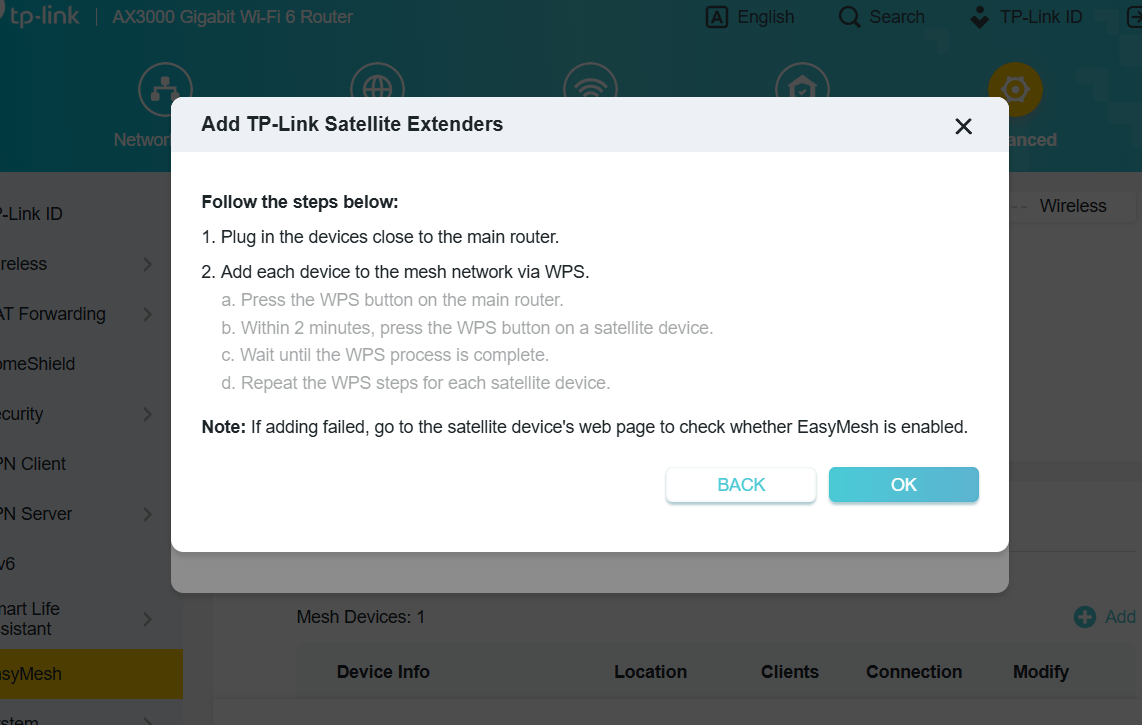
Anyway, here is a screenshot showing TP-Link's instructions on how to connect a range extender like the RE450 V4 to an EasyMesh router.
- Copy Link
- Report Inappropriate Content
@woozle Thank you. Do you know if tp link extender should be factory reseted before doing that?
- Copy Link
- Report Inappropriate Content
Normally, a factory reset should not be needed before adding the extender via WPS.
But I usually do a factory reset anyway, because I don't like to take the risk of running into any unforeseen issues that may have gone unnoticed during TP-Link's testing.
- Copy Link
- Report Inappropriate Content
@woozle I did what you said and tp-link advised but it did not work. I reseted the RE450 and waited a two or three minutes then i pres WPS on router and after that on the RE 450. The RE450 flashes and I seems like it is connected and the 5Ghz LED was on but then after a minuter it turns off ths 5GHz LED and resets. Then after a two or three minutes it repeats this process. It does not work.
- Copy Link
- Report Inappropriate Content
Hello @NFilipek ,
Thanks for contacting our community.
When you try to add RE450 to the EasyMesh Network, have you turned off another Huawei EasyMesh device to see if that helps?
If you set RE450 to be a repeater, can it be connected to the Huawei router?
Also, can you scan for a new EasyMesh device on the Huawei EG8145X6-10 and add the extender for a try? Take TP-Link EasyMesh router for an example:
How to add an extender to an EasyMesh network as a satellite device?
If the suggestions above don't help, it's also possible that Huawei routers have some limitations. We would recommend that you consult Huawei Technical Support for advice.
- Copy Link
- Report Inappropriate Content
Information
Helpful: 0
Views: 2202
Replies: 5
Voters 0
No one has voted for it yet.