
MR6400 LTE router V4 supports Cloud ID

Hi there,
I read on an old post (https://community.tp-link.com/en/home/forum/topic/216900) that the V3 of the MR6400 is not suitable for CloudID and hence Tether App.
In the same post it was said that V5 is indeed suitable.
Is V4 supposed to be suitable?
Seems I can connect to the MR6400 trough the App on an iOS while connected to the same network.
Impossible to connect from the same phone externally the network.
Is the V4 supposed to work?
Thank you so much,
Andrew
- Copy Link
- Subscribe
- Bookmark
- Report Inappropriate Content


Hi, welcome to the community.
Tether APP supports both local management and cloud management. TL-MR6400 V3 and V4 don't allow binding to the Cloud ID, but you can still manage the device when the mobile phone is connected to the WiFi of the router.
V5 supports binding to the TP-Link Cloud, so the Tether APP allows both local management and cloud management.
Thank you very much.
Best regards.
- Copy Link
- Report Inappropriate Content
I have to add that I noticed that on two official pages the following compliance either for Tether as for IDCloud for the V4, so I suppose shall work.
Am I right?
https://www.tp-link.com/nordic/cloud-service/product-list/
https://www.tp-link.com/nordic/tether/product-list/
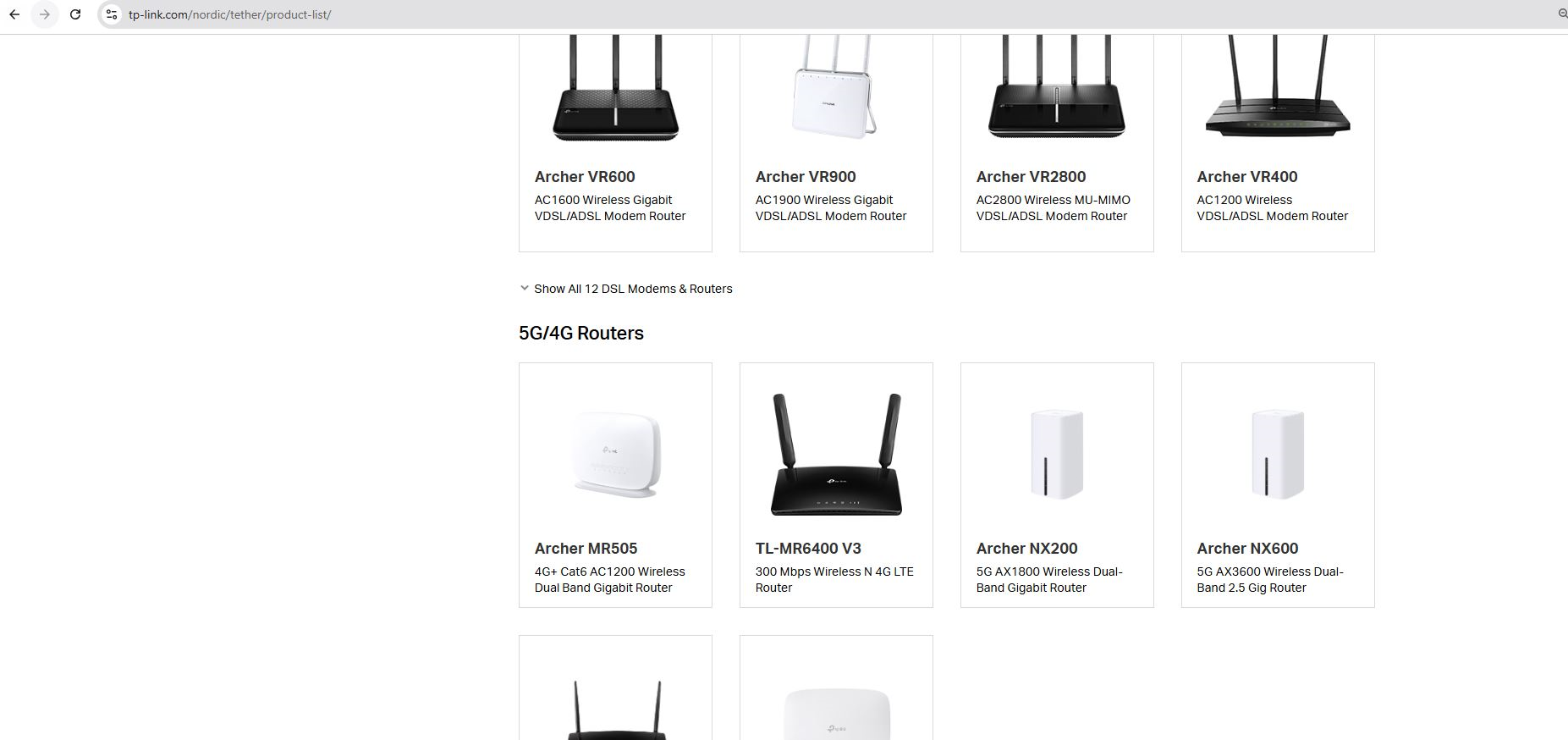
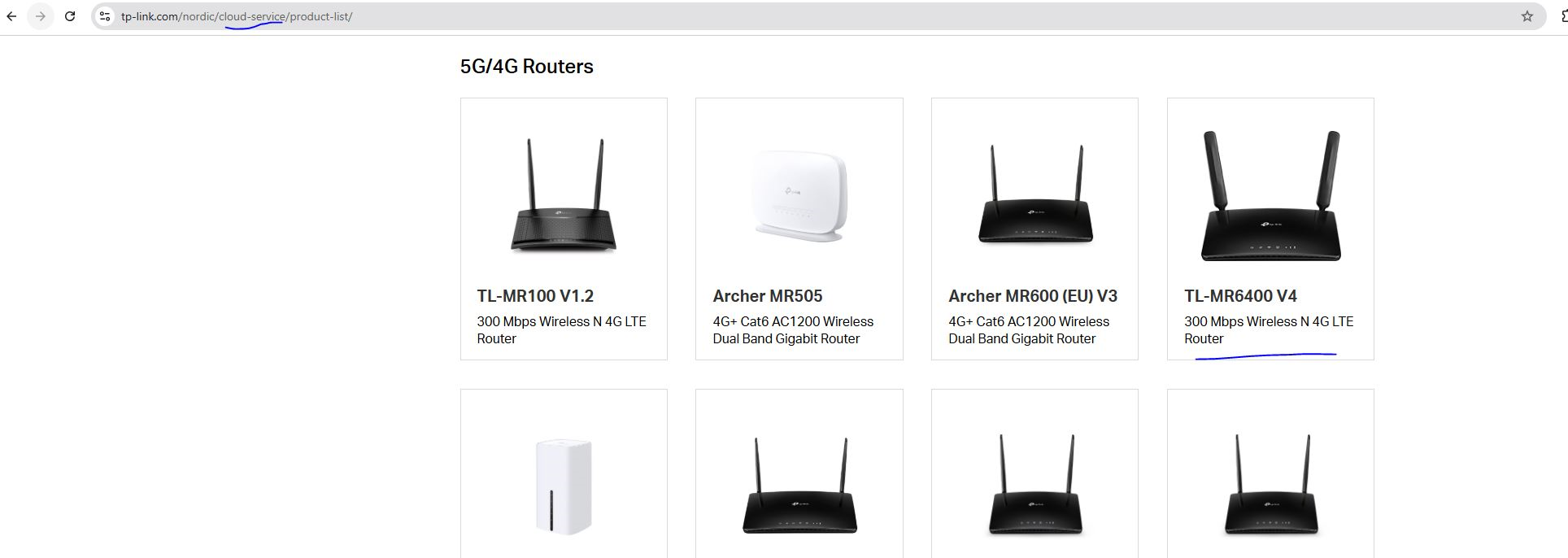
By the way I follow also this guide (https://www.tp-link.com/it/support/faq/2808/?app=kasa) but no chance to get online when outside my network, and the Cloud ID options (mentioned in the guide, point 2) does not appear on my V4.
Any hints about:
shall work on V4?
how to solve it?
Thanks,
Andrea
- Copy Link
- Report Inappropriate Content
Hi, welcome to the community.
Tether APP supports both local management and cloud management. TL-MR6400 V3 and V4 don't allow binding to the Cloud ID, but you can still manage the device when the mobile phone is connected to the WiFi of the router.
V5 supports binding to the TP-Link Cloud, so the Tether APP allows both local management and cloud management.
Thank you very much.
Best regards.
- Copy Link
- Report Inappropriate Content
Hi David TP,
Firstly thanks for the information.
This is a very bad news from my point of view.
The compatibility either for Tether App and Cloud ID, is mentioned everywhere on TPLink Website (see images on my previous post) from V4, and App (see image attached) starting from V3.
On some local TP link Website it even mention V3 for both compatibility with ether App and Cloud ID.
In my case these information from TPLINK have been misleading, since I recently specifically purchased a V4 (after having specifically required to the seller to check on the unit if this was V4 and not previous one) because I needed among other features also the SMS reading from the APP.
Obviously I looked for that specific seller because the price was interesting.
If I had known V5 was required I would have looked for a different solution.
Since one month elapsed from the purchase while in vain I tried to configure what I needed with a lot of tests and spent of time, to allow the system work, I cannot even return the unit to the seller (which by the way is not all responsible for this).
I believe the wrong information from TPLINK website and App took me to purchase a unit which does not do what is declared and claimed on the official communication channel of TPLINK.
Moreover this wrong information is probably over the Internet since at least 5 years (which I found amazing!)
What am I supposed to do now with such unit? How can TP Link help in solve this situation not caused by my error?
Thanks for the comprehension.
Andrew

- Copy Link
- Report Inappropriate Content
Hi David,
considering my previous request claiming for wrong information claimed by TP link on communication official channel, can you tell me how to handle this case and claim?
Who shall I address my claim to get support and clarification by TP Link? How can TP Link help in solve this situation not caused by my error?
Thanks in advance,
Andrea
- Copy Link
- Report Inappropriate Content
Hi, thank you very much for your update.
First, it is recommended to return the TL-MR6400_V4 first, as you just purchased it.
Then there are some of my thoughts. TL-MR6400_V5 and below(V1-V5) are already EOL, and usually, if you purchase from the official store, you might receive V7/V8 or at least V5.3/5.2. TL-MR6400 V4 doesn't support Tether APP remote management, but its firmware upgrade supports OTA firmware pushed from TP-Link Cloud via MAC address. I can't say for sure the exact reason why V4 is listed as compatible with the Cloud service. If it refers to the firmware upgrade, the compatible list does make sense in certain ways.
Thanks a lot for your understanding and support.
Best regards.
- Copy Link
- Report Inappropriate Content
@David-TP Hi David,
Thanks for the reply.
The unit cannot be returned since basically it works and respect what I specifically required to the seller (V4).
The product return policy was valid for 30 days but as mentioned in my previous post I tried for the whole last 45 days (after receving the product) to make it work without chance.
This because I was sure TP Link information provided (V4 compatible) was right, while it was not.
Now the return product policy period is elapsed and hence I have a unit which does not do what the producer tell it is supposed to do and I can't return it.
You mention by the way: "TL-MR6400 V4 doesn't support Tether APP remote management, but its firmware upgrade supports OTA firmware pushed from TP-Link Cloud via MAC address. "
It would be fine for me having to perform the FW upgrade to enable the feature, but I tried to perform a Firmware upgrade from the dedicated page on the browser but it mention the last firmware available is already installed and no different upgrade is possible.
How I am supposed in this case to perform the Firmware upgrade?
Thanks,
Andrew
- Copy Link
- Report Inappropriate Content
Hi, thanks for the quick reply.
I'm afraid there might be some misunderstanding. MR6400_V4 supports OTA firmware release, which is considered part of the cloud service and might explain why the MR6400 was listed in the compatible list. I didn't mean to say the Tether APP remote management can be added via firmware upgrade. As I mentioned earlier, MR6400 V3/V4 has been EOL for quite some time, and it is unlikely to receive any new firmware versions.
Thank you very much.
Best regards.
- Copy Link
- Report Inappropriate Content
@David-TP Hi David,
I am sorry to insist but this does not change the fact.
I paied a product which TP LINK states to be compatible with a specific feature while it is not.
Now, who shall be considered responsible for the amout paid:
1) me as customer?
2) the provider?
3) the producer?
IMHO, definetely not the first two, so how TP LINK will manage this? If is not you the one that can reply to this question, can you tell me who shall I address my concern?
Thanks for your help.
Andrew
- Copy Link
- Report Inappropriate Content
Hi, thanks for your update.
Maybe you can reach out to the local technical support for further assistance.
https://www.tp-link.com/it/support/contact-technical-support/#Hotline-Support
Best regards.
- Copy Link
- Report Inappropriate Content
Information
Helpful: 0
Views: 509
Replies: 9
Voters 0
No one has voted for it yet.