
Network Stability
 This thread has been locked for further replies. You can start a new thread to share your ideas or ask questions.
Network Stability
This thread has been locked for further replies. You can start a new thread to share your ideas or ask questions.
Hi guys! I'm having issues with my wi-fi network stability. I can't have my network stable for more than 20 mins, then I suffer rebooting the network several times until have it up again. This how my network is configured:
Type of Deco devices: (3 x Deco 20X ) + (2 x Deco 50X )
Main Deco: Deco X20 (To use a Deco X20 as main deco was recommended by TP-Link Support but I tested using the X50 as main Deco with same result)
Advance Option:
Operation Mode: Access Point (I also tried as Router modem but no changes on Stability)
Main Deco is connected to my service provider router using cable
Fast Roaming: disabled
Beamforming: disabled
Wi-Fi Settings: 2.4 GHz & 5 GHz Network
Firmware Versions
Deco X20: 1.5.3 Build 20231226 Rel 71315
Deco X50: 1.2.10 build 20241105 Rel 40010
Environment:
Deco devices are on the 1st and 2nd floor of my house.
My network is 100% Wi-Fi, no network wire between Decos
No detected/evident interferences between Decos
All devices on my network see strong or at least medium strength signal.
Issue:
My Wi-Fi randomly drop devices and checking the network status on the app I always find random Deco devices offline
From time to time, my network gets intermittent, slow and/or with no connectivity. The only way I have to get everything working again is to reboot the entire network
The issues started around 3 weeks ago without any apparent issue (I didn’t change anything). Before that, everything was working great
Could you please help me to fix the issue? Am I doing something wrong? I'll appreciate any assistance I'm getting crazy trying to fix the issue!!
- Copy Link
- Subscribe
- Bookmark
- Report Inappropriate Content

Thanks for reaching out. I understand that your Deco Mesh network is experiencing random Wi-Fi drops, with devices going offline unpredictably and the network becoming intermittent or unresponsive, requiring frequent reboots. This issue started recently, and you've already tried changing main Deco units, operation modes, and disabling Fast Roaming and Beamforming, but the problem persists.
Here are some targeted troubleshooting steps to help resolve unstable or dropping connections on your Deco Mesh system:
Main Deco Unstable/Dropping:
1. Ensure the Ethernet cable connecting your main Deco to the provider router is secure and in good condition. Try replacing it with a new cable if possible.
2. In the Deco app, go to MORE > Internet Connection > IPv4 > DNS Address and set the DNS servers to 8.8.8.8 and 1.1.1.1.
3. Try cloning the MAC address of your PC or previous router to the Deco (see this FAQ for guidance: https://www.tp-link.com/en/support/faq/2925/).
Satellite Deco Unstable/Dropping:
1. Make sure all Deco units are placed in open areas, not inside cabinets, shelves, or corners.
2. Move satellite units closer to the main Deco to ensure strong backhaul signal (aim for at least 2 out of 3 bars).
3. Temporarily disconnect any Ethernet cables from satellite units to see if this improves stability.
4. In the Deco app, go to MORE > ECO Mode (if available) and ensure ECO Mode is turned off.
Client Devices Unstable/Dropping (while Deco LEDs are green):
1. For mobile devices (laptops, phones, tablets):
• In the Deco app's client list, select your device and ensure 'Speed Limit' is disabled, 'Mesh' is ON, and 'Connection Preference' is set to AUTO.
• Check the Parental Control section to make sure your devices are not restricted by any profiles.
• Make sure your devices are connected to the nearest Deco with a strong signal, and try to use the 5GHz band for better performance. Toggle Wi-Fi off and on to reconnect.
2. For 2.4GHz IoT devices:
• [If available on your model] In the Deco app, go to MORE > Wi-Fi Settings > Advanced and set 2.4GHz Channel Width to 20MHz. Also, go to More > Advanced > Wireless Network Mode and select 'High Capacity' mode.
• Use the 'Network Optimization' tool in the Deco app to optimize your Wi-Fi channels.
• If you have many Deco units and IoT devices, try powering off some units/devices to see if stability improves.
If you have already tried these steps and the problem continues, please contact TP-Link support and provide the results of the above troubleshooting for further assistance.
- Copy Link
- Report Inappropriate Content
@HelpFixDecoApp thanks for your assistance.
I tried al the suggestions you sent, but the issue conitnues. On my last try, I recreated the wifi with fully new ID and password. At this moment one X50 is my main Deco, it is on Router mode and addition I have one X50 and three X20 devices on my wifi. But I continue with issues, my Decos randomly loose its connection and the only way to restablish the wifi is to reset it.
Additional info:
- My house has 2 floors
- On the first floor I have two X50 (Main Deco and other) and one X20
- On the second floor I have two X20
- When connected, all Decos show full connectivity. I understand it means all of them are in range.
- All Decos are on the latest firmware according to the Deco app
- Apparently, I never loose connection to my Main Deco, because I always can access it to reset the wifi.
- Everiring was working great, until 3 weeks or so when everithing started to have issues with no reason, I never did any change on the wifi config, I did't move any Deco from their place, I did nothing!
I'll appreciate any kind of additional support. My wife and Iwork from home and we're getting crasy!!!
- Copy Link
- Report Inappropriate Content
Is there any beta firmware? I can never keep track of which models have beta firmware from those who don't
- Copy Link
- Report Inappropriate Content


Hi, during the disconnection, have you also noticed any satellite Deco turn red?
How many online clients are connected to the Deco Mesh? Can I have the model numbers of the mobile devices that constantly dropped out?
If we reduce the number of Deco units in the Mesh network, will the wireless network stability be improved?
For example
- On the first floor- two X50 (Main Deco and the other Deco X50)
- On the second floor- leaving one Deco X20 only
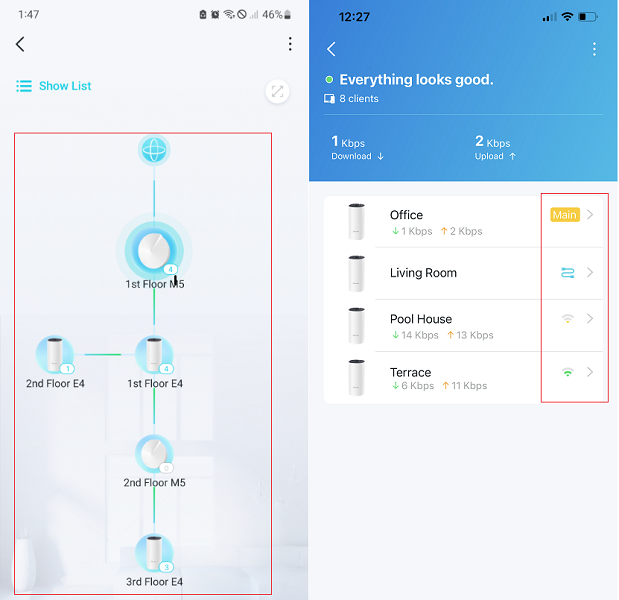
Can I also have a screenshot of the network map on the Deco App, such as:
Wait for your reply.
Best regards.
- Copy Link
- Report Inappropriate Content
@HelpFixDecoApp thanks for your message.
These are the firmware versions that my devices report on the app:
Deco X20: 1.5.3 Build 20231226 Rel 71315
Deco X50: 1.2.10 build 20241105 Rel 40010
None of them are reported as Beta, but I can't confirm for sure.
- Copy Link
- Report Inappropriate Content
@David-TP thanks for your message.
About your questions:
- Durig the desconnection the info I see on the app is consistent with the light alert on the devices. Every device the app show as disconnected, shows a blinking red light
- I have 28 devices connected to mi mesh wifi, including PCs, Phones, Tablets and IoT devices
- In added the las 2 X50 devices because I had low wifi coverage in some parts of my home. My main concern is that 1st flow has the highest wifi traffic (my wife office, a lot of IoT devices and 2 Xbox)
- I'll try the mix you suggest and I let you know
This is my current wifi:
- 1st Floor: RED
- 2nd Floor: GREEN
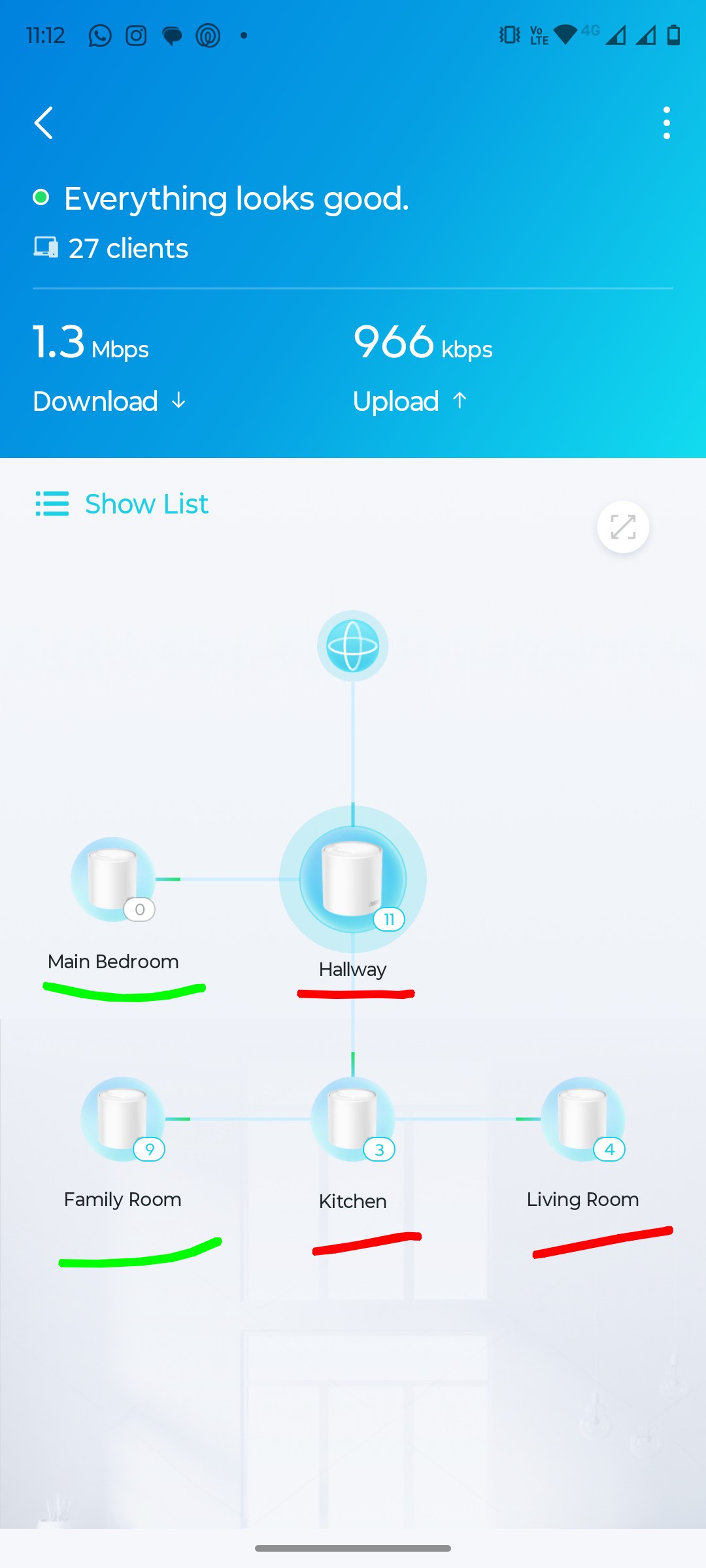
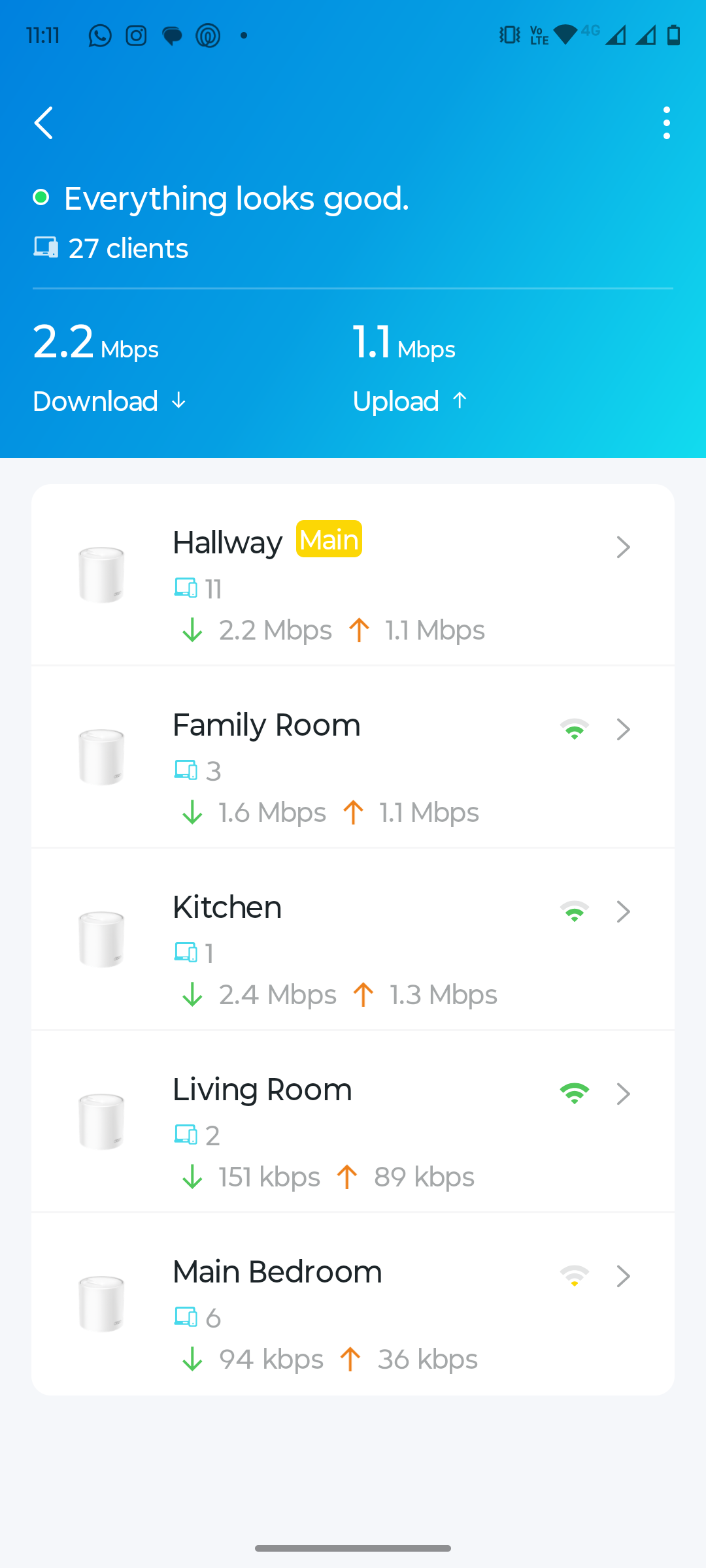
Thanks!!!!
- Copy Link
- Report Inappropriate Content

@German_Soler Have u tried to use Connection Preference to connect your Deco to Deco for better singals and performance. Like from Deco 1 to Deco 2 and from Deco 2 to Deco 3 and from Deco 3 to Deco 4 and from Deco 4 to Deco 5
- Copy Link
- Report Inappropriate Content
@ARGamingPK1 , thanks for your message.
The answer is yes, I tried that option but:
- That option is only available for X50 devices, I don't see that option available for the X20 devices
- Then, In any kind of mixture I tried I always have only 2 predefined lo between Decos, and I'll have 3 remaining devices that had the same desconnection issues.
At the end the issue remained.
Thanks!
- Copy Link
- Report Inappropriate Content
@German_Soler What's your Deco X20 Hardware Version and your Deco X20 firmware 1.5.3 is very old and you have to update to latest firmware because latest firmware of Deco X20 support Connection Preference and after this your network performance will improve alot.
- Copy Link
- Report Inappropriate Content
@ARGamingPK1, thanks for your message.
- I made a reset my X20 devices and they ran an update. They are now in 1.6.1 Build 20250831 Release 77853
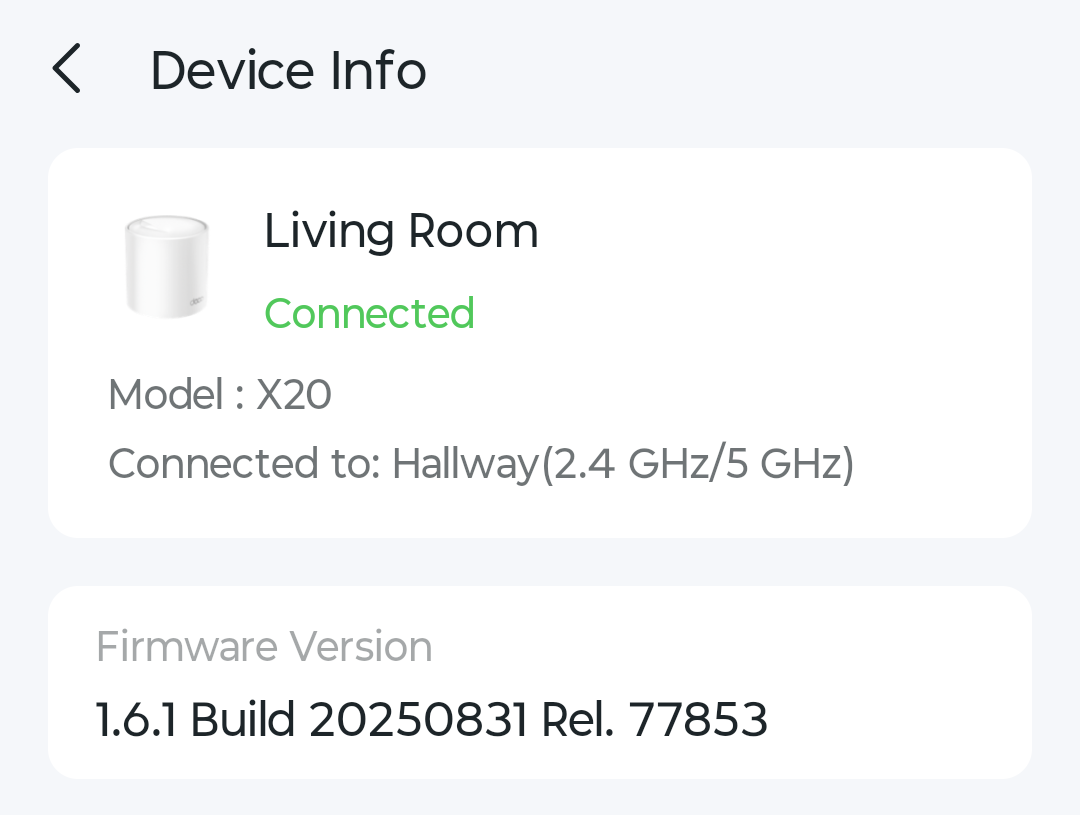
- But the option "Connection Preference" is not available either
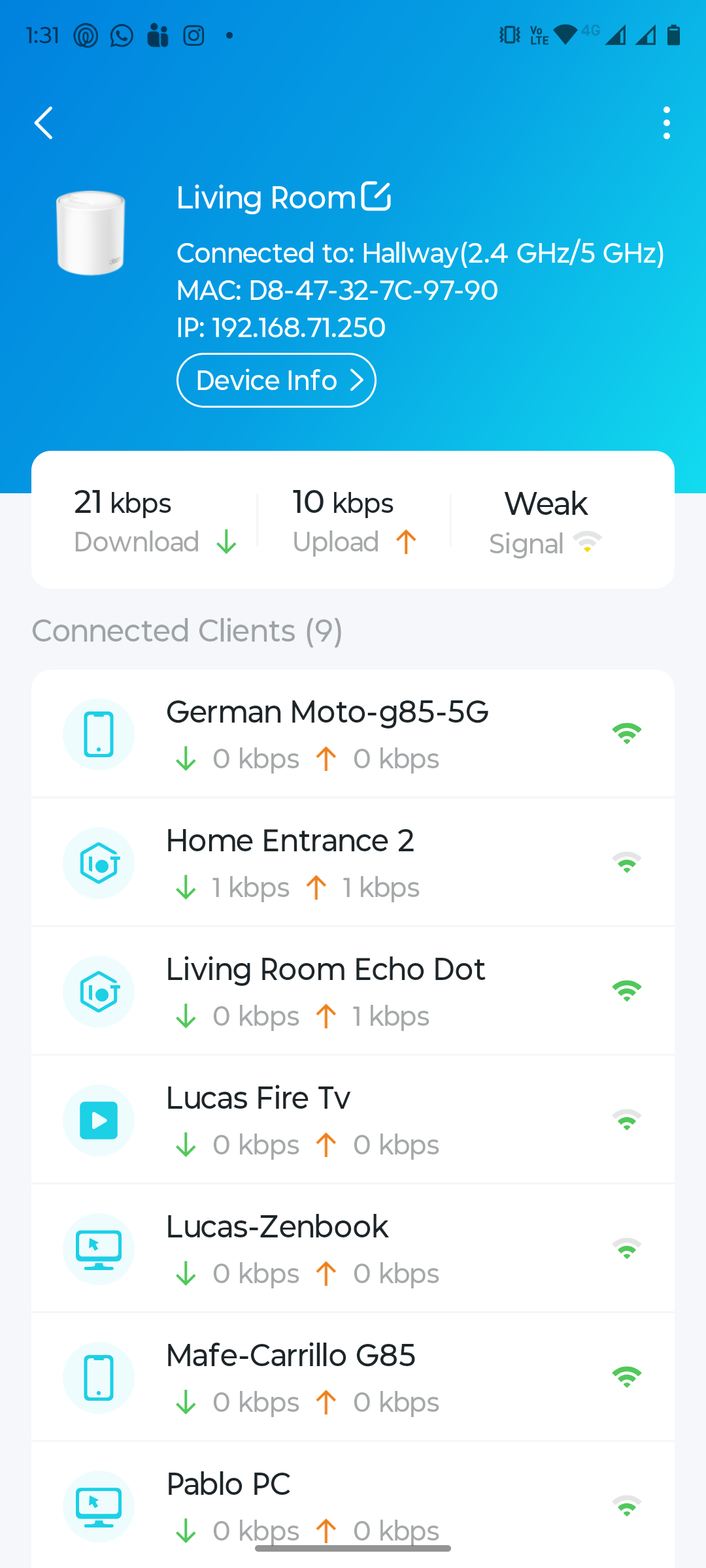
- As I can see on the X20 devices all of them are Very 1
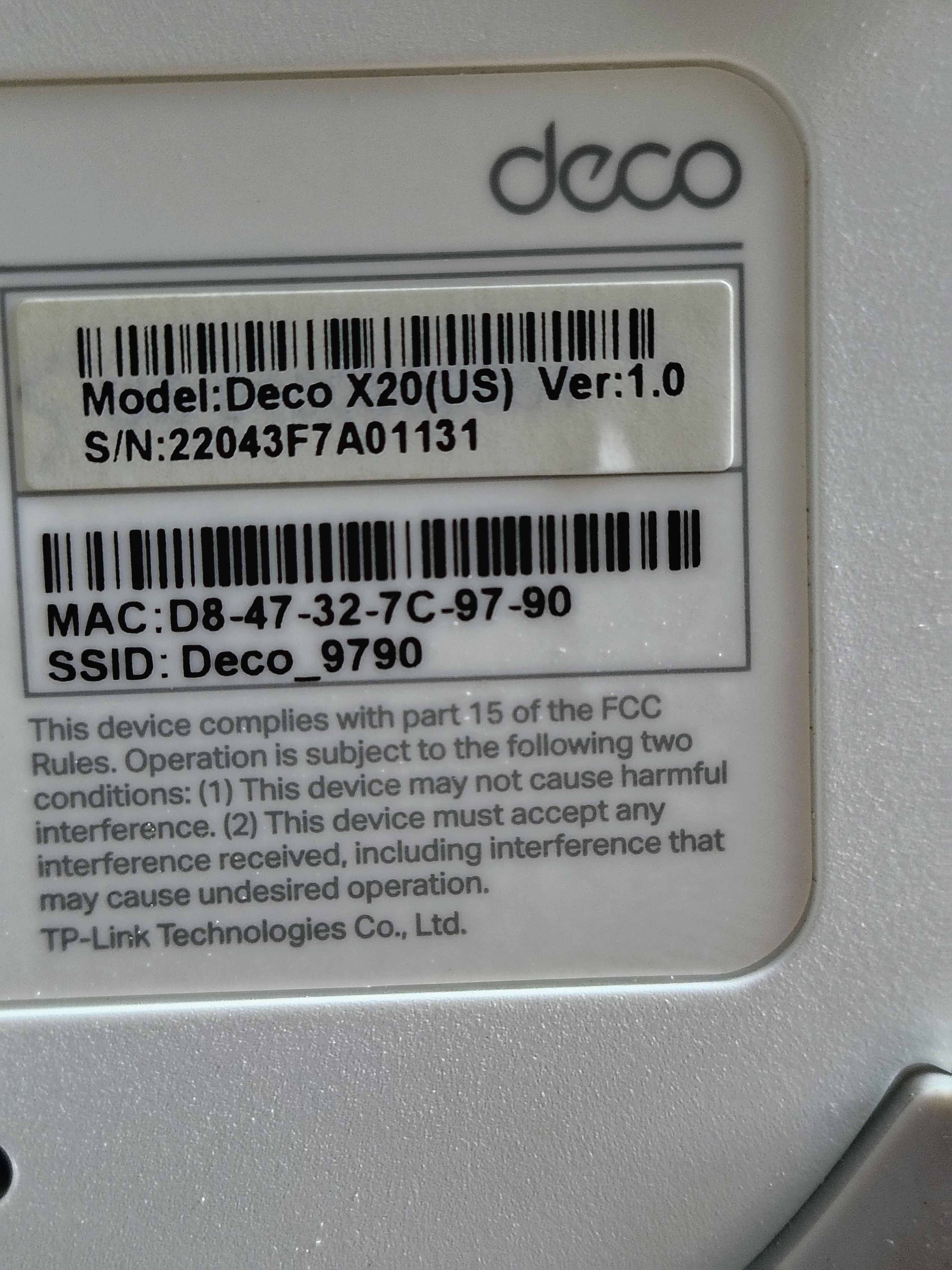
Are the devices on the latest firmware version? Can I upgrade them using a different method and not the app? The app is showing that they are on the latest available version, but I don't have the "Connection Preference" available.
Thanks!
- Copy Link
- Report Inappropriate Content
Information
Helpful: 0
Views: 3544
Replies: 11
Voters 0
No one has voted for it yet.