
GlobalProtect VPN Disconnects - Deco XE75
GlobalProtect VPN Disconnects - Deco XE75

Recently installed 3 x Deco XE75s as APs to my Sky Fibre Broadband router. All seems to be working well other than my Work laptop which fires up GlobalProtect by default. It seems that anything browser related seems to stall and won't fire up again until I have refreshed the GlobalProtect VPN link, then works immediately for a while.
This AP connecting the work laptop is wired directly from the loft to the downstairs TP-Link switch which connects to the Sky Broadband router.
I have dedicated the laptop to connect to one XE75 and disabled Mesh for its connection to the AP. This doesn't not solve the problem.
If I set my work mobile up as a mobile hotspot and connect the laptop to it, which continues to use the GlobalProtect VPN, all works fine, until I switch back.
I have seen multiple threads regards GlobalProtect VPN with other devices, but not seen any resolutions, other than the odd firmware release, which I seem to be on the latest.
Anyone found a resolution to this issue?
Firrware: 1.3.0 Build 20250722 Rel. 38703
- Copy Link
- Subscribe
- Bookmark
- Report Inappropriate Content

Thanks for reaching out. I understand that you're experiencing issues with your work laptop's GlobalProtect VPN connection when connected via Ethernet to your Deco Mesh network (XE75s in Access Point mode), while it works fine over a mobile hotspot. The VPN stalls browser activity until refreshed, and disabling Mesh on the laptop's dedicated Deco unit did not resolve the issue.
Based on your description, this appears to be a VPN connectivity issue when using the Deco Mesh network. Here are some troubleshooting steps you can follow:
1. VPN Server Requirements:
• Deco VPN Server features (OpenVPN, WireGuard, PPTP, L2TP) require a public IPv4 address. If your Deco is in Access Point mode and your main router (Sky Fibre) is handling routing, VPN passthrough and port forwarding must be correctly configured on the main router.
• Go to the Deco app > MORE > Internet Connection > IPv4 and check if the WAN IP address is public. If not, VPN Server features may not work as expected.
• If another router is in front of the Deco (as in your setup), ensure that port forwarding is set up on the main router for the VPN ports.
2. VPN Client Access:
• If you can connect to the VPN but have no Internet or cannot access network resources, go to Deco app > MORE > VPN > VPN Server, tap your VPN Server, and ensure 'Client Access' is set to 'Internet and Home Network'.
• If you only see 'Home Network Only', Internet access will not be available through the VPN.
3. Firewall Settings:
• If you cannot access home network resources (such as servers or NAS devices), check that the firewall on those devices is not blocking connections from the VPN subnet.
4. Additional Steps:
• Since your VPN works on a mobile hotspot but not on the Deco network, this suggests a possible issue with network segmentation, firewall, or VPN passthrough on your main router or switch. Double-check that your Sky Fibre router allows VPN passthrough and that there are no restrictions on the Ethernet switch.
• Try connecting your laptop directly to the main router (bypassing the Deco and switch) to see if the issue persists. This will help isolate whether the problem is with the Deco Mesh, the switch, or the main router.
If you continue to have issues, please provide the following information to TP-Link support:
• Your WAN IP address
• Screenshots of your VPN Server configuration
• Screenshots of your VPN Client configuration (on your laptop)
• VPN connection logs (if possible)
For more details, you can refer to the official FAQ: https://www.tp-link.com/en/support/faq/2925/
Let us know if you need further assistance, and please share the results of these troubleshooting steps.
- Copy Link
- Report Inappropriate Content


Hi, thank you very much for your feedback.
Is the current network topology like:
Internet service----Sky Fibre Broadband----TP-Link switch---main Deco XE75, 2*satellite XE75 wirelessly connected to the main XE75?
Did you set Deco XE75 into access point mode?
Can you constantly reproduce this issue on the laptop:
"Anything browser-related seems to stall and won't fire up again until I have refreshed the GlobalProtect VPN link, then it works immediately for a while."
By the way, I'll follow up on your case via email and consult the senior engineer for more advice. Please check whether you can receive my email.
Thanks a lot.
Best regards.
- Copy Link
- Report Inappropriate Content
@David-TP Thanks for the response, to answer your questions;
Fibre modem (BT) --> Sky Hub --> TP-Link unmanged switch --> Deco XE75 (Main) --> Deco XE75 (Wireless backhaul)
--> Deco XE75 (Wired backhaul) --> Work laptop (WiFi6)
The Deco XE75s are set in AP mode
I introduced the Deco's as the wireless performance and range of the Sky mesh wifi was poor, but everything works with the work laptop, if I switch back to the Sky WiFi it works fine, so this is absolutely repeatable and only occurs once connected to the Deco WiFi.
Regards Rich
- Copy Link
- Report Inappropriate Content

- Copy Link
- Report Inappropriate Content
- Copy Link
- Report Inappropriate Content
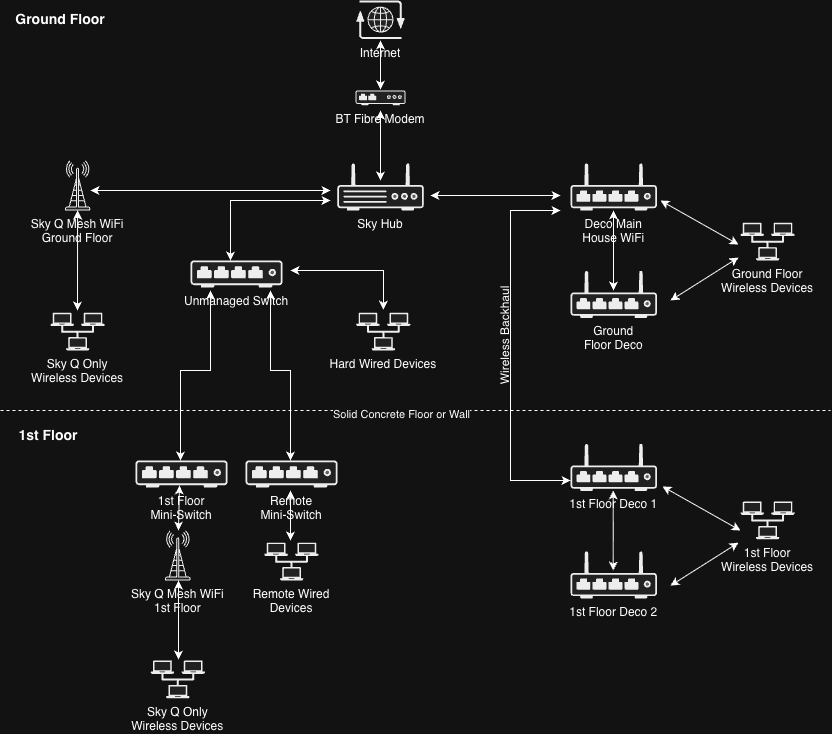
Just as a way of an update to my problem which is now resolved. My wired backhaul was being shared between Sky devices and the Deco backhaul, when I totally seperated the traffic and dedicated the wired backhaul to Sky and also all wired devices going to the unmanaged switch then the Sky Hub, then everything WiFi not needing to connect to Sky all through the Deco's and the Main Deco connecting to the Sky Hub, that seemed to resolved the problem. I did introduce a fourth Deco to help with the wireless backhaul. Picture if anyone is interersted.
- Copy Link
- Report Inappropriate Content
@David-TP I have figured out exactly the symptoms of my problem. On my work notebook GlobalProtect is always connecting automatically on restart. It seems there is some issue with GlobalProtect VPN and DecoXE75 FW. After a couple of hours everything slows down on my notebook, Outlook stalls for minutes when syncing my emails. As soon as I disconnect GlobalProtect VPN, wait a few minutes and then reconnect everything is fine again. This does not happen if I plugin a different third party router and connect my notebook with it.
Seem XE75 is unable to consistently sustain a GlobalProtect IPSec VPN Tunnel and and VPN slows down every few hours (especially for windows applications like Outlook, Sharepoint etc.). On startup, Outlook is always stalling for multiple minutes and regularly freezes. All of these symptoms only show when using XE75 as my router and go away if I use a third party router or use XE75 in AP mode. This makes it very difficult for me to work from home.
- Copy Link
- Report Inappropriate Content
Hi, thank you very much for the feedback.
I'd like to follow up on your case via email and ask the senior engineer for more suggestions.
Please check whether you've received my email.
Best regards.
- Copy Link
- Report Inappropriate Content
- Copy Link
- Report Inappropriate Content

Hi @mji
Did you resolve your issue?
I'm having similar poor & unstable connection with Deco BE11000 with only a work laptop that must have Globalprotect running for internet access. It's definitely the GP that's my issue too as every other device is getting close to max DL\UL per my ISP.
I haven't tried running the Deco in AP but also don't want to as it defeats the purpose of my upgrade.
- Copy Link
- Report Inappropriate Content
Information
Helpful: 0
Views: 1309
Replies: 11
Voters 0
No one has voted for it yet.