
External connections from Internet to my routers using Tether App
 This thread has been locked for further replies. You can start a new thread to share your ideas or ask questions.
Hello,
We usually connect to our routers or range extenders from the own internal network or wifi using the Tether app installed for example our mobile.
But i am testing if we have the possibility to connect from internet or other external connection (5G-4G, or other wifi) through TP-Link servers and Tether app. Because the problem is that sometime yes and sometimes no. And it should be or always yes, or always no.
I would say that is usually not possible, and Tether App doesn't find my routers from internet. But in some occasions i have found my routers and i could connect to them visualizing their configurations. I could even understand that not all configurations are accessible, for example, i can't visualize all the radio configuration or information from my router Archer NX600.
- Is it or not possible the external connections?
- Which are the minimal conditions or the requirements to do that? Not clear for me, why sometimes yes and sometimes no.
- Those connections should be possible through TP-Link servers or infrastructure, and based on our administrators account. Which are the security requirements or policies in place to avoid than others could access to our routers?
Thanks,
Javi
- Copy Link
- Subscribe
- Bookmark
- Report Inappropriate Content

Tether app is a tool that can manage your TP-Link compatible device wherever you are throught the TP-Link Cloud service - details.
In order to manage your TP-LInk device via tether app, it has to be with a compatible firmware. Here's a list of the tether app compatible devices.
The security of this remote access method depends on your TP-Link ID account password strength - details.
To be able to use the tether app for remote access you have to configure your router with your TP-Link ID - details.
- Copy Link
- Report Inappropriate Content
Ok, those are links to clarify what Tether App can offer regarding my devices management, how all should configured, and i think i am compliant with all.
But now we should answer to the behavior that i need to understand.
The most common connection is from the own private wifi established in both devices. If i connect my mobile to the wifi that my devices are providing, no problem, Tether app is finding all the time my devices, and i can connect to them.
But when i connect my mobile to another wifi with access to internet, or my mobile is connected to my operator 4G/5G network, Tether app has connection through internet. The only way to find my devices is through TP-Link Infrastructure and with a private connection based on my TP-Link ID. Is this possible?
These last weeks, Tether app is not generally finding my devices form internet connection. But one month ago, i could do. As i commented, some particular configurations (radio info) were not visible or accessible through this external/different connection from internet, but i could find and connect to my devices from internet to visualize part of their configuration. How could i do?
Again, should it be possible? If yes, actually i having problems to find my devices from internet.
Thanks,
Javi
- Copy Link
- Report Inappropriate Content
Thether app should provide you a remote management access to your TP-Link supported devices.
You shoukd be able to remootely manage your TP-Link supported devices via internet wherever you are, as long as these devices and the Tether app (on your mobile) have access to the TP-Link cloud service.
You should bare in mind that Tether app has fewer options for management than their WebGUI provides and some features may not be implemented.
The is an alternative method for remote management of these devices (mainly for the wireless routers) described here.
- Copy Link
- Report Inappropriate Content

Hi, thank you very much for the feedback.
Could you please leave me a message with the MAC address of the Archer NX600?
Please also save a screenshot on the Tether APP showing that Archer NX600 can't be found when the mobile phone is connected to the operator 4G/5G network or other WiFI Networks?
By the way, may I know your SIM ISP?
Wait for your reply.
Best regards.
- Copy Link
- Report Inappropriate Content
Yes, this is what i see in Tether App when i am connected to my ISP or to another wifi.
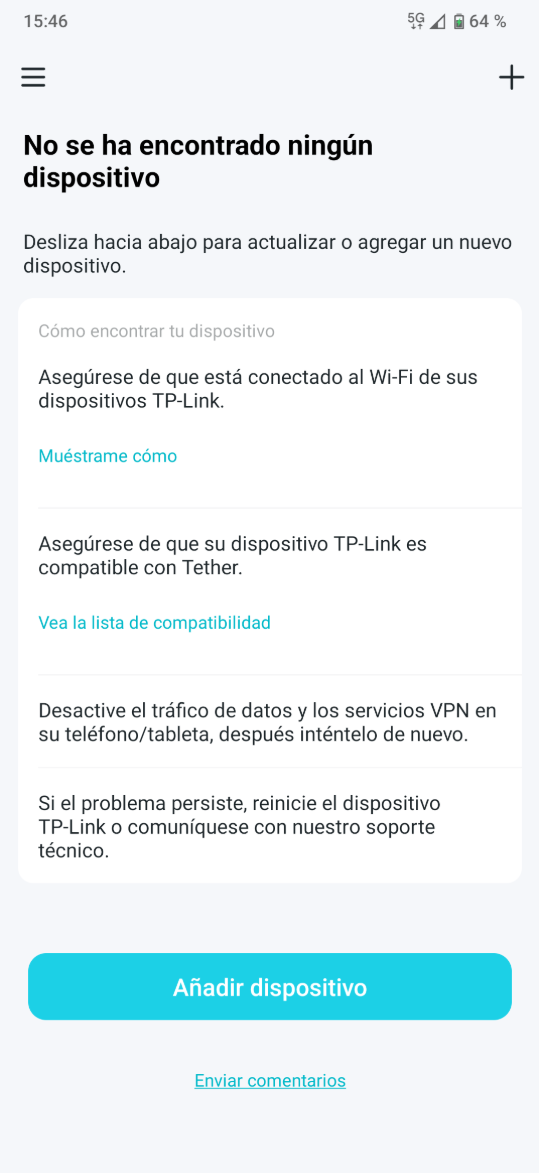
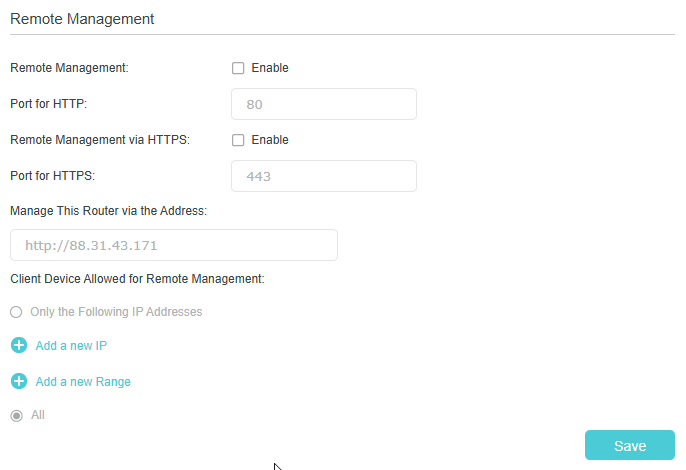
And i think this is what is coming by default, about possible remote management, that is not allowed. I don't remember to touch here, when i could connect externally in some moment from another wifi or my ISP via Tether App.
- Copy Link
- Report Inappropriate Content
Hi, thank you very much for the message.
The "remote management" on the web admin UI is for HTTP/HTTPS login via web browser, which is often not required for App remote management.
I checked the MAC address of Archer NX600, and it is offline in the cloud server now. The App remote management requires the router to be online all the time.
Did you notice any disconnection of the NX600(such as the internet light went off) when the Tether App reported "No Device Found"?
Wait for your reply.
Best regards.
- Copy Link
- Report Inappropriate Content
I am testing my routers for the final environment, and like they are still not in place, i have usually then powered off .
I can maintain my main router powered on some days, connected to internet, but when i test it from time to time, it is the same. My Tether App can't reach my routers through others internet connections, except if i connect my mobile with Tether App to the own wifi locally.
Must my router be connected regularly 24 hours per day to be detected by TP-Link cloud server?
Is it cleared from TP-Link cloud server if my router is powered off when it's not in use for example during nights?
Thanks,
Javi
- Copy Link
- Report Inappropriate Content
I have continued testing remote Tether App access to my devices...
Scenario 1: Other Router (Wifi1), EasyMesh Archer NX600 + RE700X (Wifi2)
After killing Tether App in my Android for clearing whatever information of my devices, and opening it... if i use as connection:
1.- 4G/5G provider network: No devices visible. No possible connection.
2.- Other Wifi1+Internet: No devices visible. No possible connection.
3.- Own Wifi2+Internet: Devices visible and reachable on the local network.
Scenario 2: EasyMesh Other Router + RE700X (Wifi1), Archer NX600 alone (Wifi2)
After killing Tether App in my Android for clearing whatever information of my devices, and opening it... if i use as connection:
1.- 4G/5G provider network: No devices visible. No possible connection.
2.- Other Wifi1+Internet: Initially RE700X visible on the local netwok.
a.- If i connect to RE700X one first time, and i come back to My Devices, NX600 appears (it seems like some info has been refreshed from the Cloud about all my registered devices).
b.- Now both devices are visible and reachable. RE700X in its local network and NX600 externally through internet and TP-Link Cloud.
3.- Own Wifi2+Internet: Initially NX600 visible on the local netwok.
a.- If i connect to NX600 one first time, and i come back to My Devices, RE700X appears (it seems like some info has been refreshed from the Cloud about all my registered devices).
b.- Now both devices are visible and reachable. NX600 in its local network and RE700X externally through internet and TP-Link Cloud.
So not clear how the external connections are done, when connections are possible through the Cloud, when not, or what information is needed or recollected by Tether App, but i would say not in consistent method: if Tether App can reach TP-Link Cloud, it should download all the info of my devices first, and try to check if they are reachable locally or from internet.
Thanks,
Javi
- Copy Link
- Report Inappropriate Content
Information
Helpful: 1
Views: 2801
Replies: 8
Voters 1
