
Deco AXE5400 Pro (XE75) no backup option in Access Point Mode?

When my Deco units are in Access Point Mode, I cannot see any option to backup my Deco settings?
Um, why not?
If I had to reset them, there's an aweful lot of settings that I would have to make manually.
- Copy Link
- Subscribe
- Bookmark
- Report Inappropriate Content

Hi, welcome to the community.
Deco in AP mode doesn't support "Configuration Backup" anymore.
As many advanced software features are not available in the AP mode, the supported features in AP mode are very similar among various models. Compared with resetting the hardware completely, it is suggested to reset one of the satellite Decos first, then go to "+" >"replace the main Deco", so it could save the current network configurations.
I'll record this feature request first and keep monitoring whether there will be more users who have the same feedback.
Thank you very much.
Best regards.
- Copy Link
- Report Inappropriate Content
@David-TP Thanks for the reply!
Can you elaborate a bit on resetting a 2nd Deco and then "replace the main Deco"?
Is the "replace" option in the Deco app on my phone?
Additionally, I have the 3-pack of Decos and I haven't connected the 3rd one yet to the system.
Could I use the 3rd Deco to backup (copy?) my system settings instead of using the 2nd Deco?
If I understand your suggestion, it's not really a backup but rather a copy from my Main Deco to a new fresh Deco.
Are the settings on the 2nd Deco actually stored on the Main Deco (one stop shopping)?
Also, thank you for considering backing up the settings for Decos in AP mode as a feature request!
Thanks!
- Copy Link
- Report Inappropriate Content
Hi, thanks for getting back to me.
It is the "Replace Main Deco" on the Deco App, such as the attached picture:
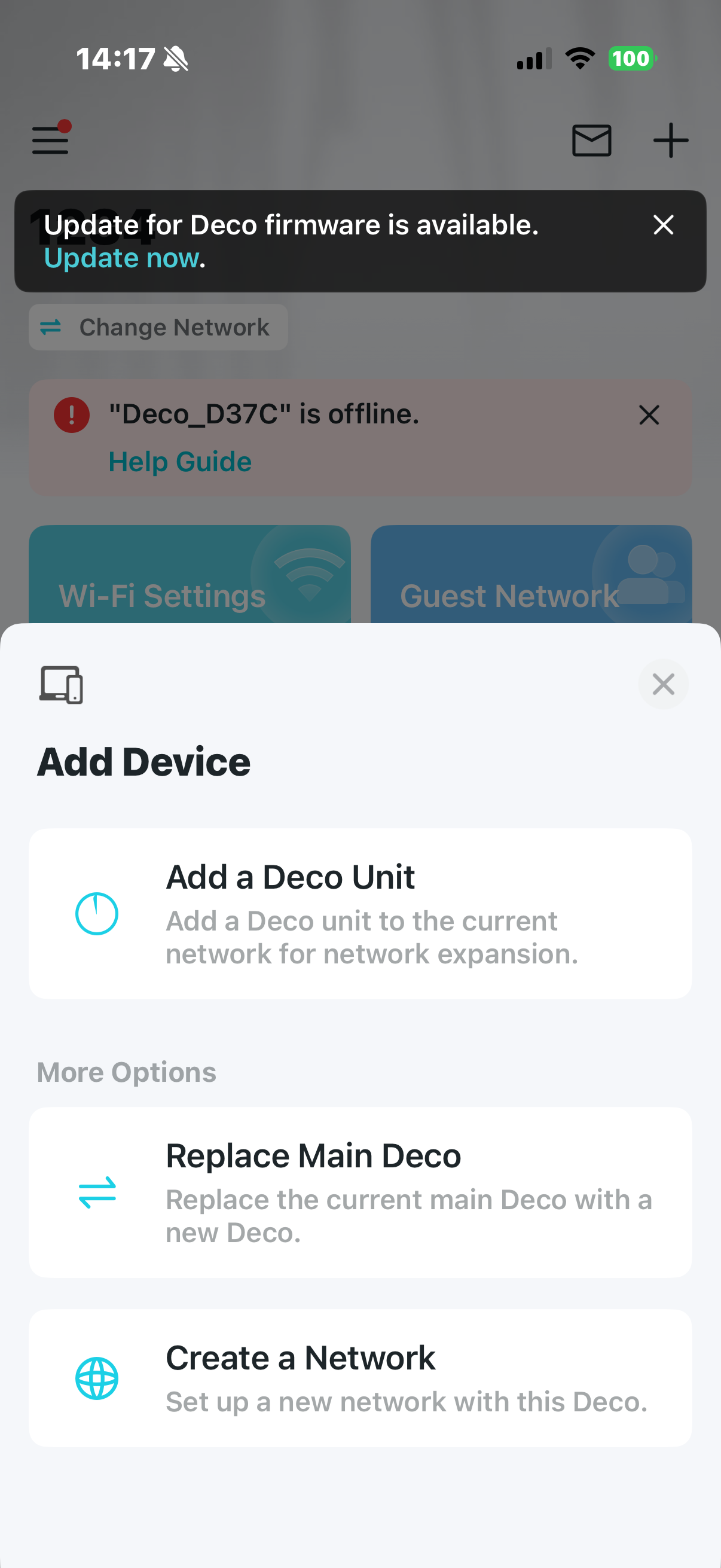
You are right, it is more like a copy from the main Deco to the new Deco.
In the AP mode, each Deco plays the same role and saves similar network settings. "Main Deco" is a more symbolic role, so the APP commands are only forwarded once to the Main unit, from which they are dispatched to others.
Best regards.
- Copy Link
- Report Inappropriate Content
@David-TP Awesome and thanks!
I did check on my Deco app and the Replace Main Deco option is present, nicely "hidden" in the "+" menu. 
I forgot that the "+" menu existed and I didn't think to look there originally.
If I use my 3rd Deco unit (currently not in use) as a temporary "backup", then took it offline (unplugged), does that work? Will "replacing the main deco" option also backup settings on my 2nd satelite unit as well?
I know that this is a bit of a workaround for an quickie AP backup, but if it works, all the better.
I also connected to my main deco via the web interface. I can also do some copy/pasting into a text file to save some of my settings.
Thanks again!
- Copy Link
- Report Inappropriate Content
Hi, In AP mode, the network settings on the main Deco are the same as those on the satellite Deco, so there is usually no need to back them up again from the satellite Deco.
If I use my 3rd Deco unit (currently not in use) as a temporary "backup", then took it offline (unplugged), does that work?
I don't think it works. "Replace the main unit" needs this Deco to be in setup mode/LED blinking blue( so it can't be configured before).
Thank you very much.
Best regards.
- Copy Link
- Report Inappropriate Content

I too have been wondering if my X4300-Pro system software had gotten (another) software bug, because MOST of the Google search results say it can be Backed-up in AP mode - the same as in Router mode!
I have almost 40 network devices that I have to go through and rename, re-configure the Wifi settings, re-select. the location and more...every time I have to rebuild or upgrade.
PLEASE, TP-Link, bring back the Backup/Restore in AP mode!
I'm really having issues with using Router mode on Google Fiber, which forces me to use their Router, then disable it's Wi-Fi... which is a real. mess. Their router customization functions are very limited... but I'm FORCED to do this if I want a stable network... which sucks.
They don't have any Device Isolation for my IoT devices... and I don't like their IoT network because it's WiFi only... and some of my IoT are using wired connections.
I spent 4 hours again yesterday, rebuilding my entire Deco network... because it crashed while in Router mode - because I thought I'd give it one more chance to work properly without the Google Fiber router. But when I was going through all of my device re-naming, setting Network preferences and options, it crashed... it "Failed" at setting a Device Type or Device Name... and went berserk. The Local network was still active, but the WAN connection became intermittent... like the software had a stack overflow and got completely lost... it literally crashed - unrecoverably... other than a complete Factory Reset... and I was just about finished when it happened...
... and my wife was anything but happy about not having internet for multiple hours... again... because of my (4 unit, wired backhaul) x4300-pro Deco system. I never had this kind of problems back when I had the old S4 system.
- Copy Link
- Report Inappropriate Content
Information
Helpful: 2
Views: 524
Replies: 6
Voters 2
