
Slow Speed on TP Link XX530v main router over Airtel 1 Gbps Plan
 This thread has been locked for further replies. You can start a new thread to share your ideas or ask questions.
Hello Community members,
I am facing severe slowness on TP Link XX530v as main router connected directly to the Airtel Line. I am getting speeds nearly 300 Mbps at a distance of 5-6 Meters from the router. I am using Static IP as mode of connection. On LAN I am getting speed of 900 Mbps. What can be the issue
- Copy Link
- Subscribe
- Bookmark
- Report Inappropriate Content


Hello @AlokJain
Thank you for posting on the TP-Link Community.
What is the device that you're testing the wireless connection speed with? What is the wireless link speed on it when it's connected to the XX530v's 5G network? Follow this guide to check the associated/link speed on a wireless client.
If you have other wireless client devices, test what speed you can get when connecting to the 5G network.
Additionally, you can follow this FAQ to change the wireless settings on the XX530v. *The specific wireless settings on your XX530v may differ from the FAQ, but you should be able to find similar settings.
- Copy Link
- Report Inappropriate Content
@Kevin_Z The device I am checking is a Windows laptop with a link speed of 1.1 Gbps, and iPhones. I am directly using the XX530V as the OLT, and the TP-Link team has already configured the router for optimised performance. I have also changed the channel band and width as per the suggested link. I want to provide my ISP with a detailed analysis and proof that the problem is at their end, and hence, they need to fix it. How can I troubleshoot?
- Copy Link
- Report Inappropriate Content

@AlokJain Check your Wi-Fi configuration
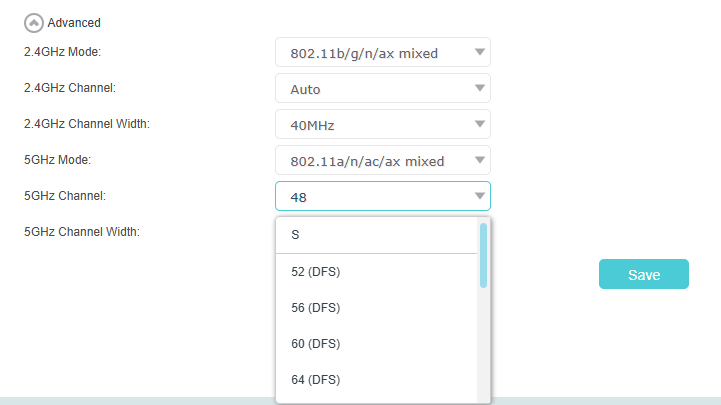
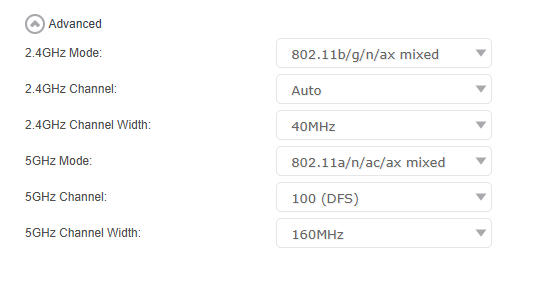
By default, XX530v does 80MHz on auto. Set it to 160MHz manually and select channel 100. This will ensure a clean 100-128 channel and speeds will increase
In my setup with EWAN, I get 750Mbps max downloads and uploads (some sort of limitation on EWAN)
- Copy Link
- Report Inappropriate Content
- Copy Link
- Report Inappropriate Content
@AlokJain Your settings are correct for 5GHz, use these values and test. Also test with channel 64 after 2-3 speedtests...
And as for the DFS, 52-64 is DFS in 80MHz range and 100-128 is DFS in 160MHz range.
In India, it takes 60s for the beacon to be live due to regulations on DFS
- Copy Link
- Report Inappropriate Content
- Copy Link
- Report Inappropriate Content
@AlokJain Yes, Channel 64 (DFS). Choose that after 5 speedtests on Channel 100 (DFS) and see the difference...
- Copy Link
- Report Inappropriate Content
@IfranAli What are implications of switching to a DFS channel
- Copy Link
- Report Inappropriate Content
@AlokJain DFS channels are what you need to run 160MHz...
I guess you should start testing without questioning too much. For that, Google is your friend.
- Copy Link
- Report Inappropriate Content
Hi @IfranAli after changing the channel to 64 (FDS), the upload speed has increased tremendously to around 850-900 Mbps, whereas download remains the same at around 300 - 350 Mbps
- Copy Link
- Report Inappropriate Content
Information
Helpful: 1
Views: 5161
Replies: 45
Voters 1
