
Slow Speed on TP Link XX530v main router over Airtel 1 Gbps Plan
 This thread has been locked for further replies. You can start a new thread to share your ideas or ask questions.
Hello Community members,
I am facing severe slowness on TP Link XX530v as main router connected directly to the Airtel Line. I am getting speeds nearly 300 Mbps at a distance of 5-6 Meters from the router. I am using Static IP as mode of connection. On LAN I am getting speed of 900 Mbps. What can be the issue
- Copy Link
- Subscribe
- Bookmark
- Report Inappropriate Content

- Copy Link
- Report Inappropriate Content
Hi @IfranAli , Thanks for your advice. The speeds are better now, but when I try to test the speed with the Speed Test Desktop App, the download speed ranges from 500-700 Mbps, and the upload speed ranges from 900 Mbps to 1 Gbps. But when I check it in the browser, the results are entirely different. Ranging from 300-400 Mbps on download and 600-800 Mbps on upload. I am totally confused as to which one to believe and how to practically check the speed
- Copy Link
- Report Inappropriate Content
@AlokJain I think it's a server issue of some sort. The Desktop app tends to be lightweight and better at accuracy, with the web one being more detailed.
I think there is a problem with the firmware or hardware itself not reaching full download speeds over wifi, but upload seems to be maxed out.
I would like to request @Kevin_Z to look into the matter, as this seems another bug.
- Copy Link
- Report Inappropriate Content
Hello @IfranAli can this be due to DNS?
- Copy Link
- Report Inappropriate Content
@AlokJain DNS is not related to your speeds. This is some sort of Internal issue which needs to be resolved
- Copy Link
- Report Inappropriate Content


AlokJain wrote
Hello @IfranAli can this be due to DNS?
Sometimes, DNS may also impact download speed. If your current DNS server is slow to respond or geographically far away, the initial step of resolving the domain name takes longer. This extra time adds to the overall time it takes for your download to begin and continue. So you can try switching to Google's public DNS or Cloudflare's DNS to see if it makes a difference.
While I still want to ask more questions to understand the current situation better:
1. Are you using EWAN mode or fibre connection?
2. What is the download and upload bandwidth you paid for Airtel?
3. When connecting a PC to the XX530v via an Ethernet cable, will you get 900 Mbps / 900 Mbps (↓↑)?
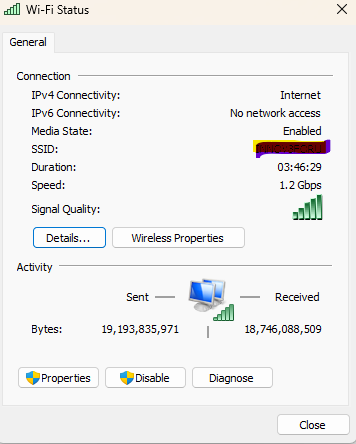
4. What is the link speed on the Windows laptop when it is connected to the 5G network? Follow this guide to check the associated/link speed, and show me a screenshot.
6. I agree with IfranAli on most of his valuable suggestions, while I would also suggest trying to change the 5G channel width to 80MHz and choose channel 36/52/100 (you can try more), then do speed tests multiple times again.
- Copy Link
- Report Inappropriate Content
1. I'm using it as Fibre Connection through XPON (Direct OLT)
2. I paid for 1 Gbps
3. Through LAN, I am getting over 900 Mbps
4. Link speed 1.2 Gbps Screenshot attached
5. I have set the Channel Width to 128 (DFS) and Channel to 160 MHz, but the upload speed is only increasing, and the download speed remains the same. I need something conclusive to provide to my ISP stating that the problem is at their end and what they need to change for maximum speed, because I am facing the same challenge with the ISP-provided original OLT
6. I have set the Cloudflare DNS 1.1.1.1 and 1.0.0.1
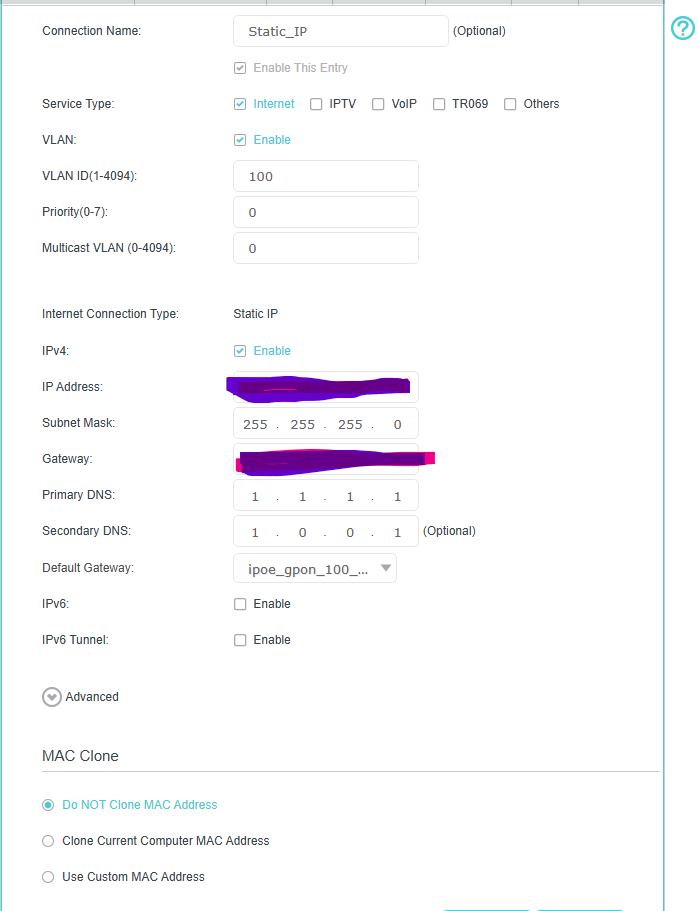
7. I am using a Static IP with the settings mentioned in the 2nd Screenshot
- Copy Link
- Report Inappropriate Content
@Kevin_Z I think his network card is limited to 1.2Gbps and not getting the full 2.4Gbps.
And DNS doesn't always affect download speeds, that's ISP side, and not the DNS provider side. Speed test servers depends on the hosted servers and how far they are + the peering of the ISP.
- Copy Link
- Report Inappropriate Content
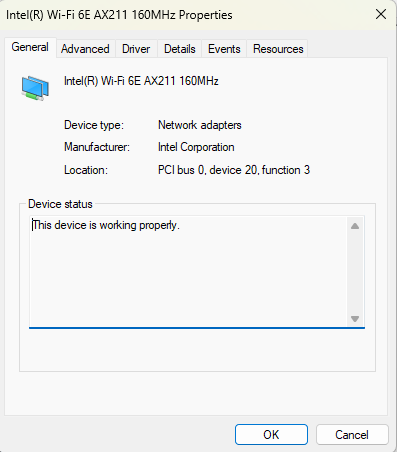
@AlokJain I suspect your network card is the problem...
Can you send the name/model of the network card?
Cuz my one, which is AX411 and AX210, can do 2.4Gbps on 160MHz and Channel 100-128, but downloads are limited to 750Mbps and uploads on 950Mbps
- Copy Link
- Report Inappropriate Content
At 116 (DFS) & 128 (DFS) I started to face frequent router disconnects and internet outages. I am using the below Wi-Fi Card, which I got replaced just 10 days back
- Copy Link
- Report Inappropriate Content
Information
Helpful: 1
Views: 5166
Replies: 45
Voters 1
