TP-Link AX1800 ArcherAX23 (NordVPN) Stuck Connecting

Hi,
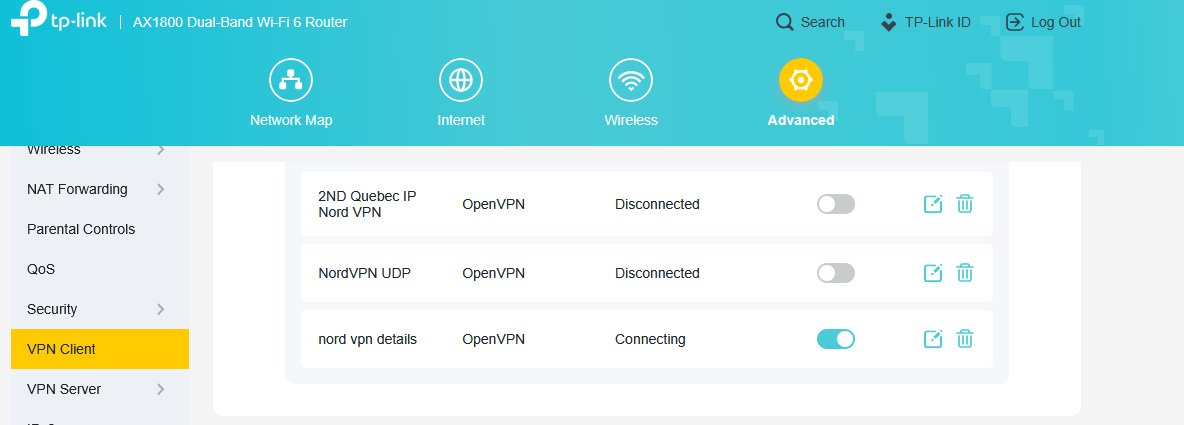
After configuring OpenVPN Client within the TP-Link router portal the connection status says "Connecting" but never connects.
VPN Server connecting to: NordVPN
VPN Type: OpenVPN
VPN Client: OpenVPN Connect (successfully connects)
Credentials Used: NordVPN Service Credentials obtained from the manual setup page within the NordVPN portal. (Not the subscription credentials)
Troubleshooting
1. Latest firmware has already been installed so no further updates available.
2. Followed the troubleshooting steps in the "VPN Server Is Not Working Properly on TP-Link Wi-Fi Routers" article.
3. Tried both UDP and TCP .ovpn config files downloaded from NordVPN. Used the (recommended server)
4. Successfully connected with OpenVPN connect and the .ovpn config files.
5. Rebooted router multiple times.
Always results in the same problem. VPN Status says "Connecting" and never successfully connects.
.ovpn config file below
client
dev tun
proto tcp
remote 94.156.148.37 443
resolv-retry infinite
remote-random
nobind
tun-mtu 1500
tun-mtu-extra 32
mssfix 1450
persist-key
persist-tun
ping 15
ping-restart 0
ping-timer-rem
reneg-sec 0
comp-lzo no
verify-x509-name CN=ca1793.nordvpn.com
remote-cert-tls server
auth-user-pass
verb 3
pull
fast-io
cipher AES-256-CBC
auth SHA512
<ca>
-----BEGIN CERTIFICATE-----
MIIFCjCCAvKgAwIBAgIBATANBgkqhkiG9w0BAQ0FADA5MQswCQYDVQQGEwJQQTEQ
MA4GA1UEChMHTm9yZFZQTjEYMBYGA1UEAxMPTm9yZFZQTiBSb290IENBMB4XDTE2
MDEwMTAwMDAwMFoXDTM1MTIzMTIzNTk1OVowOTELMAkGA1UEBhMCUEExEDAOBgNV
BAoTB05vcmRWUE4xGDAWBgNVBAMTD05vcmRWUE4gUm9vdCBDQTCCAiIwDQYJKoZI
hvcNAQEBBQADggIPADCCAgoCggIBAMkr/BYhyo0F2upsIMXwC6QvkZps3NN2/eQF
kfQIS1gql0aejsKsEnmY0Kaon8uZCTXPsRH1gQNgg5D2gixdd1mJUvV3dE3y9FJr
XMoDkXdCGBodvKJyU6lcfEVF6/UxHcbBguZK9UtRHS9eJYm3rpL/5huQMCppX7kU
eQ8dpCwd3iKITqwd1ZudDqsWaU0vqzC2H55IyaZ/5/TnCk31Q1UP6BksbbuRcwOV
skEDsm6YoWDnn/IIzGOYnFJRzQH5jTz3j1QBvRIuQuBuvUkfhx1FEwhwZigrcxXu
MP+QgM54kezgziJUaZcOM2zF3lvrwMvXDMfNeIoJABv9ljw969xQ8czQCU5lMVmA
37ltv5Ec9U5hZuwk/9QO1Z+d/r6Jx0mlurS8gnCAKJgwa3kyZw6e4FZ8mYL4vpRR
hPdvRTWCMJkeB4yBHyhxUmTRgJHm6YR3D6hcFAc9cQcTEl/I60tMdz33G6m0O42s
Qt/+AR3YCY/RusWVBJB/qNS94EtNtj8iaebCQW1jHAhvGmFILVR9lzD0EzWKHkvy
WEjmUVRgCDd6Ne3eFRNS73gdv/C3l5boYySeu4exkEYVxVRn8DhCxs0MnkMHWFK6
MyzXCCn+JnWFDYPfDKHvpff/kLDobtPBf+Lbch5wQy9quY27xaj0XwLyjOltpiST
LWae/Q4vAgMBAAGjHTAbMAwGA1UdEwQFMAMBAf8wCwYDVR0PBAQDAgEGMA0GCSqG
SIb3DQEBDQUAA4ICAQC9fUL2sZPxIN2mD32VeNySTgZlCEdVmlq471o/bDMP4B8g
nQesFRtXY2ZCjs50Jm73B2LViL9qlREmI6vE5IC8IsRBJSV4ce1WYxyXro5rmVg/
k6a10rlsbK/eg//GHoJxDdXDOokLUSnxt7gk3QKpX6eCdh67p0PuWm/7WUJQxH2S
DxsT9vB/iZriTIEe/ILoOQF0Aqp7AgNCcLcLAmbxXQkXYCCSB35Vp06u+eTWjG0/
pyS5V14stGtw+fA0DJp5ZJV4eqJ5LqxMlYvEZ/qKTEdoCeaXv2QEmN6dVqjDoTAo
k0t5u4YRXzEVCfXAC3ocplNdtCA72wjFJcSbfif4BSC8bDACTXtnPC7nD0VndZLp
+RiNLeiENhk0oTC+UVdSc+n2nJOzkCK0vYu0Ads4JGIB7g8IB3z2t9ICmsWrgnhd
NdcOe15BincrGA8avQ1cWXsfIKEjbrnEuEk9b5jel6NfHtPKoHc9mDpRdNPISeVa
wDBM1mJChneHt59Nh8Gah74+TM1jBsw4fhJPvoc7Atcg740JErb904mZfkIEmojC
VPhBHVQ9LHBAdM8qFI2kRK0IynOmAZhexlP/aT/kpEsEPyaZQlnBn3An1CRz8h0S
PApL8PytggYKeQmRhl499+6jLxcZ2IegLfqq41dzIjwHwTMplg+1pKIOVojpWA==
-----END CERTIFICATE-----
</ca>
key-direction 1
<tls-auth>
#
# 2048 bit OpenVPN static key
#
-----BEGIN OpenVPN Static key V1-----
e685bdaf659a25a200e2b9e39e51ff03
0fc72cf1ce07232bd8b2be5e6c670143
f51e937e670eee09d4f2ea5a6e4e6996
5db852c275351b86fc4ca892d78ae002
d6f70d029bd79c4d1c26cf14e9588033
cf639f8a74809f29f72b9d58f9b8f5fe
fc7938eade40e9fed6cb92184abb2cc1
0eb1a296df243b251df0643d53724cdb
5a92a1d6cb817804c4a9319b57d53be5
80815bcfcb2df55018cc83fc43bc7ff8
2d51f9b88364776ee9d12fc85cc7ea5b
9741c4f598c485316db066d52db4540e
212e1518a9bd4828219e24b20d88f598
a196c9de96012090e333519ae18d3509
9427e7b372d348d352dc4c85e18cd4b9
3f8a56ddb2e64eb67adfc9b337157ff4
-----END OpenVPN Static key V1-----
</tls-auth>