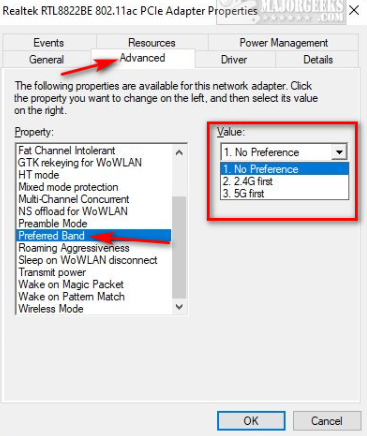
Enabling 2.4GHz band means devices connect at 2.4GHz instead of 5GHz or 6GHz
 This thread has been locked for further replies. You can start a new thread to share your ideas or ask questions.
Enabling 2.4GHz band means devices connect at 2.4GHz instead of 5GHz or 6GHz
Tags:
#Network Connectivity
I was getting low speeds and noticed my laptop was connecting on the 2.4GHz band even though the connection Protocol showed WiFi 6 and my LG Gram supportes WiFi 6. On my Deco BE65 network I had all 3 bands enabled - 2.4GHz, 5GHz and 6GHz.
I disabled 2.4GHz band on my Deco network and my laptop connected to the 5GHz band, and my dowload speed almost tripled. I then re-enabled the 2.4GHz band on my Deco and my laptop went back to connecting to the 2.4GHz band and I was back to low speeds.
I'd like to be able to use the 2.4GHz band for IoT. Is this an issue with my WIFi network or my laptop? What can I do to fix the issue?
TIA - R.
1 Accepted Solution