Enabling 2.4GHz band means devices connect at 2.4GHz instead of 5GHz or 6GHz

Enabling 2.4GHz band means devices connect at 2.4GHz instead of 5GHz or 6GHz

Enabling 2.4GHz band means devices connect at 2.4GHz instead of 5GHz or 6GHz
3 weeks ago
Model: Deco BE65  
Hardware Version:
Firmware Version:

I was getting low speeds and noticed my laptop was connecting on the 2.4GHz band even though the connection Protocol showed WiFi 6 and my LG Gram supportes WiFi 6. On my Deco BE65 network I had all 3 bands enabled - 2.4GHz, 5GHz and 6GHz.


I disabled 2.4GHz band on my Deco network and my laptop connected to the 5GHz band, and my dowload speed almost tripled. I then re-enabled the 2.4GHz band on my Deco and my laptop went back to connecting to the 2.4GHz band and I was back to low speeds.


I'd like to be able to use the 2.4GHz band for IoT. Is this an issue with my WIFi network or my laptop? What can I do to fix the issue?


TIA - R.

  1      
  1      
#1
Options
5 Reply
Re:Enabling 2.4GHz band means devices connect at 2.4GHz instead of 5GHz or 6GHz
3 weeks ago

  @Rooster998 

Hi, can I have the firmware version of the Deco BE65?

It is suggested to refer to How to select a preferred signal source on the Deco App to set the preferred band to 5GHz to see whether it helped.

Wait for your reply.

Best regards.

  0  
  0  
#2
Options
Re:Enabling 2.4GHz band means devices connect at 2.4GHz instead of 5GHz or 6GHz
2 weeks ago

  @David-TP I tried setting the connection preference but that option wasn't available for my laptop. Interestingly enough, it was available for my Pixel 8 phone and my wife's iPad and iPhone, but not my LG Gram laptop, our housemate's iPhone or any of our Sonos equipment.


THe firmware version is 1.2.0 Build 20250718 Rel. 43949 for all 3 of our Deco units.

  0  
  0  
#3
Options
Re:Enabling 2.4GHz band means devices connect at 2.4GHz instead of 5GHz or 6GHz
2 weeks ago

  @Rooster998 

Hi, thanks for the update. I think you can try to disable the 2.4GHz band in the Main WiFi network, then enable IOT network for 2.4GHz only.


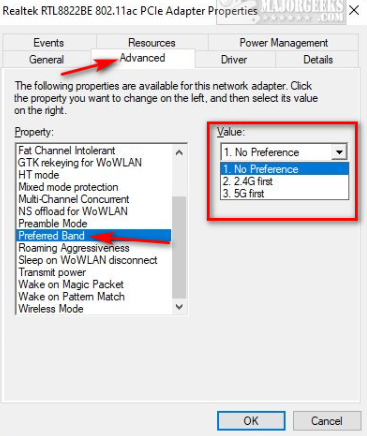
It is also suggested to check whether there is a new wireless driver for the LG Gram laptop. And you can also check whether you can set the preferred band on the wireless driver to be 5GHz, such as:

Best regards.


  0  
  0  
#4
Options
Re:Enabling 2.4GHz band means devices connect at 2.4GHz instead of 5GHz or 6GHz
2 weeks ago

  @David-TP - creating the IoT network and giving it only 2.4GHz while removing 2.4GHz from my regular and guest networks worked, thank you for that. However, while that was a smart workaround and your help was really appreciated, the BE65 still wasn't working as it should. I hope your team keeps that in mind as they continue development.


As an FYI, I had already updated the drivers for my WIFi adapter, and now set the Preferred Band to 5GHz as you suggested.


Thanks again - R.

  1  
  1  
#5
Options
Re:Enabling 2.4GHz band means devices connect at 2.4GHz instead of 5GHz or 6GHz
2 weeks ago

  @Rooster998 you're probably having similar issues to other BE65 owners with the recent 1.2.0 firmware. Just do a search on the community pages and you'll see for yourself. I also note TP Link seem to have hidden some threads on this matter. 1.2.0 has introduced critical bugs causing a huge headache some some owners. 

  1  
  1  
#6
Options