
Deco S7 1900 / Livebox connexion-configuration issues
 This thread has been locked for further replies. You can start a new thread to share your ideas or ask questions.
Deco S7 1900 / Livebox connexion-configuration issues
This thread has been locked for further replies. You can start a new thread to share your ideas or ask questions.
Hi people, French "user" here, try english as adviced.
Context: Large two-story house. The Livebox and the RJ45 network patch panel are in the basement. The box's basic Wi-Fi signal is very weak, if not nonexistent, on the first floor.
Objective: To extend Wi-Fi coverage to the first and second floors. By connecting the first "satellite mesh" via RJ45 in a bedroom, and then the second via Wi-Fi on the second floor.
I launched the Deco app, and the first attempt to connect directly to the first floor failed. Second attempt in the basement, 20 cm from the Livebox. I managed to launch the app, configure the Deco access point, create a Wi-Fi network and password, and the app indicated that it was OK (even though the speed seemed extremely slow, 13/14 Kbps).
The Livebox configuration panel (198.162 etc.) recognizes the device as connected (I verified this on my main computer). So I decided to move this access point to the first floor where it should be. But... disaster struck! It can no longer connect via Ethernet and remains a silent red light despite restarting. It also disappears from the connected devices tab for port 4 on the Livebox.
I also tried switching the access point to Access Point mode. I read somewhere that the Livebox already acts as a router and that I needed to switch to Access Point mode. But it doesn't work for me. I'm really stuck. Could someone help me if they know about this type of problem and configuration? Do I need to set a static IP address? Configure something else? I'm completely lost, and I'm way too tech-savvy.
Here above is google translate... Anyway, I'm not sure that i must stay in Acces Point, someone on the livebox forums told me to go back in router configuration. Also i ask myself If static can be ok, but with all possibility (NAT/DHCP and so on) i'm clearly lost, as i don't really understand how it's working and how to choose wisely.
Does anyone can help me? With maybe little knowledge of french Orange/livrebox Provider?
Thx to you
- Copy Link
- Subscribe
- Bookmark
- Report Inappropriate Content


Hi, welcome to the community.
Do you have two Deco S7 units?
Is the network topology like:
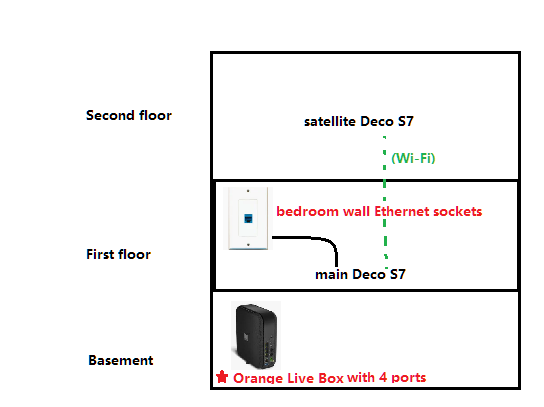
First, there are some notices during the setup.
- It is suggested to set Deco S7 into "Access Point " mode under Deco App>More>Advanced>Operation Mode.
- The first main Deco S7 needs to be connected to an Ethernet cable to the Livebox all the time.
However, if you still run into any issues, can you help me check the following details:
- Is the RJ45 cable a long Ethernet cable directly from port 4 of the Livebox? Or an Ethernet connection from the wall Ethernet socket?
- Have you tested the Bedroom Ethernet connection with the laptop to see if the laptop can access the internet from the Livebox?
Thank you very much.
Best regards.
- Copy Link
- Report Inappropriate Content
Hi, welcome to the community.
Do you have two Deco S7 units?
Is the network topology like:
First, there are some notices during the setup.
- It is suggested to set Deco S7 into "Access Point " mode under Deco App>More>Advanced>Operation Mode.
- The first main Deco S7 needs to be connected to an Ethernet cable to the Livebox all the time.
However, if you still run into any issues, can you help me check the following details:
- Is the RJ45 cable a long Ethernet cable directly from port 4 of the Livebox? Or an Ethernet connection from the wall Ethernet socket?
- Have you tested the Bedroom Ethernet connection with the laptop to see if the laptop can access the internet from the Livebox?
Thank you very much.
Best regards.
- Copy Link
- Report Inappropriate Content
Hi David thx for quick reply and warm welcome.
the plan/drawing you made is exactly the aim of the network topology, what i want to achieve.
yes in the box there is 2 units
At this moment i disconnected everything. Here are replys below
"First, there are some notices during the setup.
- It is suggested to set Deco S7 into "Access Point " mode under Deco App>More>Advanced>Operation Mode. "
I did it when i was in the basement with the first déco connected by small rj45 cable (30 cm) directely to the livebox, on port 4 eth. When i did change from router to AP, there was a weird warning message before (or maybe after) reboot. When the déco was connected this way, app said everything ok but only shows 4kbps/14kbps speed.
- "The first main Deco S7 needs to be connected to an Ethernet cable to the Livebox all the time."
Does that mean that i should let the first one in the basement and try activate the second one on the 2d floor?
"However, if you still run into any issues, can you help me check the following details:
- Is the RJ45 cable a long Ethernet cable directly from port 4 of the Livebox? Or an Ethernet connection from the wall Ethernet socket?"
The RJ45 cable is an ethernet connection from the wall socket, made when i bought home 10 years ago, it's Grade6 cable inside walls.
- "Have you tested the Bedroom Ethernet connection with the laptop to see if the laptop can access the internet from the Livebox?"
The ethernet bedroom wall ethernet works, as i previously have a android tv box connected on it, to watch streaming tv services like nerflix or prime. Important notice regarding this socket. To make the tv box work, i had to set a static IP adress in the livebox admin menu, was quite hard to do, and tell the box to authorize full access to device.
Last point i don't know if important the livebox image you use is livebox model S, i have a model 4.
Thank in advance for futur reply.
As i'm very bad in this matter, point by point progression or advices is welcome.
- Copy Link
- Report Inappropriate Content
Thanks for the quick reply.
"The ethernet bedroom wall ethernet works, as i previously have a android tv box connected on it, to watch streaming tv services like nerflix or prime. Important notice regarding this socket. To make the tv box work, i had to set a static IP adress in the livebox admin menu, was quite hard to do, and tell the box to authorize full access to device."
https://docs.opnsense.org/manual/how-tos/orange_fr_tvf.html
-I wonder whether this Wall Ethernet port might be reserved for the IPTV service only from the Orange Livebox 4. If yes, this port is often tagged with a VLAN ID and is not recommended to be used for other Ethernet connections.
-Are you able to test the Ethernet port on a wired laptop?
As for the speed rate on the Deco APP, it is suggested to refer to How to Understand Speed Rates on the Deco APP. These numbers don't stand for the actual network speed.
If you're curious about the current download/upload speed, you can run a speed test via https://www.speedtest.net/ directly.
The reason I highlighted "The first main Deco S7 needs to be connected to an Ethernet cable to the Livebox all the time" is that, occasionally, we found users might unplug the Ethernet cable on the main Deco after setup and thought it could still wirelessly connect to the ISP router, which it can't. So it is ok to plug the first Deco S7 into the Ethernet wall port on the second floor(if it is not dedicated to the STB IPTV box).
Thank you very much.
Best regards.
- Copy Link
- Report Inappropriate Content
Hi David hope you're going well.
The document regardin IPTV setup seems to refer to the Orange IPTV decoder, and not to the android box i use (Strong Leap model), which is not an official Orange TV decoder. And i must say that if the document is very interesting, it's quite too technical for me. For exemple i cannot find same menu in my own livebox menu .
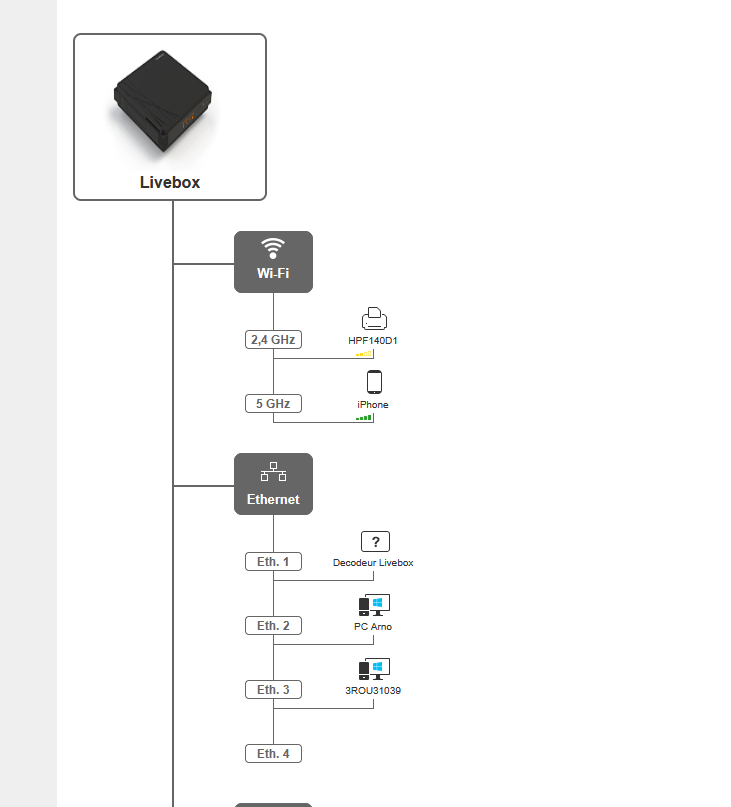 Caption
Here you can see Eth4 is free cause not booted The strong Leap device. I have no menu mentionning VLAN interfaces as in your document.
Feel so bad.. Ok then i'll test my laptop connected on Eth3 on the wall socket this afternoon to see if i have some internet, this should ensure the port is not reserved to VLAN?
Also if i understand well, i can connect the first déco box on the 2nd floor wall ethernet plug (corresponding to Eth3) and then put the second one (pure wifi) on the first floor?
Sorry for you my technical skills and english skills are to facilitating exchange.
Thx for your patience
- Copy Link
- Report Inappropriate Content
Hi David, little Update, I tried to connect laptop to the wall socket of 1rst floor (pro with ivanti secure client), and as you told no internet connexion. Seems you're right the socket is kinda "reserved" to the android box.
Waiting your reply concerning main déco trial second floor.
Best regards
- Copy Link
- Report Inappropriate Content
Hi, thank you very much for the further confirmation .
.
"Ok then i'll test my laptop connected on Eth3 on the wall socket this afternoon to see if i have some internet, this should ensure the port is not reserved to VLAN?"
Yes, if a regular PC works with Eth3 or the wall plug on the 2nd floor, it is unlikely to be reserved for VLAN.
"Also if i understand well, i can connect the first déco box on the 2nd floor wall ethernet plug (corresponding to Eth3) and then put the second one (pure wifi) on the first floor?"
That should work as well. The satellite Deco S7 will always try to seek a connection to the main Deco S7.
By the way, Will the Ethernet wall plug on the 2nd floor be routed from the Eth3 of the Orange Livebox in the basement?
Thanks a lot.
Best regards.
- Copy Link
- Report Inappropriate Content
I feel like i lost you with the floors, wall plug and eth n°x.
Yesterday i tried to connect laptop to wall socket eth4 / first floot = so signal / reserved VLAN
Soon i'll try to connect the déco main on the second floor wall socket connected to eth3 you're right.
I'll keep you informed soon if this does work.
Hope i reply well and your understood.
- Copy Link
- Report Inappropriate Content
Hi David, Hope you going well
Latest news, i connected the main déco on the 2d floor wall plug linked to Eth3. And i'm happy to say that App and déco are correctly connected.
This first step is ok.
I'm going to add the second déco in the 1st floor bedroom in pure wifi today. Edit [ 2nd connected in wifi sucess, firmware updated]
But i'm quiet worried by the network speed. The déco app change from 5kps/7kps (in/out) to 25/35kpbs, is that ok? As my box has 34 mb speed (VDSL)
I gonna look uphere the informations regarding network speed, i remember you gave a link. [was a link to test my primary speed, confirmed at 34.7 / 4 Mb]
Now my concern is 1/ about network speed and also 2/ choice between router mode or access point, cause you said AP, and a guy on livebox forum told me router...
Best regards good week end
Cu i hope monday :D
- Copy Link
- Report Inappropriate Content
Hi, thank you very much for the feedback.
It would be better to set Deco into "Access Point" mode, as the Orange Livebox is already the NAT/DHCP server.
For the speed, do you refer to the "real-time" speed rate on the Deco App?
If yes, you can refer to this link How to Understand Speed Rates on the Deco APP. They are not actually the same as the network speed. It would be better to run a speed test on the clients directly via https://www.speedtest.net/.
Best regards.
- Copy Link
- Report Inappropriate Content
Hi David, hope you're going well.
In fact i setted in router, and gave no problem. Is that a big issue? Or can i stay in router mode?
Regarding speed, i must admin the problem is between the chair and the screen, aka myself... I was looking the exchange on the deco app, but with no device logged... So evidence, no data..
Then i connected via wifi, and do speed test, rates are similar 32mb/ 3mb. Everything works fine, i even connected my 3Dprinter in wifi on 2nd floor, worked fine.
Thanks a lot for your help.
If you got time to told me if router mode is ok.
Best regards !
- Copy Link
- Report Inappropriate Content
Information
Helpful: 0
Views: 1310
Replies: 13
Voters 0
No one has voted for it yet.