
Archer NX200 keeps dropping out - all lights off inc. Wi-Fi
Archer NX200 keeps dropping out - all lights off inc. Wi-Fi

Hi,
I've recently set up mobile broadband at home running an Archer NX200 with a 5G sim, connected to an external antenna. When it's working speeds seem pretty good. But I'm having two issues that I'm unsure how to solve.
1. A few times a day I lose all connection, not only internet access, but also Wi-Fi network. All of the lights on the front of the router go off, except the power light. After some time (time varies from seconds to minutes) everything comes back on and connections are re-established.
2. When all lights are on (and white/strong) initial connection to websites or apps can be sluggish. Apps can sit spinning for 20-30 seconds, same with web page loading.
The router is only one month old. Has anyone else had similar issues?
- Copy Link
- Subscribe
- Bookmark
- Report Inappropriate Content


Hi, thank you very much for the update.
I'd like to forward your case to the senior engineer for further assistance.
Please check whether you've received my email.
Thanks a lot.
Best regards.
- Copy Link
- Report Inappropriate Content
Hi, welcome to the community.
Can I have the firmware version of your Archer NX200?
May I know your SIM ISP?
For the first issue, I think the router seems to be randomly restarting itself.
By the way, can I also have the model number of the external antenna?
Wait for your reply.
Best regards.
- Copy Link
- Report Inappropriate Content
@David-TP
Thank you, yes details as follows:
Firmware version: 1.2.0 3.0.0 v60e0.0 Build 250725 Rel.73467n
Archer NX200 v2.0 00000000
Serial no. 2256132000789
SIM ISP: Lebara
External antenna: Poynting XPOL-1-5G V2
- Copy Link
- Report Inappropriate Content
Hi, thank you very much for the update.
I'd like to forward your case to the senior engineer for further assistance.
Please check whether you've received my email.
Thanks a lot.
Best regards.
- Copy Link
- Report Inappropriate Content
@David-TP Thanks David, yes I've got the email from your engineer, I'll send them the info they need. Cheers
- Copy Link
- Report Inappropriate Content

Same problem here. The router is only a few months old. I changed the settings so that the router restarts once a day, in the night, but that does not solve the problem. Today two drop-outs, within ten minutes of each other.
- Copy Link
- Report Inappropriate Content
Hi, thank you very much for the feedback.
May I know your SIM ISP?
Have you observed any LED changes on the Archer NX200 when the router dropped out?
Did it help improve the network stability if we set the "Network Mode" to "4G only"?
Wait for your reply.
Best regards.
- Copy Link
- Report Inappropriate Content
Thank for the response. 'RED by SFR' in France is the ISP.
There were no changes in the lights. All the lights were on when the router stopped working.
I changed the network mode to 4G only, immediately after reading these posts. No problems since then.
Yesterday evening I switched it back to 5G/4G/3G because I hoped the connection would get faster (having quite a lot of trouble in trying to receive a Dutch service called NLZiet). Had no drop-outs since the switch-back.
Kind regards
- Copy Link
- Report Inappropriate Content
- Copy Link
- Report Inappropriate Content
Good day,
Did you find a solution for the problem with your Archer NX200?
I have the same device, with the same hardware- and firmware version, but in my case all the lights stay on and there is no internet connection. Rebooting is the only solution.
Kind regards,
Lawrence
- Copy Link
- Report Inappropriate Content
Hi, thank you very much for the feedback.
I'd like to follow up on your case via email and ask the senior engineer for further assistance.
Could you please update the email with the following details:
- Some screenshots of the Internet status page(before and after the disconnection)
- A copy of the web UI system log. (Please do not restart the router before saving the system logs.)
By the way, for the "TP-Link 150" here, do you refer to " TL-MR150"?
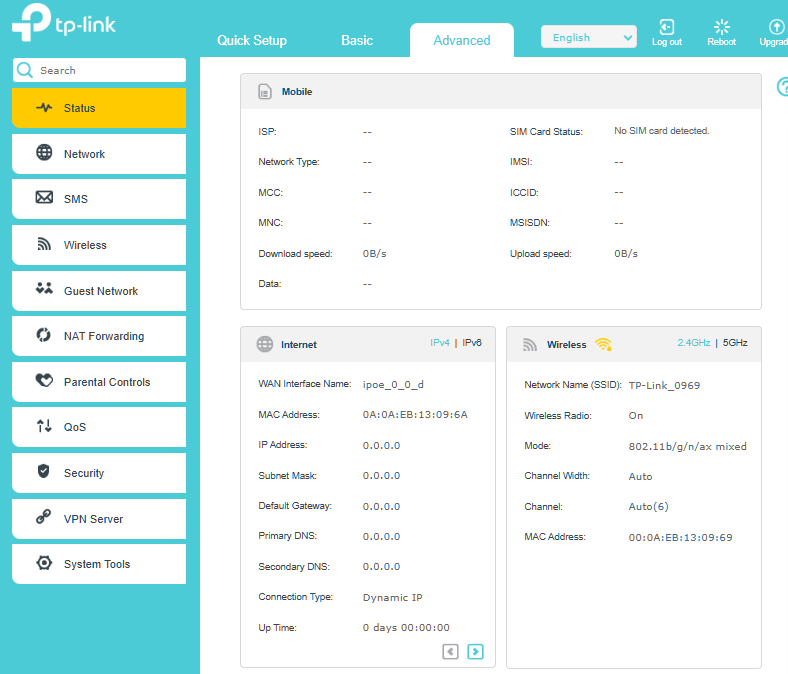
Wait for your reply.
Best regards.
- Copy Link
- Report Inappropriate Content
Information
Helpful: 1
Views: 5278
Replies: 11
Voters 1