
Archer BE800: The shared drive “disappears” after a reboot.

Archer BE800: The shared drive “disappears” after a reboot.

Archer BE800: The shared drive “disappears” after a reboot.
Yesterday
Tags: #Storage Sharing
Model: Archer BE800  
Hardware Version: V1
Firmware Version: 1.3.2 Build 20251015 rel.10659(5553)

I recently purchased an Archer BE800 v1.20 and updated it to firmware version 1.3.2 Build 20251015 rel.10659(5553). Overall, it has worked perfectly for me, but this morning, after scheduling an automatic reboot at 2:00 a.m., I noticed that I could not access my shared network folder. When I logged into the administration panel, I only saw the following message: “No USB storage device found. Insert one into a USB port on your router and try again.”


Of course, I unplugged it and reconnected it several times, with no success. I even tried using other USB cables, but nothing worked. I rebooted the router to see if that was the issue, but that did not help either, nothing at all.


So I tried something else: testing with a different device. The one that was “causing the issue” was an Asus TUF Gaming A2 enclosure paired with a Samsung 990 EVO Plus 4TB SSD (NTFS format, GPT). It had initially worked without any issues, with excellent transfer speeds. I unplugged it and tested another device using the same cable, this time a Samsung T7 Shield 4TB (also NTFS, GPT), and it was detected immediately without any problems. I then tried a SanDisk Extreme PRO 256GB, and again, no issues at all. However, when I reconnected the Asus enclosure, it was still not detected.


I took the Asus enclosure, thinking it might be faulty, and connected it to my PC. I had no trouble accessing it at all. Even though it did not prompt me to do so, I ran an error check using the Windows tool, which reported no errors and that everything was fine. I disconnected it again and brought it back to the router. And here is the strange part: it worked perfectly once again:
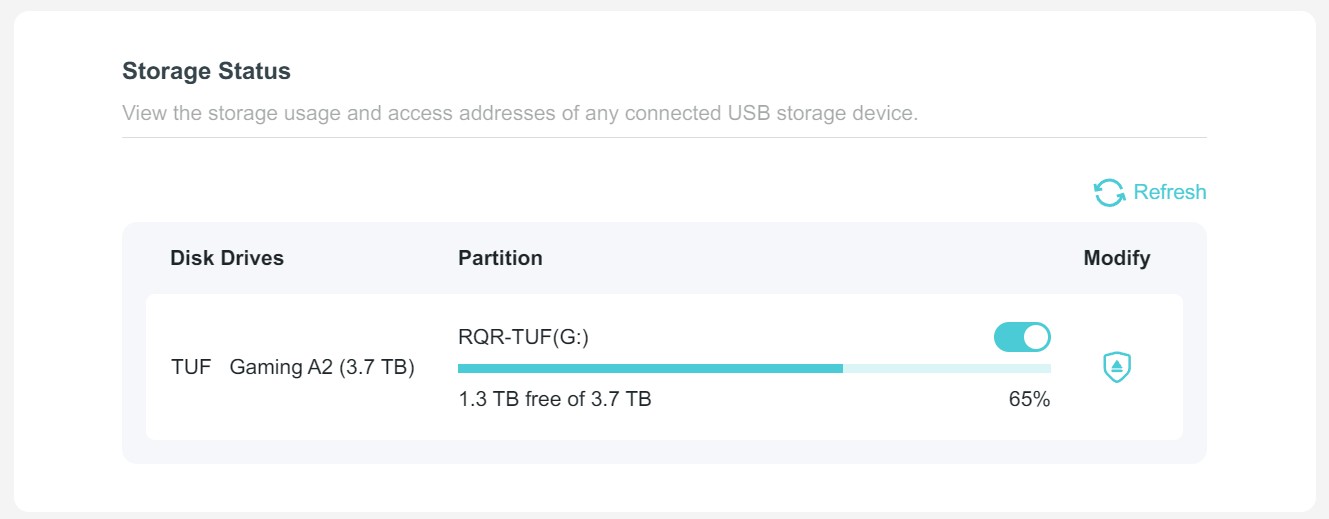


I removed it again, disconnected and reconnected it, and once more it was not detected. I tried rebooting the router again, but nothing changed. I repeated the process of taking it back to my PC, and then, voilà, it worked again without any issues.


Based on all of the above, it seems to me that the hardware itself is not faulty, but rather that there is some issue with the router’s firmware that is preventing the drive from being properly recognized after a reboot, or after a drive that was initially working gets disconnected. Hopefully this can be reviewed by the technical team. For now, it works relatively well, but sooner or later the router will reboot again and the issue will likely reappear.


  0      
  0      
#1
Options
4 Reply
Re:Archer BE800: The shared drive “disappears” after a reboot.
Yesterday

  @RQR 


Hi,


How is the ASUS enclosure containing the Samsung 990 EVO Plus connected to the BE800? I mean, directly or via a powered USB hub?
 

  0  
  0  
#2
Options
Re:Archer BE800: The shared drive “disappears” after a reboot.
Yesterday

  @woozle Hi, the enclosure is connected directly to the router’s USB port 🙂

  0  
  0  
#3
Options
Re:Archer BE800: The shared drive “disappears” after a reboot.
Yesterday

  @RQR 


According to Samsung's specifications the 4TB version of the 990 EVO Plus has an average power consumption of 5.5 W during read.
https://semiconductor.samsung.com/consumer-storage/internal-ssd/990-evo-plus/


Furthermore, the electronics of the ASUS enclosure itself also need some additional power operate, albeit not much.


The official specification for an USB 3.0 Type‑A port, like the one built into the Archer BE800, is 5 V and 0.9 A, which translates to power of 4.5 W. (P = U * I)
https://en.wikipedia.org/wiki/USB_3.0


As you can see, connecting an ASUS TUF Gaming A2 containing a 4TB Samsung 990 EVO Plus to an USB 3.0 Type‑A port is beyond the spec and extremely pushing it.


The fact that it's working fine on your PC purely means that the manufacturer of the PC (actually the mainboard) has most likely "oversized" the rating of its USB 3.0 Type‑A ports.


Ideally an ASUS TUF Gaming A2 with a 4TB Samsung 990 EVO Plus should be connected to an USB-C port, because USB-C is specified with a higher current rating.


I agree that the pattern of behavior you are seeing is weird, but in my opinion it is caused by the SSD requiring more power than the USB 3.0 Type‑A port of the Archer BE800 can provide.

  2  
  2  
#4
Options
Re:Archer BE800: The shared drive “disappears” after a reboot.
9 hours ago

  @woozle 

Hello! Wow, thanks so much for replying. The information you shared is actually incredibly valuable. It honestly had not crossed my mind at all. I used to have it connected to an Asus RT-AX86U and never had any issues.

As soon as I can, I will try leaving the Samsung T7 Shield connected directly to the router instead. From what I can see, its power requirements are much lower compared to the enclosure. I will test it and reboot the router a couple of times.

Best regards, and thanks again 😄

  0  
  0  
#5
Options
