BE68 and BE65 - Unstable network with connection issues and slow DNS resolution

BE68 and BE65 - Unstable network with connection issues and slow DNS resolution

BE68 and BE65 - Unstable network with connection issues and slow DNS resolution
a week ago
Model: Deco BE65   Deco  
Hardware Version: V1
Firmware Version: 1.1.1 Build 20250616 Rel. 12316

This is a similar issue to one posted here: Frequent DNS resolution lag. - Home Network Community


For the past 2 weeks or so, I've been facing an intermittent connectivity issue in my Deco network that occurs randomly. The DNS resolution of websites seems to sometimes take extremely long, most often ending in a connection timeout. Other times, certain devices will be able to connect to the WIFI network but receive no internet connection. I am also unable to run the Speedtest within the Deco app when the issue is occurring, as it quickly returns a failed message. During this entire time, all lights on the Decos remain green and I can see that they are well connected within the Deco app.


This issue persists even when I wire my device directly to the main Deco that is connected to my ISP's ONT, which is configured to be run in bridge mode by default. This also means that I am unable to use my Decos in AP mode.


I've verified that there is no issue on the ISP's end, as the internet connection works fine when I plug directly into the ONT.


My network consists of 2 x BE65(1.0) running the 1.1.1 Build 20250616 Rel. 12316 firmware and 2 x BE68(1.0) running on the 1.1.0 Build 20250718 Rel. 75864 firmware, with one of the BE68 being the main Deco.


Similar to the other posts, I've also attempted the following troubleshooting actions to no avail:

  • Using default ISP DNS servers
  • Using 8.8.8.8 / 1.1.1.1
  • Testing different devices
  • Testing via ethernet direct into the main Deco unit
  • Deleting and creating the WIFI network from scratch


I would appreciate it if anyone could provide assistance as the Deco network has been performing nicely up until now and it's almost borderline unusable in its current state. I do have several log files saved, but I'm unsure of which parts are of relevance to include.


  3      
  3      
#1
Options
5 Reply
Re:BE68 and BE65 - Unstable network with connection issues and slow DNS resolution
a week ago

  @bhua14 

Hi, welcome to the community.

May I know your internet service provider?

Can I have the IPV4 subnet mask under Deco App>More>Internet Connection>IPV4?


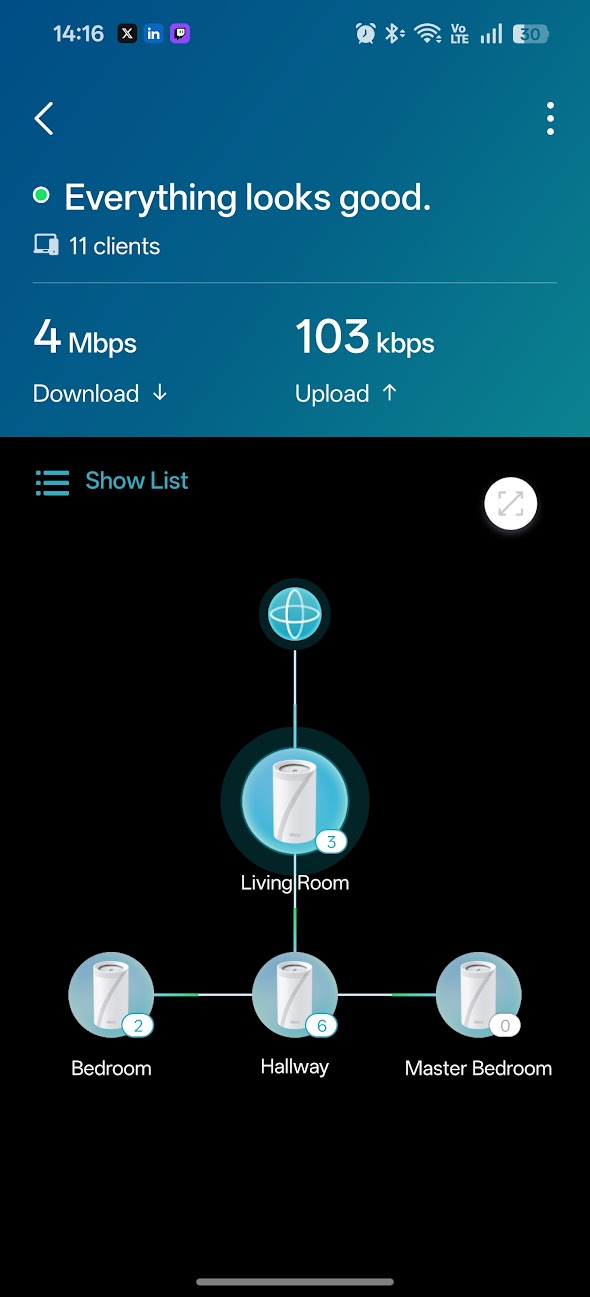
Please also send me a screenshot of the network map on the Deco App, such as:

Wait for your reply.

Best regards.


  0  
  0  
#2
Options
Re:BE68 and BE65 - Unstable network with connection issues and slow DNS resolution
a week ago - last edited a week ago

  @David-TP 


Hi David,


thanks for the response. I'm residing in Singapore and my ISP is MyRepublic. They use CGNAT but I'm unsure if it would be relevant for troubleshooting.


The IPV4 subnet mask is 255.255.224.0


Below is my network map


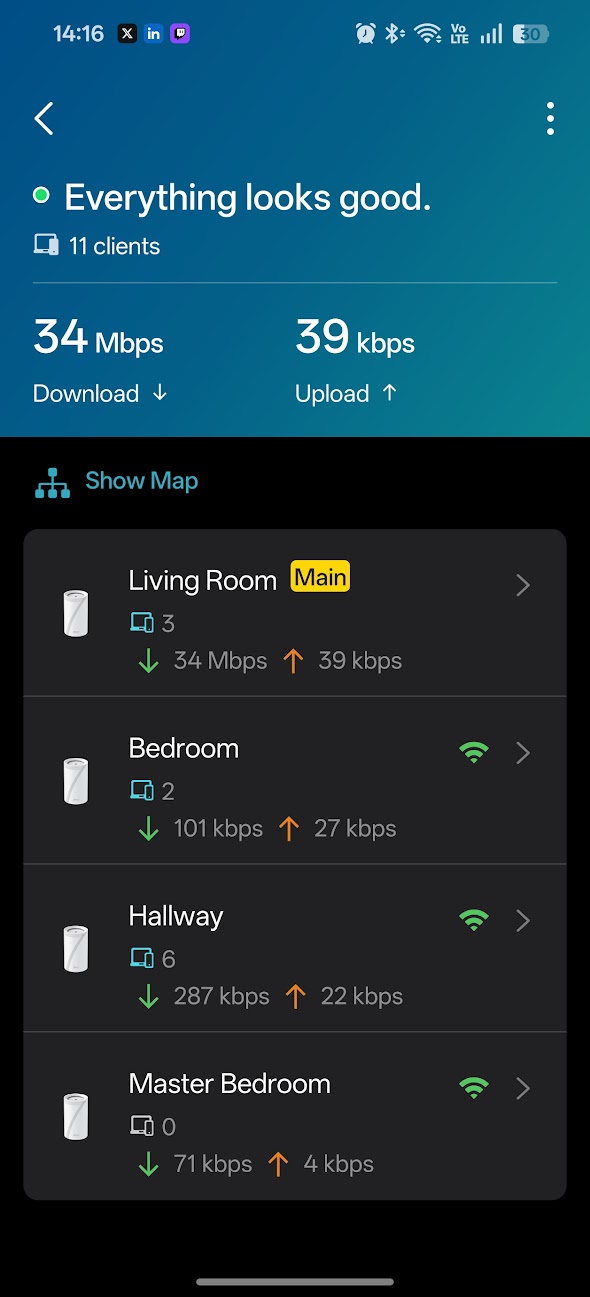
The BE68s are set up as Living Room (main deco) and Hallway. The BE65s are in the bedrooms. All are connected via wireless backhaul.

  0  
  0  
#3
Options
Re:BE68 and BE65 - Unstable network with connection issues and slow DNS resolution
Friday

  @bhua14 

Bedroom and Master Bedroom should connect to Living Room Deco to avoid daisy chaining.

  0  
  0  
#4
Options
Re:BE68 and BE65 - Unstable network with connection issues and slow DNS resolution
Friday - last edited Friday

  @BPCS even if the connection strength is only 2 bars? With the way my network is set up, the main Deco in the Living Room is near the entrance of my home, and the Hallway Deco is actually the most central unit. So the bedroom Decos actually have the strongest connection to the Hallway Deco. The main Deco and the Hallway Deco have LOS so I figured it wouldn't be an issue to run the wireless backhaul in this manner.


But nevertheless, I'm not sure if this is related to the issue I'm having as I still experience it even when I connect my laptop directly to the main Deco to test. I've been working with TP-Link Singapore support and they've kindly provided me with a beta firmware for the BE68 which seems to have mostly resolved the issue, will keep monitoring to see if it comes back.

  1  
  1  
#5
Options
Re:BE68 and BE65 - Unstable network with connection issues and slow DNS resolution
Saturday

  @bhua14 

Ok i hope it stays stable. Regarding your comment, yes, I find and TP Link say that 2 bars reception is fine for a satellite to connect to a main Deco. If you have concerns, select "Auto" and see if the satellites are happy to select the main Deco that is connected to your modem.

  0  
  0  
#6
Options