
SIM management and hot-swapping SIMs

Hi all,
is it allowed/recommended to unplug SIM and plugin new SIM while the router is powered on?
(At least for initial setup wizard this seems to be the recommended way to plugin SIM while device is on).
And how does the NX200 manage multiple SIMs?
Does the router remember SIM PIN and configuration for each SIM?
- Copy Link
- Subscribe
- Bookmark
- Report Inappropriate Content


Hi, welcome to the community.
Occasional hot-swapping SIMs would be fine. It is not recommended to unplug or plug in a SIM card while a mobile router is powered on very frequently.
Powering off the router first could avoid the following risks.
- Prevent Hardware Damage: Removing or inserting a SIM while power is flowing can occasionally cause electrical shorts or "fry" the SIM card or the router's delicate reader pins.
- Avoid Software Glitches: Routers may fail to recognize the new SIM immediately if swapped while running. Powering off forces the device to re-read the SIM profile and register correctly with the cellular network upon startup.
- Data Integrity: Some routers perform minor write operations to the SIM for settings or SMS storage. Abrupt removal can lead to data corruption.
- Security & PIN Management: If your SIM has a PIN enabled, swapping while the router is "live" can sometimes trigger security locks or require a reboot anyway to prompt for the code
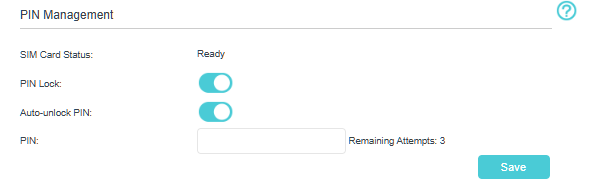
- If you enable "Auto-unlock PIN", the mobile router would "remember" the SIM PIN.
Thank you very much.
Best regards.
- Copy Link
- Report Inappropriate Content
Hi, welcome to the community.
Occasional hot-swapping SIMs would be fine. It is not recommended to unplug or plug in a SIM card while a mobile router is powered on very frequently.
Powering off the router first could avoid the following risks.
- Prevent Hardware Damage: Removing or inserting a SIM while power is flowing can occasionally cause electrical shorts or "fry" the SIM card or the router's delicate reader pins.
- Avoid Software Glitches: Routers may fail to recognize the new SIM immediately if swapped while running. Powering off forces the device to re-read the SIM profile and register correctly with the cellular network upon startup.
- Data Integrity: Some routers perform minor write operations to the SIM for settings or SMS storage. Abrupt removal can lead to data corruption.
- Security & PIN Management: If your SIM has a PIN enabled, swapping while the router is "live" can sometimes trigger security locks or require a reboot anyway to prompt for the code
- If you enable "Auto-unlock PIN", the mobile router would "remember" the SIM PIN.
Thank you very much.
Best regards.
- Copy Link
- Report Inappropriate Content
- Copy Link
- Report Inappropriate Content
Information
Helpful: 1
Views: 362
Replies: 2
Voters 1