
Request for beta/test firmware for Archer BE3600

Hello,
I own a TP‑Link Archer BE3600, hardware version: V1, firmware: Archer BE3600(EU)_V1_1.2.1 Build 20250804
After the latest firmware update, the web panel shows SSL warnings / red error screens, which makes it difficult to use the router.
Is it possible to get a beta/test firmware that resolves this issue?
Thank you for your help.
- Copy Link
- Subscribe
- Bookmark
- Report Inappropriate Content

Oh, I see.
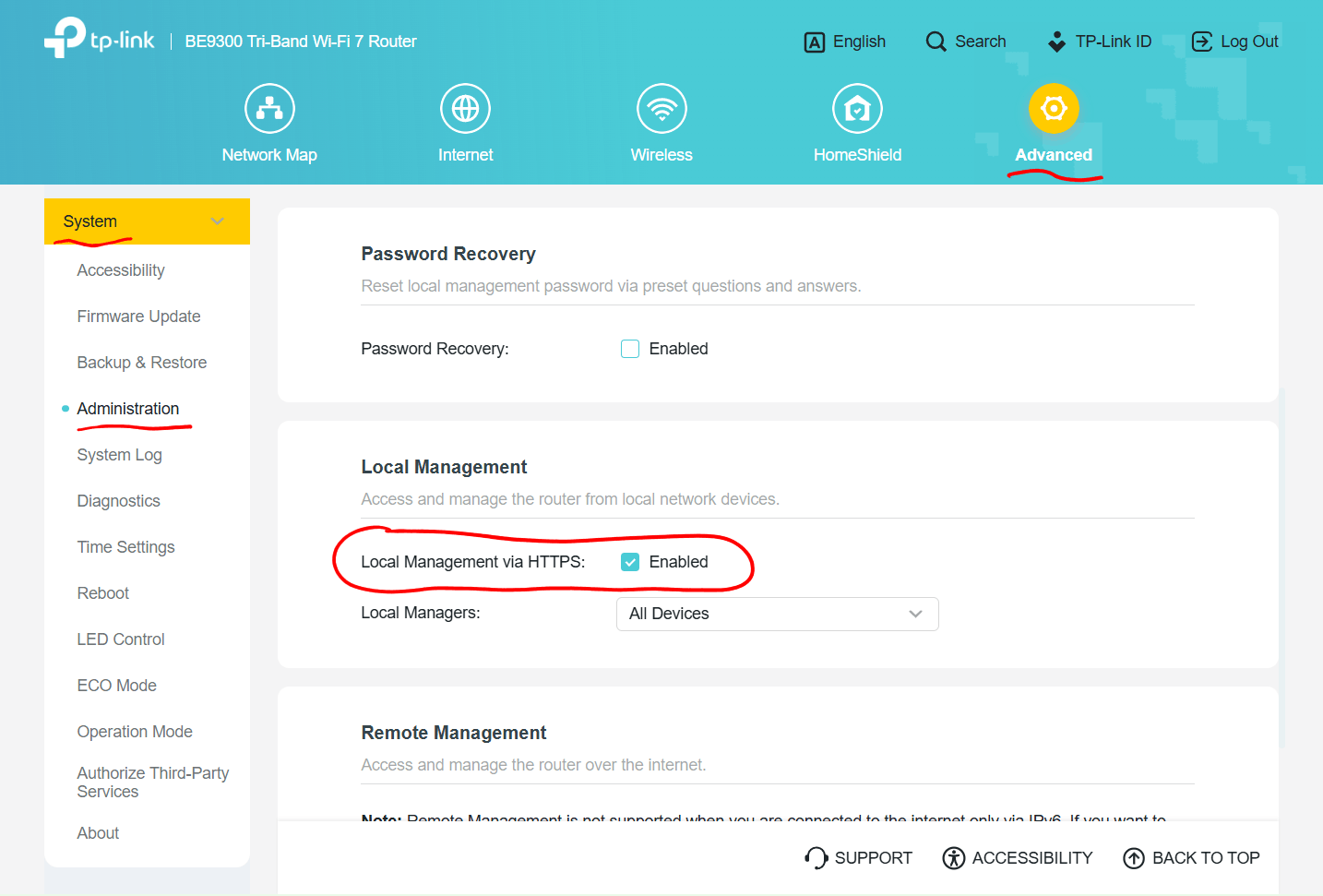
TP-Link has recently been changing the default setting for the local management webpage from HTTP to HTTPS on their newer router models. So, this is not something that will change in a future firmware, be it beta or not.
On the screen you see you need to click the "Advanced" button and the click on "Proceed to tplinkwifi.net (unsafe)". Then the router's login page should load as usual.
If you'd like to go back to the old behavior (without encryption), then you need to uncheck the option "Local management via HTTPS: [v] Enabled" and then click the [Save] button.
- Copy Link
- Report Inappropriate Content
Hi,
Can you perhaps post a screenshot of such a red error screen?
In case there is personal information visible on that screen, then please use a paint software to remove that personal information.
- Copy Link
- Report Inappropriate Content
@woozle Every time I log into the router, I get this error. This problem didn't exist before updating the firmware to the latest version. If I had known, I wouldn't have updated it. It's frustrating, knowing it wasn't there before.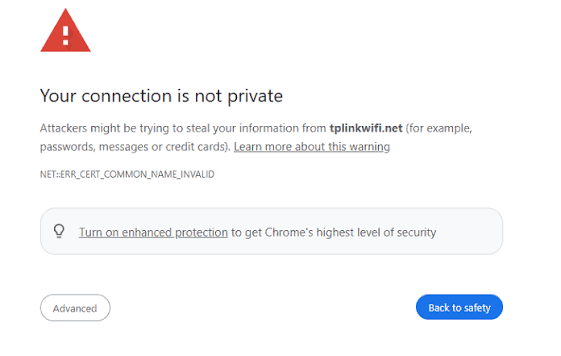
- Copy Link
- Report Inappropriate Content
Oh, I see.
TP-Link has recently been changing the default setting for the local management webpage from HTTP to HTTPS on their newer router models. So, this is not something that will change in a future firmware, be it beta or not.
On the screen you see you need to click the "Advanced" button and the click on "Proceed to tplinkwifi.net (unsafe)". Then the router's login page should load as usual.
If you'd like to go back to the old behavior (without encryption), then you need to uncheck the option "Local management via HTTPS: [v] Enabled" and then click the [Save] button.
- Copy Link
- Report Inappropriate Content
@woozle I didn't know about these settings. Thanks for your help.
- Copy Link
- Report Inappropriate Content
@woozle Could you expand the Tether app to include features like UPnP and port forwarding? This would be very useful in the app; other routers from other brands have this in the app.
- Copy Link
- Report Inappropriate Content
Rafael777 wrote
@woozle Could you expand the Tether app to include features like UPnP and port forwarding? This would be very useful in the app; other routers from other brands have this in the app.
For feature requests you need to tag one of the representatives of TP-Link in this forum, for example @Joseph-TP.
- Copy Link
- Report Inappropriate Content


Thanks to @woozle for the reminder.
Hello @Rafael777, For App feature optimizations and additions ,please start a new thread on the Feature Request (Routers) board.
- Copy Link
- Report Inappropriate Content
Information
Helpful: 0
Views: 1172
Replies: 7
Voters 0
No one has voted for it yet.