
Solution Windows System 1030.52.731.2025 May Cause Signal Drop and Instability with WiFi 4/5 USB Adapters


This Article Applied to:
All WiFi 4/5 USB network adapters
Phenomenon:
Hello! We have received some user feedback that after the Windows Update automatically pushed and installed driver version 1030.52.731.2025, the WiFi 4/5 USB adapter may exhibit the following abnormal behaviors:
- Abnormal Signal Strength Display: WiFi signal strength drops suddenly from full bars (100%) to approximately 2 bars, indicating a weak signal.
- Unstable Connection: The wireless connection becomes severely unstable, which may involve frequent disconnections, reduced throughput, or inability to connect to specific bands.
Typically, one of these behaviors might occur after the driver’s Auto Update.
Available Solutions:
Our relevant departments have been working on feasible long-term solutions. They have also provided some temporary solutions for the situations mentioned above.
1. Check the current driver version
Please follow the steps below to check the current driver version to confirm if the anomaly is caused by the Windows update:
1) Right-click the Start icon on the Windows taskbar and select "Device Manager.
2) Expand the "Network adapters" list.
3) Find TP-Link Wireless MU-MIMO USB Adapter (or other names like Realtek 8821CU Wireless LAN 802.11ac USB NIC), right-click it, and select "Properties".
4) Switch to the "Driver" tab and check the "Driver Version":
- If the version is 1030.52.731.2025: Confirmed as the problematic driver pushed by Windows. Please proceed with the subsequent repair steps.
- If the version is 1030.44.XXXX.XXXX or other: This is the normal driver. If you still encounter the unexpected behavior described above, other causes need to be investigated.
2. Upgrade Driver
Through the efforts of relevant departments, we have released a universal driver. Here are the detailed steps for downloading and installing the driver:
1) Click the link below to download the updated driver package: https://static.tp-link.com/upload/beta/2026/202601/20260108/RTWlanUSB_WindowsDriver.zip
2) Locate the downloaded zip file, right-click it, and select Extract All to unzip the contents.
3) Open the extracted folder, find the Setup.exe file, and double-click it to run the installation program.
4) Once the installation is complete, restart your computer to apply the changes.
5) Check if the upgraded to 1030.52.1110.2025.
If you encounter other anomalies after automatically updating your Windows system to version 1030.52.731.2025, please provide more details. This includes, but is not limited to:
1) The specific model and hardware version, and the current adapter driver version.
2) Detailed description of the situation.
Any other convenient troubleshooting steps or suggestions are welcome!!
- Copy Link
- Subscribe
- Bookmark
- Report Inappropriate Content

Hello,
I have installed the new driver 1030.52.1110.2025 with my T3U Plus adapter.
The problem "Abnormal Signal Strength Display" seems to be resolved.
But, unfortunately, "Unstable Connections" still there... (connection becomes severely unstable, with frequent disconnections and reduced throughput).
I don't use the ForceUsbMode parameter, so the adapter uses USB 2.0 mode.
For information, my PC is only 4 m from the router, with no walls in between, and the connection is on 5GHz
Regards.
- Copy Link
- Report Inappropriate Content
Hello@Marcoweb ,
Thanks for contacting our community.
Is the instability always present, or does it occur after a particular update?
Please refer to case2 of What should I do if the TP-Link network adapter is not working properly in my computer?
- Copy Link
- Report Inappropriate Content

@Joseph-TP By the way, a newer version of this driver, 1030.52.1216.2025, has been released. Could you please share that as well?
- Copy Link
- Report Inappropriate Content
Hello @Fikotr74 ,
Thank you for your feedback.
As far as I know, this version 1030.52.1216.2025 hasn't been fully rolled out to all users yet. Have you received a notification to install the new driver on the PC?
If not yet, you can enable automatic updates in the Windows Update interface. If the PC receives the push notification, this new driver should be installed automatically.
- Copy Link
- Report Inappropriate Content

I've gotta thank ya for this horrible visual glitch finally being over with. I have the Realtek 8811CU.. I've always wanted to ask some kind of expert about this adapter's event logs.. Are these normal? (430 more installation needed. All the 400's are "the device was configured". 410, the device has started, 411: had a problem starting.
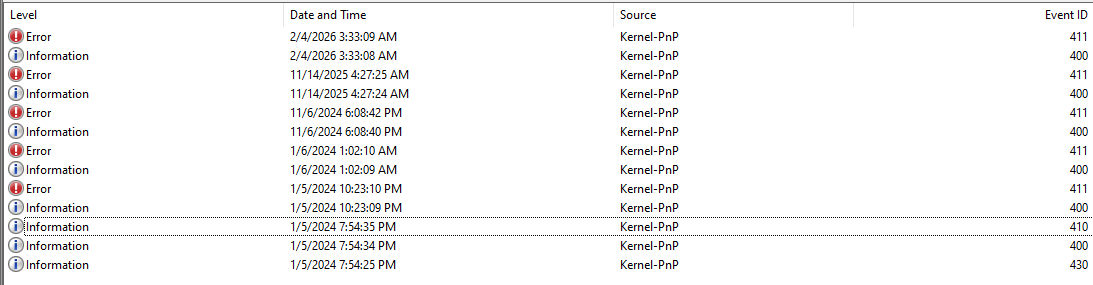
In terms of instability, I'd say I started experiencing that like 3 weeks before November 14th 2025. My TP Link extender would do this really weird thing where instead of getting 4 green lights, I would get a red light on the 2.4Ghz, even though I'd be connected to the 5 Ghz... But also my Internet would not be existent... Even weirder I could initiate windows troubleshooter, reset my adapter and then the 2.4 Ghz light comes back on, and connection is good for a few seconds up to 20ish minutes.Then eventually I got an optional update for the 11/14 adapter I had and then I had 1 bar connections on the TP link extender... Though I did find a way to make it become full bar connections before today.
I'd connect my phone to the 2.4 Ghz, put it on a wireless charger, and then use my phone as an extender.. Got me full bar connected that way.
I found this forum after checking ccleaner and seeing that this driver had an update.
I usually only do driver updates near the beginning or end of the year.. Since all my problems show up around then.Though, with only 8 more security updates from Windows.. I honestly don't know what I'll do at tje end of this year.
- Copy Link
- Report Inappropriate Content
Hello @Wrathma ,
Welcome to our community.
May I know the models of your adapter and extender? Are they both TP-Link devices?
How to find the model number of your TP-Link device
Please let me know your network topology. For example:
ISP modem—router )))((( client devices
(Note: — stands for wired connection,)))((( stands for wireless connection )
Regarding the adapter failing to obtain a full signal when connected to WiFi, you can enable automatic updates on your PC. Version 1030.52.1216.2025 should have already been rolled out to users.
- Copy Link
- Report Inappropriate Content
I may have to wait till the next security update rolls around. I haven't seen it. I'm currently on Windows 10, so that may be a reason why I didn't receive anything related to it.
Specificially my Adapters model or Device Pid and Revision is this. PID C811 REV 0200. That's an RTL8811CU.. But don't assume I have anything like the images. Really it looks like a Comfast wireless Adapter, but it's apparently Realtek. I don't know much about the adapter since I got it bundled with my PC a few years ago
My Extender is a TP-Link RE315.
Modem----Router ))))((((( TP-Link RE315 )))))((((( my computer.
My issues with being able to force connectivity via windows troubleshooting over and over again felt really weird to be honest.. Though it could've just been that I swapped over from Verizon to Spectrum/charter for Internet, maybe. going from a hotspot router to Broadband. Though updating the driver to 731.2025 fixed my instability or whatever that all was
Then the bars going down from 2 out of 3 bars to 1 out of 3 bars seemed concerning for awhile. But that was fixed with 1105.
Should I be seeing issues right now? Don't you dare tell me it's related to link speed.. Since I guess sometimes my phone gets ~100 Mb more link speed, and it's only like 2 inches closer to the tp link. My phone and the Adapter are both old.. Actually no idea when the adapter came out (got the adapter in 2024. phones from 2018.
- Copy Link
- Report Inappropriate Content
- Copy Link
- Report Inappropriate Content
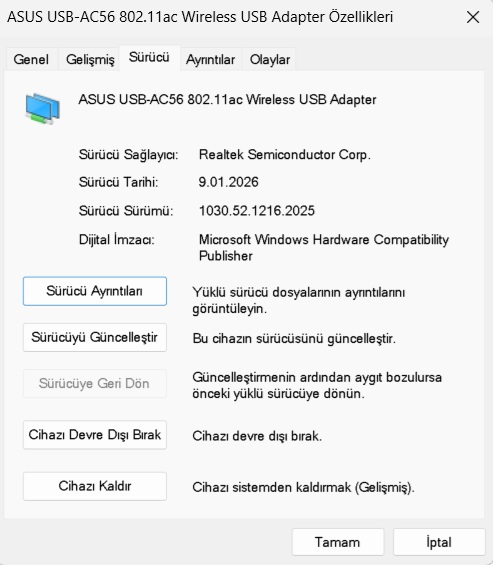
@Joseph-TP Finally, the "Realtek USB WLAN Driver 1030.52.1216.2025 (09.01.2026)" driver has been released. https://station-drivers.com/index.php/en/forum/realtek-wireless-bluetooth-drivers/719-rtl8723du-8812au-8192-au-realtek-usb-wlan-driver-1030-52-1216-2025-09-01-2026?start=10
- Copy Link
- Report Inappropriate Content
- Copy Link
- Report Inappropriate Content
Information
Helpful: 14
Views: 14119
Replies: 24
Voters 1
