Problem with deco in summer

Problem with deco in summer

Problem with deco in summer
2025-12-27 16:16:54 - last edited 2026-01-14 07:15:33
Tags: #Network Connectivity #deco disconection clients
Model: Deco XE75  
Hardware Version: V3
Firmware Version: 1.3.0 Build 20250722 Rel. 38703

Topology: 1 master node + 2 mesh nodes
Mode: Router
Environment: Home with multiple IoT devices, cameras, and persistent clients


For several days now, coinciding with high ambient temperatures, the Deco system has been experiencing frequent Wi-Fi client disconnections, general instability, and temporary loss of connectivity, without the device ever fully restarting.


This problem is neither isolated nor new: I have previously used Deco E4 and Deco X20, and the pattern is the same (actually, I had more significant problems before; now, I only have the one related, I suppose, to the temperature and the multiple disconnections).


The Deco XE75, despite having a much greater theoretical capacity, exhibits exactly the same symptoms under load.

The master node logs repeatedly show messages like:
tmpsvr: Error: memfree less than 10000 KB


Following this event, the following are observed:
* Massive disconnections of Wi-Fi clients (AP-STA-DISCONNECTED)
* Band steering/roaming system failures
* Internal process errors (CGI read error, tmp_trans_relay)
* Repeated disconnections of the same client (not random devices)
There is no complete reboot of the equipment, but rather a degraded system state.


I also wouldn't like a periodic reboot (I have a lot of IoT management technology implemented, which requires a stable LAN). 90% of the devices are "fixed," and I've set roaming to "no" for them. In general, I'm trying to manage all my devices on the local network (I have a dedicated home assistant), but I still have many whose firmware I haven't been able to reflash. I'm not saying the problem is solely with the decoder. It just struck me as odd that these problems would occur on a day with a feels-like temperature of 37 degrees Celsius. The nodes are positioned high up, as recommended for better signal distribution. But I understand that this complicates things.
Just in case chatgpt's analysis of the logs is incorrect, I'm attaching the logs from all three nodes.


Perhaps the problem isn't the heat. I understand that TP-Link can't prevent it from getting hot. But perhaps something can be done (I've tried many things due to disconnections, and I've seen some improvements, but the issue of running out of RAM, considering I have a small number of systems compared to the maximum supported by the XE75, worries me).


Thanks for any help!

File:
logs.zipDownload
1
1
#1
1 Accepted Solution
Re:Problem with deco in summer-Solution
2026-01-06 09:34:12 - last edited 2026-01-14 07:15:33

  @joluinfante 

Hi, I've left a message with a new firmware for Deco XE75_V3_1.3.0.

Could you please help me test whether it helps to improve the network instability issue?

Wait for your reply.

Best regards.


Recommended Solution
0
0
#4
4 Reply
Re:Problem with deco in summer
2025-12-28 16:06:30

  @joluinfante 

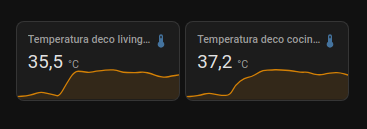
More info. This is "now" the temperature in two of three decos:

Hot air rises, of course... I've been looking into some kind of fan solution that activates automatically, controlled by a sensor. But I don't want to reinvent the wheel. Any ideas for cooling the set-top boxes without resorting to central air conditioning?

1
1
#2
Re:Problem with deco in summer
2025-12-30 03:14:41
Need help with the Deco app, setup, Ethernet backhaul, network switch or rolling back firmware? Router or AP mode? https://community.tp-link.com/us/home/forum/topic/699816?page=1
0
0
#3
Re:Problem with deco in summer-Solution
2026-01-06 09:34:12 - last edited 2026-01-14 07:15:33

  @joluinfante 

Hi, I've left a message with a new firmware for Deco XE75_V3_1.3.0.

Could you please help me test whether it helps to improve the network instability issue?

Wait for your reply.

Best regards.


Recommended Solution
0
0
#4
Re:Problem with deco in summer
5 hours ago

  @joluinfante 

Hi. I’ve read your post, and after performing a deep log analysis on an identical system (Deco XE75 Pro, firmware 1.3.0), I have some findings that might save you a lot of troubleshooting: the problem isn't the heat, even if the 37°C weather made it seem like the primary suspect.

What you are experiencing is a critical RAM exhaustion triggered by a firmware "infinite loop" that affects almost the entire Deco line.

Here is the technical breakdown of what is actually happening to your network:

1. The "Smoking Gun": The 802.11k Steering Loop

The error you see in your logs (tmpsvr: Error: memfree less than 10000 KB) is the system's "death rattle." When free memory drops below 10 MB, the OS starts killing critical processes to stay alive.

The root cause is the band steering daemon (nrd). When a modern device (especially iPhones or Samsung hardware) uses a Private/Randomized MAC address—which is enabled by default nowadays—the Deco system enters an 802.11k measurement loop every 6–15 seconds.

  • Evidence in the logs: In your "Living" node, the device with MAC 74:B0:59:27:F9:7A (an Apple device) is stuck in this loop on channel 48. It generated over 8,000 log lines just by failing a measurement that never completes.

  • The Result: This constant stream of errors saturates the CPU and gradually "leaks" RAM until the system collapses.

2. Why Your IoT Devices are Failing

You mentioned the system doesn't reboot but degrades. This is because as memory runs out:

  • The Lua-based client manager crashes (Lua: call failed).

  • The inter-node communication (TDP) breaks down, causing satellite nodes to go red or disconnect.

  • The management web interface stops responding (CGI read error), which matches your observations.

In your "Bedroom" node, a Samsung device on the 6 GHz band is cycling through connect/disconnect every 10 seconds. This isn't due to interference; the Wi-Fi driver simply lacks the resources to maintain the WPA handshake.

3. The Heat Myth

While high ambient temperatures don't help with heat dissipation, the iptables and user.emerg errors in your logs point to firewall configuration corruption due to memory pressure, not thermal throttling. The fact that you experienced this with the E4 and X20 models as well confirms this is a systemic platform-level bug in the Deco codebase that has gone unpatched for years.

Potential Workarounds

Unfortunately, there is no definitive user-side fix until a firmware update is released, but you can try these "band-aids":

  • Disable Private MAC Addresses: On your most frequently used devices (phones, tablets, laptops), go into the Wi-Fi settings for your home network and turn off "Private/Randomized MAC." This stops the 802.11k measurement loop for those specific clients.

  • Scheduled Reboots: Even if it's annoying for your Home Assistant setup, it's currently the only way to "flush" the memory before it hits that 10,000 KB critical threshold.

  • Ethernet Backhaul: If possible, wire your nodes. It slightly reduces the processing overhead on the mesh system, though it won't fix the 802.11k bug itself.

It is incredibly frustrating that a high-end system like the XE75 fails with a relatively small number of devices, but the logs are clear: this is a classic memory leak.

Have you noticed if a specific new device (like a recently updated phone) coincided with the start of these latest disconnection waves?

0
0
#5