Router is blocking the connection from Telegram

Router is blocking the connection from Telegram

Router is blocking the connection from Telegram
2026-01-01 04:37:56 - last edited 2026-02-10 09:55:05
Model: Archer BE230  
Hardware Version: V1
Firmware Version: 1.2.1 Build 20250804 rel.79639(4555)

After purchasing and installing the router, a problem appeared on my macOS system: when I connect Telegram Lite, it cannot connect as it did with the old router. And besides the fact that the application cannot connect, or rather, the router does not allow it, the native Telegram client also stops working. I checked that if I share the Internet via my phone, Telegram Lite works without any problems. But the router does not allow it. The problem can be solved by renaming or changing the device type through the TP-Link Tether app, but this is only a temporary solution. How can I solve this problem permanently?


P.S. I think the problem is in the Telegram Lite protocol (MTProto) and in IPv6.

0
0
#1
1 Accepted Solution
Re:Router is blocking the connection from Telegram-Solution
2026-01-04 06:39:26 - last edited 2026-02-10 09:55:05

Hello@Murat_Karibay,

Welcome to our community.


May I know if your network topology diagram is as follows:

ISP modem—BE230)))((( client devices

(Note: — stands for wired connection,)))((( stands for wireless connection )


Could you try connecting the Telegram client device directly to the front-end modem to confirm whether you can access Telegram applications normally?

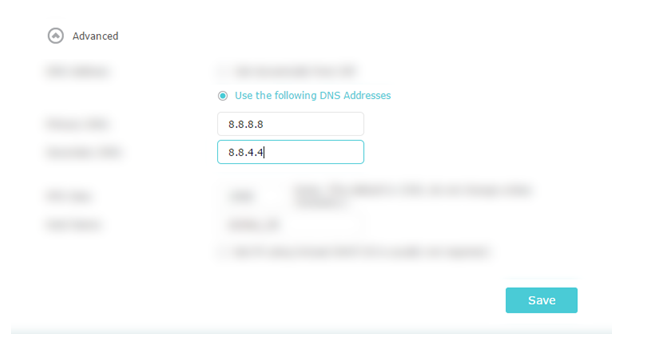
Please change DNS to Google DNS:

Additionally, have you set up parental controls and filtered out Telegram keywords? Please check the settings and remove profiles for comparison.


Welcome to Our Community! Get the latest posts: △New Firmware for Archer GE550/GE650 V1 Introduces AI-QoS, EasyMesh IoT Expansion, and More! △New Firmware Releases for Archer BE805 V1/BE450 V1 to Support VPN Merge, New ECO Mode, and More! More posts, please see: △ Get the Ongoing Pre-release Firmware for Wi-Fi Routers Here— Subscribe for Updates! Urgent problems with your Wi-Fi Router, Range Extender, or DSL Modem? Please reach out via private Messages or @Joesph-TP in your new thread directly. Click Or ☆Recommended Solution if the post/answer helps.
Recommended Solution
0
0
#2
1 Reply
Re:Router is blocking the connection from Telegram-Solution
2026-01-04 06:39:26 - last edited 2026-02-10 09:55:05

Hello@Murat_Karibay,

Welcome to our community.


May I know if your network topology diagram is as follows:

ISP modem—BE230)))((( client devices

(Note: — stands for wired connection,)))((( stands for wireless connection )


Could you try connecting the Telegram client device directly to the front-end modem to confirm whether you can access Telegram applications normally?

Please change DNS to Google DNS:

Additionally, have you set up parental controls and filtered out Telegram keywords? Please check the settings and remove profiles for comparison.


Welcome to Our Community! Get the latest posts: △New Firmware for Archer GE550/GE650 V1 Introduces AI-QoS, EasyMesh IoT Expansion, and More! △New Firmware Releases for Archer BE805 V1/BE450 V1 to Support VPN Merge, New ECO Mode, and More! More posts, please see: △ Get the Ongoing Pre-release Firmware for Wi-Fi Routers Here— Subscribe for Updates! Urgent problems with your Wi-Fi Router, Range Extender, or DSL Modem? Please reach out via private Messages or @Joesph-TP in your new thread directly. Click Or ☆Recommended Solution if the post/answer helps.
Recommended Solution
0
0
#2