
TP-Link Archer NX210 latest firmware

Hello, Just updated to the latest firmware this week what I noticed is the data usage counter keeps on resetting once the 5G router reboot......
- Copy Link
- Subscribe
- Bookmark
- Report Inappropriate Content


Hi, thanks for the update.
May I know your SIM ISP?
I'd like to follow up on your case via email and ask the senior engineer for further assistance.
Please check whether you've received my email.
Best regards.
- Copy Link
- Report Inappropriate Content
Hi, welcome to the community.
Do you refer to firmware 1.2.0 3.0.0 v60f3.0 Build 250804 Rel.60572n?
Is the "Data Usage" under Status page:
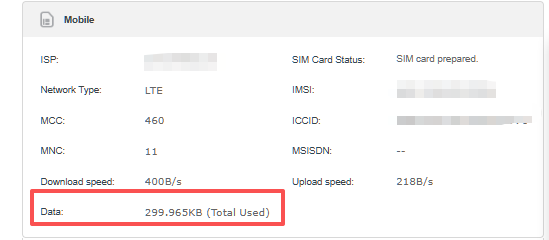
Would it reset as well under Advanced>Network>Data settings after reboot:
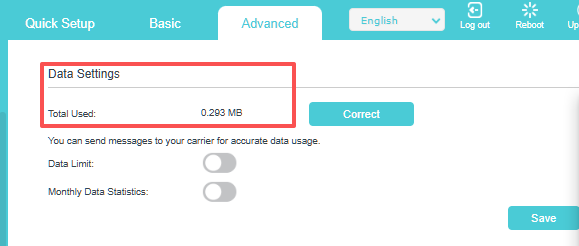
Can you consistently reproduce this issue?
Wait for your reply.
Best regards.
- Copy Link
- Report Inappropriate Content
@David-TP hello, Yes indeed reset itself I downloaded 500mb data logged into the modem webpage switched the modem off and back on total data usage is back to zero......
- Copy Link
- Report Inappropriate Content
Hi, thanks for the update.
May I know your SIM ISP?
I'd like to follow up on your case via email and ask the senior engineer for further assistance.
Please check whether you've received my email.
Best regards.
- Copy Link
- Report Inappropriate Content
Hello,
David, pass this onto your engineer.
TP-Link NX210 v2 UK model.
Firmware build 1.2.0 3.0.0 v60f3.0 Build 250804 Rel.60572n
The UK ISP I'm using is Three UK.
I did find the bug.
I factory reset four times; each time I factory reset, I did a speed test.
Once the speed test finished, I logged into the router webpage and noted down the total data usage (430 MB, 603 MB, 857 MB and 503 MB).
Once I turn the modem on and off.
I log back into the TP-Link webpage, and the total usage data is showing zero again nothing downloaded.
This time I downloaded bigger files over 5GB, - 15GB, rechecked the total data usage and turned the router off and on.
Total data usage is correct, showing the correct amount of total data used; it didn't reset itself back to zero...
I did this test twice and both times worked perfectly.
- Copy Link
- Report Inappropriate Content
Information
Helpful: 0
Views: 325
Replies: 4
Voters 0
No one has voted for it yet.