
Connecting laptop to entender

I've connected the extender to the router. When I try to connect my laptop to the extender (the network with "_EXT" at the end) I get an error message stating that the password is incorrect. I've tried the regular wifi password, the modem admin password and the password I set up for the Tether app - none of them work. And if I want the wifi signal to be stronger in my home office, I need to be connected to the extender, correct? THis is recent purchase for me and if it doesn't work, I need to return it.
- Copy Link
- Subscribe
- Bookmark
- Report Inappropriate Content


Hello @Tech_Frustrated ,
Welcome to our community.
Please try the following suggestions:
1. Check if your device can connect to your main router's Wi-Fi without any problems.
2. Make sure you are entering the correct wireless password for the extender.
3. Reboot both your device and the extender.
4. On your device, forget the extender's Wi-Fi network and try reconnecting to it.
- Copy Link
- Report Inappropriate Content

Hi,
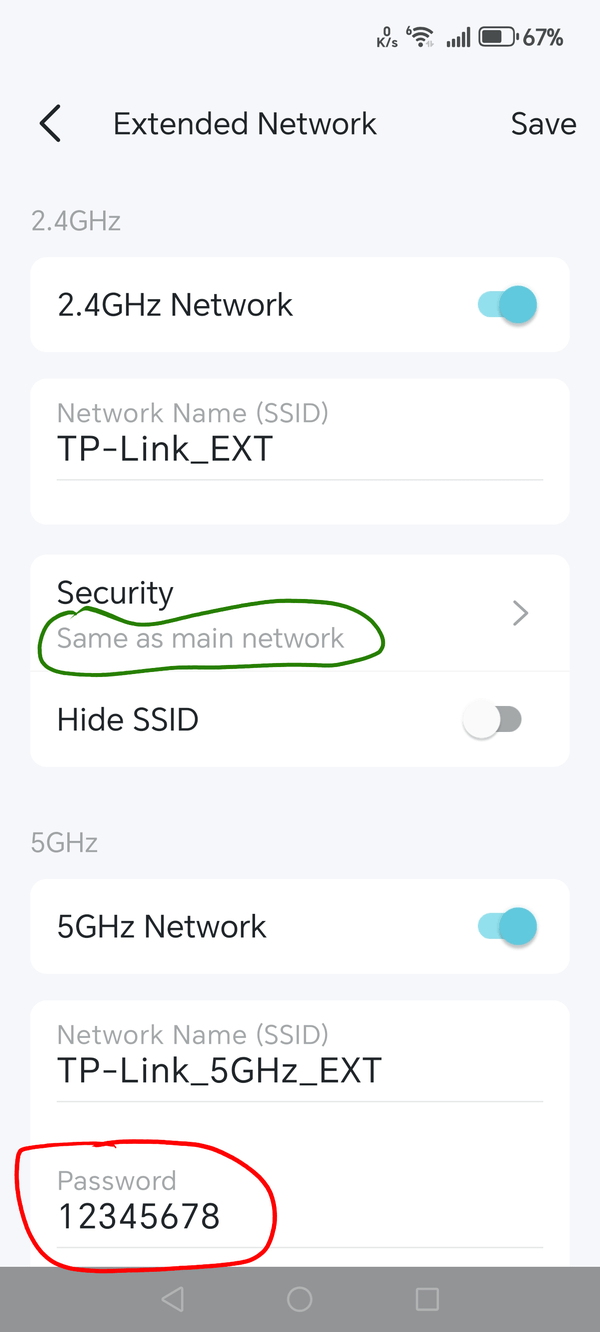
With your phone connected to the router to which the RE315 is connected to open the Tether app again, select the RE315 and then tap on the field "Extended Network".
There it will either say "Security -> Same as main network" (circled green in picture below) or, if not same as main network, it will show the Wi-Fi password there (circled red).
If you are not sure what the "Same as main network" Wi-Fi password is, then exit the menu "Extended Network" and tap on the field "Main Network" in the Tether app to see what the password is.
- Copy Link
- Report Inappropriate Content
I followed the steps you suggested and used the information in the field that you circled in red as the password to connect my laptop but still received the error message that it couldn't connect.
- Copy Link
- Report Inappropriate Content
Hello @Tech_Frustrated ,
Welcome to our community.
Please try the following suggestions:
1. Check if your device can connect to your main router's Wi-Fi without any problems.
2. Make sure you are entering the correct wireless password for the extender.
3. Reboot both your device and the extender.
4. On your device, forget the extender's Wi-Fi network and try reconnecting to it.
- Copy Link
- Report Inappropriate Content
Information
Helpful: 0
Views: 358
Replies: 3
Voters 0
No one has voted for it yet.