
BE800 ist not connecting, not to the internet and i cant reach the webinterface
BE800 ist not connecting, not to the internet and i cant reach the webinterface

Hi there,
i want to use the BE800 as a mesh sattelite with an GE800 as the main router. At first start, i could connect it as a mesh sattelite as usual, just bi starting ist up and searching fo it in the tether app. Then i changed the position to another one with ethernet backhaul. it worked. Then it connected it back to my computer to see if i can configure the leds. but this is only possible for the GE800. Internet working. Then i put it back at the place before with the ethenet backhaul. The connection to the internet was not possible anymore. I resettet it several times, but now the tether app doesnt find it anymore while starting up. It only shows this leds from the manual: "pulsing leds. The router is starting up or beeing reset." i did this a lot of time: https://www.tp-link.com/us/support/faq/497/
is my router broken? Can you help me?
- Copy Link
- Subscribe
- Bookmark
- Report Inappropriate Content


Hi @Matthias_Q & @xg4ll ,
We are delighted to announce the pre-release firmware for the Archer BE800 V1! This update has introduced new advanced features.
It is recommended that you try this firmware and take advantage of the new features.
New Firmware for Archer BE800 V1 to Support VPN Merge,Guest/IoT Network Extend in EasyMesh, and More
Any feedback and suggestions are welcome~
- Copy Link
- Report Inappropriate Content

Ok so let me understand your topology.
GE800 MAIN > BE800 MESH via Ethernet?
Are you sure if you have plugged into the correct LAN port from the GE800 to the BE800 and not plugged into the WAN port of the BE800?
I have a GE550 plugged in from my BE805 < main and it has been working so far. Or you could turn off your main router and on again and reconnect the LAN cable? Or have you properly factory reset the BE800? Let me know.
Matthias_Q wrote
Hi there,
i want to use the BE800 as a mesh sattelite with an GE800 as the main router. At first start, i could connect it as a mesh sattelite as usual, just bi starting ist up and searching fo it in the tether app. Then i changed the position to another one with ethernet backhaul. it worked. Then it connected it back to my computer to see if i can configure the leds. but this is only possible for the GE800. Internet working. Then i put it back at the place before with the ethenet backhaul. The connection to the internet was not possible anymore. I resettet it several times, but now the tether app doesnt find it anymore while starting up. It only shows this leds from the manual: "pulsing leds. The router is starting up or beeing reset." i did this a lot of time: https://www.tp-link.com/us/support/faq/497/
- Copy Link
- Report Inappropriate Content
I tried different topolgies right now. First one was, and that worked: Connected Lan- Port from main router GE800 to WAN-Port from BE800, working as as a sattelite in a easy mesh. Therefore i started the BE80 without any Lan Cables and used the tether app to automatically configure for my existing mesh. The i changed the place and connected LAN (GE800) to WAN (BE800), so the BE800 got ethernet backhaul --> it worked. But i couldnt coonfigure the LEDs on the BE800 (what is not supported, ifound out). For trying, i connected my PCs LAN to BE800 LAN and tried to get to the webinterface of the correctly configured BE800 to change LEDs. But this didnt work, because the BE800 connected with WLAN backhaul to my GE800 and connetected my PC to the internet (because it was coinnected to the LAN-Port of the BE800). So i realised i can't connect to the webinterface of a sattelite sionce the moment he was automatically condigured. Then i wanted to get it back to the place with LAN-backhaul. But it couldn't get internet connection anymore. Not with LAN not with WLAN. I tried to reset ist by pushing the reset button at thr rear of the BE800, but it can't get the automatically configuration with tether app. My Router doesnt see it's MAC-adress, wether its connect from LAN(GE800) to WAN(BE800) or to LAN(BE800). When it startes up after a reset, just the " ! " signe comes up up after some time. No standard WLAN is emitted from the BE800, what should be alwas the case after reset and start.
- Copy Link
- Report Inappropriate Content
Do you see anything in the EasyMesh of the GE800 web or tether app? For example when it is connected via LAN for both locations? Have you tried changing the ethernet cable? I need time to understand this entire thing so I won't give you wrong information/solutions.
As of now, you could try this
- You could try to turn EasyMesh of the GE800 off and on again and plug the BE800 via LAN again but this time don't open the tether app or the WEB UI and see if anything happens on the BE800. If nothing happens after a few minutes then you access the WEB UI of the GE800 to see the Ethernet Status if it says anything
- Or you try plugging the LAN of the GE800 from one of its 2.5G LAN port instead of the 10G LAN port to see if the other ports work
- Are you using a LAN port? Or is the cable running along the walls. You can experiment using different LAN cables if possible and see if it works.
Do let me know.
Example :
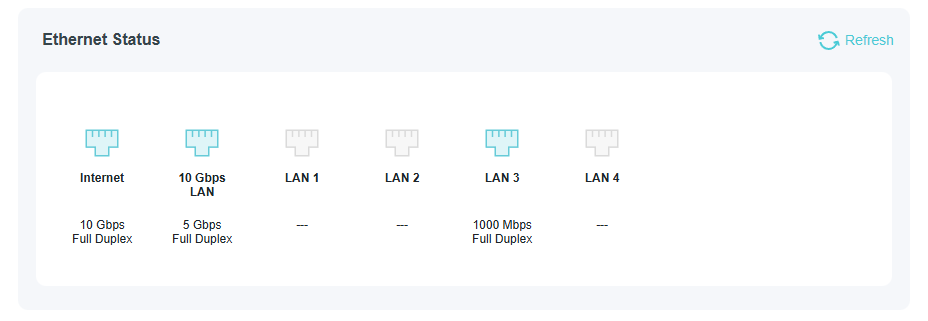
- Copy Link
- Report Inappropriate Content
i see all 4 others routers in the tether app (parts of my easy mesh):
C88, BE230, BE450 and AX18.
But i dont see anything of the BE800 even not if i connect it to my router/modem combination. I tried different cables. Even when i connect no LAN-Cable, only the power supply, resett the BE800 and restart it, its not emittiing its standard WLAN SSID. I tried directly connect my PC to the BE800 with different cable at all LAN-Ports but i never get a connection
- Copy Link
- Report Inappropriate Content
Those other routers are connected via wireless or wired? Just curious how big is your house that you require 4 now 5 routers? Just wondering.
You mentioned that you connected the BE800 from your router/modem combo unit but nothing happens still and you weren't able to get the BE800 to work as a main router?
- This sounds crazy but you could try and set the BE800 up as the main router again so removing the GE800 as the main router. And if possible remove the other EasyMesh routers and add back each one by one. Also turn your modem off but keeping the LAN cable plugged in and turning it on again.
Able to screenshot your EasyMesh topology + the Ethernet Status?
I hope this is not a hardware issue with your BE800 though but can't say for sure unless there is too many EasyMesh devices but that can't be the issue.
- Copy Link
- Report Inappropriate Content
House has 300qm plus garden, garage and cellar. I cant remove the ge800 as the main router easily, because a lot of other people will not be able to use the internet. But i connected the BE800 to my moden/router) not GE800 and i still se any mac adress of it, independet from the tether app or the GE800. So i think its a hardwar3e problem. I mean, when you start the resettetd BE800 only with power supply, it should at least emitt its standard wlan as any other router does. And this is not working also.
- Copy Link
- Report Inappropriate Content
Wait you mentioned that other people are using the GE800 for WiFi access so how many WAN ports are there on your modem? But the BE800 should be able to pick up any one of the WAN signal from your modem though . . . I was thinking you could disconnect the GE800 and set up the BE800 but like you mention, other people are using the GE800.
As for now, maybe try setting the BE800 as wireless using WPS?
Maybe a more experienced TP-Link support can comment on this too but in the meantime, you can reach out to the TP-Link support email about this as I can't think of much else. If there is any other ideas, I will update.
- Copy Link
- Report Inappropriate Content
my problem is, i cant set anything on the BE800. Its not emitting its standard wlan and if i just connect my pc to it (no other WLAN or LAN connecting running on my PC), i cant reach the webinterface or i cant even ping it. So i think its broke. it doenst work, independent from the GE800 easy mesh.
- Copy Link
- Report Inappropriate Content
So I googled that maximum devices is 10 nodes including main + satellites but best to use 3 to 4 nodes for stability.
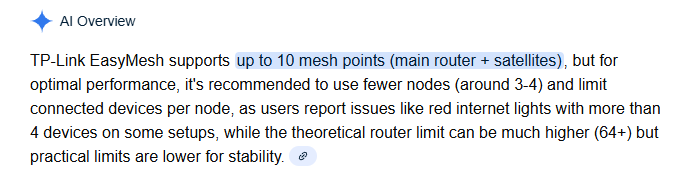
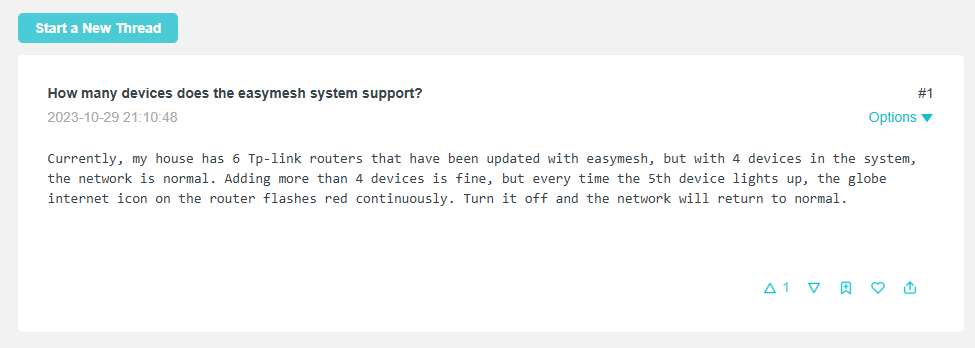
There's another tplink post made about 3 years ago where a user has 4 devices then adding more causes stability issue and you have quite a few nodes.
- So instead of disabling the GE800. Try to disconnect some of the other EasyMesh routers where people are not using it that much and add the BE800 from there and see if anything happens. Maybe the BE800 is confused when you shifted it back and forth.
Are those connected wirelessly or wired? I need to know this.
- Copy Link
- Report Inappropriate Content
4 routers are connected wired and one wireless.
But forget about my existing mesh. Even if i take the BE800 to another place, reset it, plug it to the pwoer, it is not emitting its standard wlan or is reachable by a PC plugged by LAN independent fgrom the LAN port. So its broken i think.
Thanks for your time and your help!
- Copy Link
- Report Inappropriate Content
Information
Helpful: 0
Views: 1554
Replies: 17
Voters 0
No one has voted for it yet.