XE75Pro - slowness and device connection issues

XE75Pro - slowness and device connection issues

XE75Pro - slowness and device connection issues
2 weeks ago
Model: Deco XE75 Pro  
Hardware Version:
Firmware Version: 1.4.5 build 20241129 real. 47521

I have 5 XE75 Pro units placed throughout my 2600SF 2 store home.  I am having 2 consistent issues.


1. Periodic slowness and buffering when web browsing or streaming.  When I check my ISP speed and latency when the issues occur, speed and latency are both OK.  9ms latency and speeds of 900MBS or better.  I have optimized regularly, but issues still occur.


2. Some of my devices refuse to stay connected.  To reconnect I must unplug the router and all deco nodes, wait, then re-plug in each.  A reboot will not solve the problem. I have to do this weekly to keep all of the connections going.  One of the devices is older and requires 2.4 Ghz, but the others are newer model HP printers.  I have changed any settings that seem to make sense, but I can't get to the bottom of it, and I am getting frustrated.


Any suggested fixes on both or either issue?


TIA


  1      
  1      
#1
Options
2 Reply
Re:XE75Pro - slowness and device connection issues
2 weeks ago

  @Joe4691 

Hi, welcome to the community.

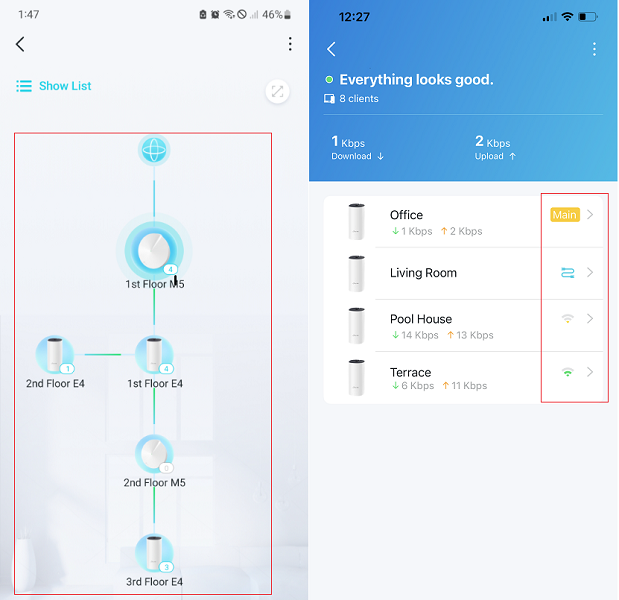
Can I have some screenshots of the network maps on the Deco App, such as:

I've left a message with a beta firmware for Deco XE75 Pro_V1_1.4.5 build 20241129 real. 47521. Could you please help me test whether it helps?

Wait for your reply.

Best regards.


  0  
  0  
#2
Options
Re:XE75Pro - slowness and device connection issues
2 weeks ago

  @Joe4691 Hello, I would like to know which version of Deco you have, I have 3 versions 3 and inn Deco with version 2 and I have problems with YouTube shorts. I hope they manage to fix this type of problem because the deco xe75 pro are widely used and the people who buy them are not allowed to enter the tp-link forums and ask for help. 


I have highly recommended the DECO xe75 pro but after the last update it has given many problems and there is no solution. 

  0  
  0  
#3
Options