Check out the features (specification) of DECO M5

Check out the features (specification) of DECO M5

Check out the features (specification) of DECO M5
3 weeks ago - last edited 3 weeks ago
Tags: #IPv6
Model: Deco M5  
Hardware Version: V2
Firmware Version: 1.9.1 Build 20250909 Rel.37570

Hello,


I'm currently using the following configuration: ONU → DECO M5 (router mode) → Rakuten Casa 6.

(M5 V2、Firmware:1.9.1 Build 20250909 Rel.37570)


I've learned that in order to effectively use the  Rakuten Casa 6 product (*),
1) the VPN (IPSec IKE) pass-through function is required.
2) The IPv6 bridge function must be enabled.

I'd like to check the DECO M5 settings, but I don't know how.

I couldn't clearly understand whether these two conditions are met even from the product manual.


( * I'm trying to use Casa to access LTE outside of Rakuten Mobile's coverage area.)


When I look at the IPv4 settings in the DECO app,

- Internet connection type: DS-Lite
- Automatic acquisition of AFTR name: ON

When I look at the IPv6 settings,

- IPv6 on/off: ON
- Internet connection type: Dynamic IP
- Obtain IPv6 address: Automatic
- Prefix delegation (PD): OFF
- DNS address: Automatic
- Allocation type: ND Proxy


I would appreciate your help.

Thank you.


Nyas

  2      
  2      
#1
Options
1 Accepted Solution
Re:Check out the features (specification) of DECO M5-Solution
3 weeks ago - last edited 3 weeks ago

  @nyas 

Hi, welcome to the community.

VPN (IPSec IKE) pass-through function is enabled by default, and it doesn't need extra configuration.

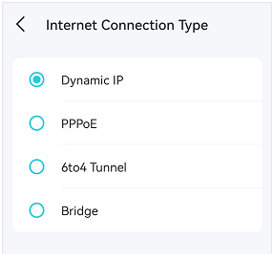
The "Bridge mode" on Deco App could be found under "Internet Connection" Type:

Best regards.


Recommended Solution
  1  
  1  
#2
Options
1 Reply
Re:Check out the features (specification) of DECO M5-Solution
3 weeks ago - last edited 3 weeks ago

  @nyas 

Hi, welcome to the community.

VPN (IPSec IKE) pass-through function is enabled by default, and it doesn't need extra configuration.

The "Bridge mode" on Deco App could be found under "Internet Connection" Type:

Best regards.


Recommended Solution
  1  
  1  
#2
Options