
How to Enable Per-Device DNS Client Metadata or Daemon Access on TP-Link MR600 v3 for Control D?

I want to see per-client DNS analytics (like hostnames and MAC addresses) from my TP-Link MR600 v3 in my Control D dashboard. I’ve read this usually requires running a DNS daemon (like ctrld) on the router via SSH, but I’m not sure if, or how, this can be done on the MR600 v3.
Is there a way to enable SSH or terminal access, or install a third-party DNS helper/daemon on this router? Are there any native options or firmware upgrades that would allow sending client-level DNS metadata to an external DNS service?
Any step-by-step guidance or clarification would be really appreciated!
- Copy Link
- Subscribe
- Bookmark
- Report Inappropriate Content


Hi, thank you very much for the update.
I'm afraid most of our home-use routers are not capable of installing the third-party DNS helper/daemon.
The advanced DHCP/DNS settings are quite similar to those settings on the Archer MR600 V3. Certain standard Wireless routers support extra DOH/DOT features.
As for " forcing to use IPv6 only without a problem connecting to IPv4",
Archer NX200(EU) 1.0, the 5G NR router, has added 464XLAT, which creates a virtual IPv4 stack on your device to support apps that require IPv4, while sending everything over an IPv6-only connection.
I think you can make a wish list of the wanted features and post it in our business forum, and my colleague could help you check whether there is any appropriate recommendation: https://community.tp-link.com/en/business
Best regards.
- Copy Link
- Report Inappropriate Content
Hi, thank you very much for the feedback.
I'm afraid Archer MR600 doesn't support SSH access or installing a third-party DNS helper/daemon.
You can try to set the Control D DNS as the local DHCP server here to see whether it helps:
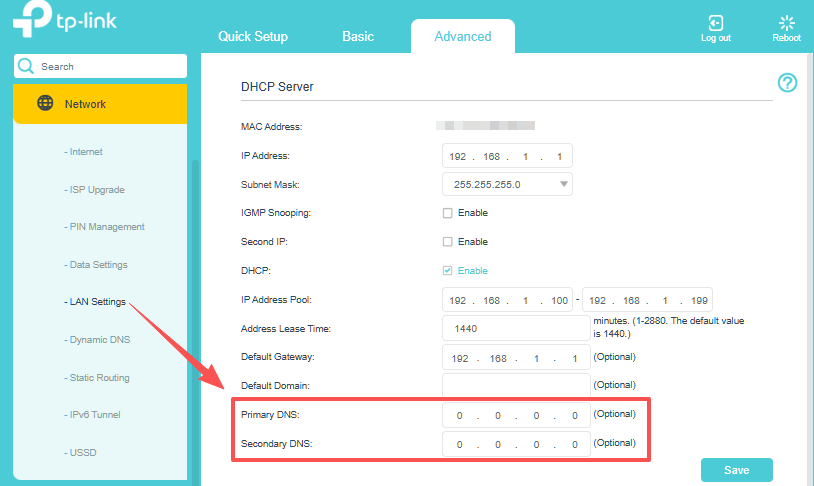
Best regards.
- Copy Link
- Report Inappropriate Content
@David-TP Hey David, appreciate your response. I am already using Control D on my router my only concern is that I am able to see my modem clients by executing this to my router?:
| (Invoke-WebRequest -Uri 'https//..api.controld...com/dl/ps1' -UseBasicParsing).Content | Set-Content "$env:TEMPctrld_install.ps1"; Invoke-Expression "& '$env:TEMPctrld_install.ps1' 'RESOLVER_ID_HERE' 'forced'" |
but as you mention that MR600 doesn't support SSH access or installing a third-party DNS helper/daemon. meaning that there is no other workaround?
- Copy Link
- Report Inappropriate Content
Hi, thanks for the update.
Archer MR600 can't execute these "Invoke-WebRequest" scripts.
I have seen users run the ctrld daemon on a separate, always-on device (e.g., Raspberry Pi, home server, or old laptop) and point it as the local DNS server on the Archer 4G routers for per-client DNS analytics.
Best regards.
- Copy Link
- Report Inappropriate Content
@David-TP I see, what router would you recommend for me to be able use this kind of features and have more control and have advance features and so on such as forcing to use IPv6 only (Starlink) without a problem connecting to IPv4, I saw someone doing this on a different brand of router but lack of support unlike TP-link 
(This is only use for home network)
- Copy Link
- Report Inappropriate Content
Hi, thank you very much for the update.
I'm afraid most of our home-use routers are not capable of installing the third-party DNS helper/daemon.
The advanced DHCP/DNS settings are quite similar to those settings on the Archer MR600 V3. Certain standard Wireless routers support extra DOH/DOT features.
As for " forcing to use IPv6 only without a problem connecting to IPv4",
Archer NX200(EU) 1.0, the 5G NR router, has added 464XLAT, which creates a virtual IPv4 stack on your device to support apps that require IPv4, while sending everything over an IPv6-only connection.
I think you can make a wish list of the wanted features and post it in our business forum, and my colleague could help you check whether there is any appropriate recommendation: https://community.tp-link.com/en/business
Best regards.
- Copy Link
- Report Inappropriate Content
Information
Helpful: 0
Views: 537
Replies: 5
Voters 0
No one has voted for it yet.