
[Bug Report] QoS speed limit High Priority toggle doesn't work

[Bug Report] QoS speed limit High Priority toggle doesn't work

[Bug Report] QoS speed limit High Priority toggle doesn't work
[Bug Report] QoS speed limit High Priority toggle doesn't work
Yesterday - last edited 2 hours ago
Model: Archer BE3600  
Hardware Version: V1
Firmware Version: 1.2.1 Build 20250804 rel.79639(4555)

I noticed multiple bugs when trying to configure my TP-LINK router.


I have a 2Gbps ISP, I've set up QoS to allow 1Gbps/1Gbps and enabled High Priority (which according to the description should remove the speed limit) for my main computer.

  • Expectation:
  • My main computer should be able to get >1Gbps speed
  • Reality:
  • My main computer is still restricted to 1Gbps/1Gbps

additional context: When I turn off QoS altogether, I'm able to reach more than 1.5Gbps so the issue isn't my internet being slow.

  30      
  30      
#1
Options
1 Accepted Solution
Re:[Bug Report] QoS speed limit High Priority toggle doesn't work-Solution
18 hours ago - last edited 2 hours ago

  @caupatoakosamas 


I see. Thanks for the screenshot.


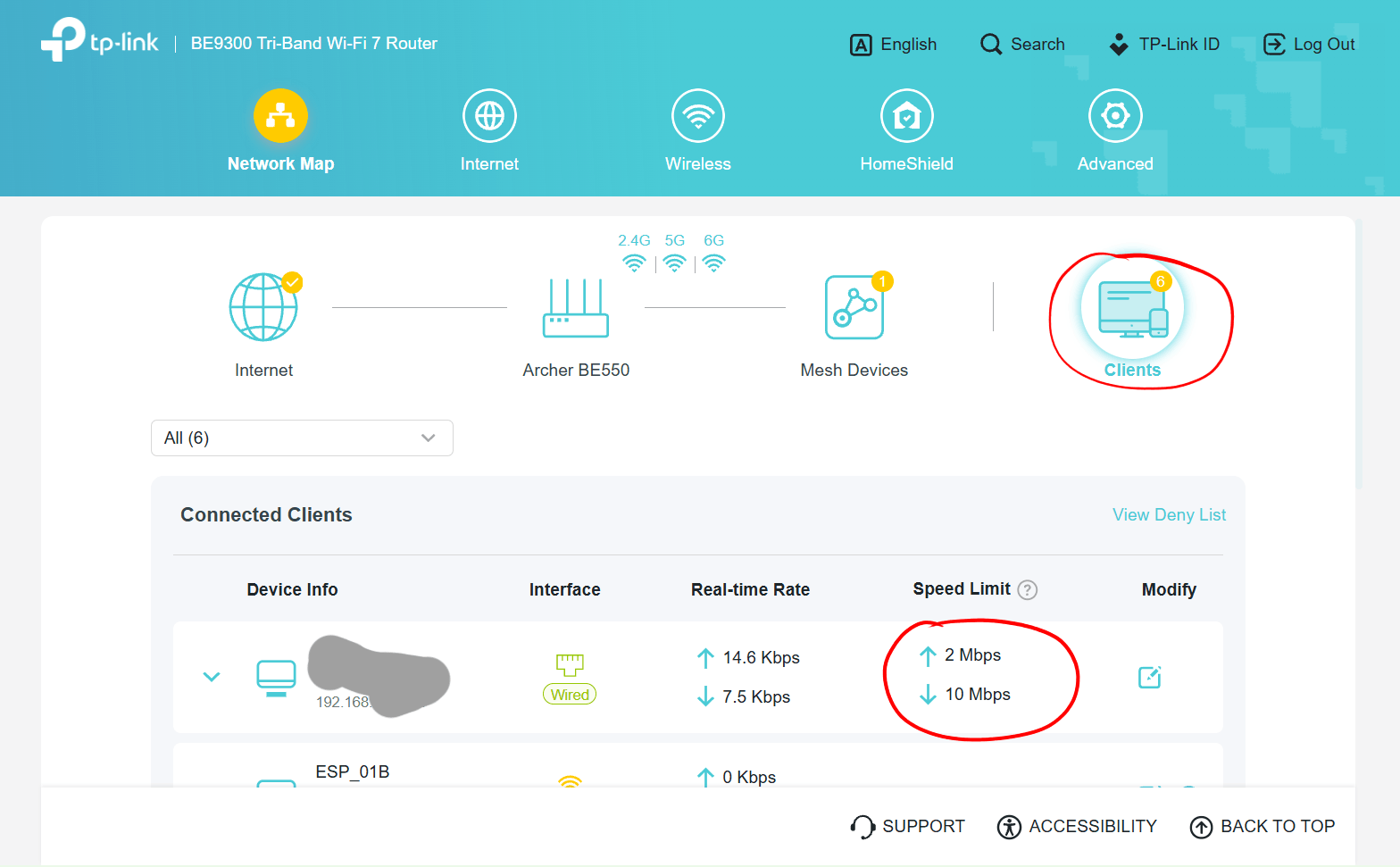
That message is referring to the actual "Speed Limit" feature. If speed limits were set, like shown in the screenshot below, then enabling QoS High Priority removes the speed limits for the device.


Recommended Solution
  1  
  1  
#5
Options
5 Reply
Re:[Bug Report] QoS speed limit High Priority toggle doesn't work
Yesterday

  @caupatoakosamas 


Hi,


In the "Download Bandwidth" and "Upload Bandwidth" fields of the QoS feature you are supposed to input the maximum upload and download bandwidth provided by your Internet service provider, so that QoS knows how much bandwidth is available for it to be shared between client devices.


Where exactly do you see a description that states enabling "High Priority" removes a speed limit?


By the way, if you want to limit the maximum speeds for certain client devices you can do so via the "Network Map" -> "Clients" menu of the web GUI..

  1  
  1  
#2
Options
Re:[Bug Report] QoS speed limit High Priority toggle doesn't work
19 hours ago

  @woozle When you toggle the "High Priority" toggle, this appears:

  0  
  0  
#3
Options
Re:[Bug Report] QoS speed limit High Priority toggle doesn't work
19 hours ago

  @caupatoakosamas for some reason I saw the screenshot when I pasted it but I can't see it now, here's an imgur link

https://i.imgur.com/b9LO1ez.png

  0  
  0  
#4
Options
Re:[Bug Report] QoS speed limit High Priority toggle doesn't work-Solution
18 hours ago - last edited 2 hours ago

  @caupatoakosamas 


I see. Thanks for the screenshot.


That message is referring to the actual "Speed Limit" feature. If speed limits were set, like shown in the screenshot below, then enabling QoS High Priority removes the speed limits for the device.


Recommended Solution
  1  
  1  
#5
Options
Re:[Bug Report] QoS speed limit High Priority toggle doesn't work
2 hours ago

  @woozle I see, I think I've just misunderstood the feature then. Thank you.

  0  
  0  
#6
Options