
TP-Link AX10 V2.8 IN Connection drop or not internet issue when playing online multiplayer games

When I playing multiplayer games like BGMI or any other more Than 40 minutes the connection drop or it stop working I have to manually disconnect and reconnect wifi to play but this again appears in 5 to 20 minutes, even I have enabled ax mode and Airtime fairness but no solution. Router I have TP-Link Archer AX10 V2.8IN
- Copy Link
- Subscribe
- Bookmark
- Report Inappropriate Content


Hello @Boihh ,
For the TLWR840N, some changes in the new firmware may be incompatible with your network, causing the device to freeze. If the network recovers after downgrading, it is recommended that you continue to keep the original firmware version.
For online games, please enable UPnP on the router: How to make Xbox online games run smoothly by UPnP (new logo)
Alternatively, you can try modifying the wireless settings and comparing them with other different networks.
- Copy Link
- Report Inappropriate Content
Hello @Boihh ,
Welcome to our community.
Here are some steps you can follow to troubleshoot and improve your connection stability:
1. Update Firmware:
• Log in to your router's web interface (http://tplinkwifi.net).
• Go to Advanced > System > Firmware Update and ensure your router's firmware is up to date.
2. Check WAN (Internet) Stability:
• Connect a PC directly to your modem (bypassing the router) to see if your ISP connection is stable.
• Make sure the Ethernet cable between your modem and router is secure and not damaged. Try replacing it with a new cable if possible.
• Change the DNS servers on your router by going to Advanced > Network > Internet > Advanced Settings and set the DNS servers to 1.1.1.1 and 8.8.8.8.
3. Improve Wireless Stability:
• Place your router in an open area, away from cabinets or shelves, to reduce interference.
• In the web interface, go to Advanced > Wireless > Wireless Settings and try different Wi-Fi channels to avoid interference from nearby networks.
• For 2.4GHz devices, set the channel width to 20MHz. For 5GHz devices, set the channel width to 80MHz or 40MHz.
• Make sure your gaming device is not included in any Parental Control profiles.
• Ensure the network adapter drivers and system software on your gaming device are up to date.
If the problem continues after trying these steps, please contact TP-Link support and provide details about the troubleshooting steps you've already performed.
- Copy Link
- Report Inappropriate Content
@Joseph-TP My old router TP-Link TL-WR840N v6.20 works perfectly with old firmware (180614). But when I update it to the latest firmware (241230), the router hangs all the time and becomes unusable. After downgrading, it works fine again. So I believe the issue is with the firmware.
Also, when I set up new Tplink archer AX10 v2.8IN router with firmware 1.3.12 Build 20250828 Rel.26873, the setup process stops halfway and I have to refresh the browser to continue. This also looks like an incomplete or poorly optimized firmware issue.
I have already tried all troubleshooting steps you mentioned, but there is no improvement. Please check and provide a stable/optimized firmware solution for these models.
Even I searched entire internet but there is not firmware for this model Tplink archer AX10 v2.8IN.
- Copy Link
- Report Inappropriate Content
Hello @Boihh ,
Thanks for getting back to us.
On the AX10, please enable the guest network for comparison.
Because firmware may differ between regions, we recommend contacting Local Support for a faster and more targeted response.
- Copy Link
- Report Inappropriate Content
@Joseph-TP There is Firmware bugs and not properly optimization for ax10 v2.8in please release stable and fix bugs even when I see in wifi analyzer other wifi getting there name but ax 10 just blank and if I do changes through Link application in ax 10 it only shows in application but in web ui there is no change made like easy mesh or mixed mode to prefered mode n and ax or wifi band. This thing clearly shows firmware issue. Even other nearby wifi support 802.11 n,k,v but my only support n,v not k standard.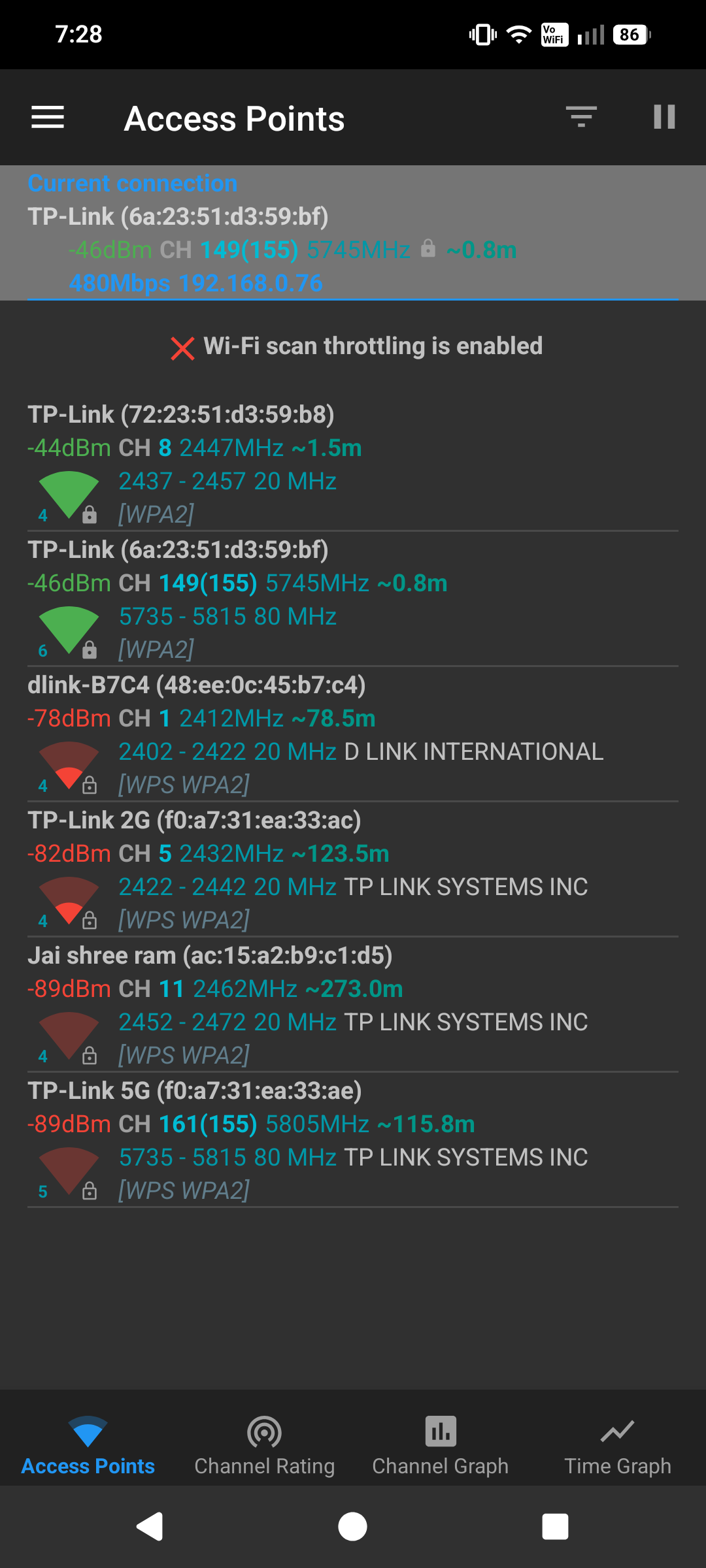
- Copy Link
- Report Inappropriate Content
Hello @Boihh ,
It seems that you have established an EasyMesh network?
May I know the whole network topology? For example,
ISP modem—main router—satellite router AX10)))((( client devices
(Note: — stands for wired connection,)))((( stands for wireless connection )
Temporarily remove the TL-WR840N and test whether the AX10 settings sync with the web interface.
- Copy Link
- Report Inappropriate Content
@Joseph-TP There is not any modem involved isp provide me pppoe connection direct through switch and i was using tplink ax10 in one house and tl wr840n In other house but I was having different issues on both router but solution is I found just downgrade to 2018 first release firmware on tlwr840n this can fixed all it's issue regarding performance but on ax10 nothing work even when i downgrade it one issue fixes but other arrived. The conclusion is firmware is not optimised for both of routers.
- Copy Link
- Report Inappropriate Content
Hello @Boihh ,
For the TLWR840N, some changes in the new firmware may be incompatible with your network, causing the device to freeze. If the network recovers after downgrading, it is recommended that you continue to keep the original firmware version.
For online games, please enable UPnP on the router: How to make Xbox online games run smoothly by UPnP (new logo)
Alternatively, you can try modifying the wireless settings and comparing them with other different networks.
- Copy Link
- Report Inappropriate Content
Information
Helpful: 2
Views: 438
Replies: 7
Voters 0
No one has voted for it yet.