
Starlink in bridge mode: fast upload, 0.7mbps download. duplex mode issue (possibly) on tp-link

I've put my Starlink (gen 3 with gen 3 router) in bridge mode and connected it to the WAN of a TP-Link router (EX-141/EX-220/Ax1800). I can connect to the internet, but download is really slow (0.7mbps) while upload is high (30mbps).
AI told me this is a duplex problem, when the WAN port speed is misidentified. Indeed, it shows up as 100mbps only:
LAN1 - Disconnected
LAN2 - 1000mbps
LAN3 - Disconnected
WAN - 100mbps
I already tried: another brand new router, another brand new cable, and connecting to the second starlink LAN port. All give the same behavior: either fast download, or fast upload, but not both.
Is this a common problem? What can I do?
TP-Link is in router mode, but I also tried AP mode, etc. I have an IPv4 and also tried with IPV6. I resetted the router multiple times, did a brand new configuration, etc.
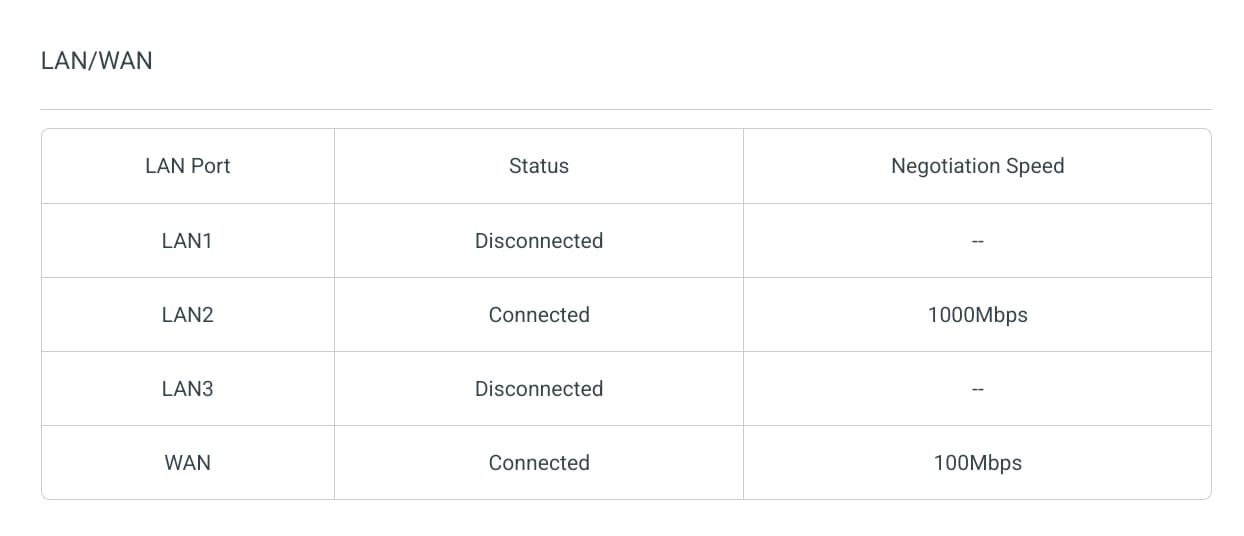 image widget

