
GE550 VLAN ID PPPOE problem

Hello, I agreed with a new internet service provider. The internet service provider I deal with does not use VLAN ID. After entering the wan username and password on the device, I need to leave the VLAN ID box blank. However, on the GE550, the VLAN ID box cannot be left blank and I must enter a value. For this reason, I cannot make a PPPOE internet connection with GE550. I had to reuse the old Asus GT-AX6000 router. Since Asus VLAN ID can be left blank, I do not have any problems. Please find a solution to this problem on the GE550 with a software update. Regards.
- Copy Link
- Subscribe
- Bookmark
- Report Inappropriate Content

Ok, it sounds like you were going through the Quick Setup, right?
If your ISP does not require VLAN ID, then you should not select any VLAN ISP Profile. Just leave it at "None", which is the default setting and means Internet VLAN ID is not used.
- Copy Link
- Report Inappropriate Content
The internet service provider I deal with does not use VLAN ID.
Hi,
On a TP-Link router, if you don't require the VLAN ID, then you need to turn this feature off (i.e. untick the tick box).
- Copy Link
- Report Inappropriate Content
Hello, there is no box selection to turn off the internet vlan id. I solved the problem like this: I selected "bridge" in the connection configuration. It only connected when I entered the wan username and password. When we select the "private" option at the connection stage, it asks us to enter a number for the internet vlan id and cannot make the pppoe connection.
- Copy Link
- Report Inappropriate Content
Ok, it sounds like you were going through the Quick Setup, right?
If your ISP does not require VLAN ID, then you should not select any VLAN ISP Profile. Just leave it at "None", which is the default setting and means Internet VLAN ID is not used.
- Copy Link
- Report Inappropriate Content


Hello @nazmiuyar ,
In addition to Quick Setup, you can also go directly to the Advanced page to configure the network.
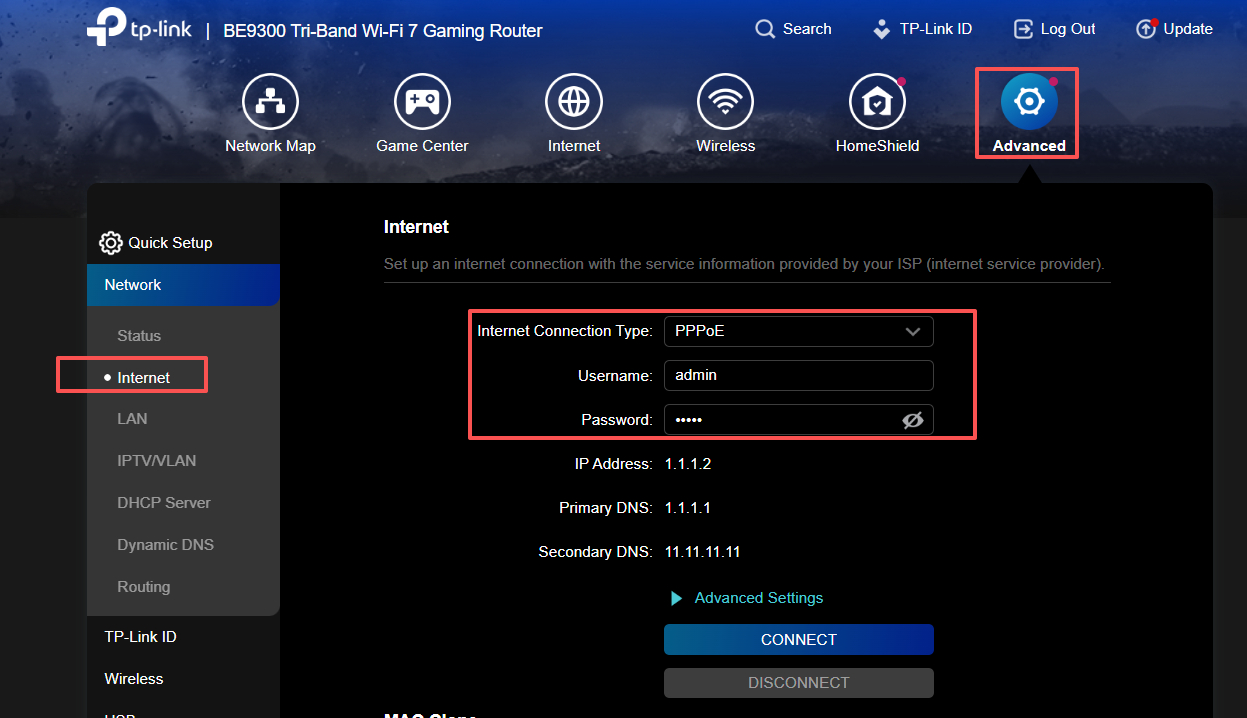
- Copy Link
- Report Inappropriate Content
Information
Helpful: 0
Views: 694
Replies: 4
Voters 0
No one has voted for it yet.