WireGuard option missing in VPN Client settings on Deco BE65-5G

Hi everyone,
I recently set up my Deco BE65-5G in the UK. I am trying to configure NordVPN using WireGuard as a VPN Client, but I am facing an issue where the WireGuard option is completely missing from the menu.
What I have tried:
-
Firmware Update: I have already updated to the latest firmware.
-
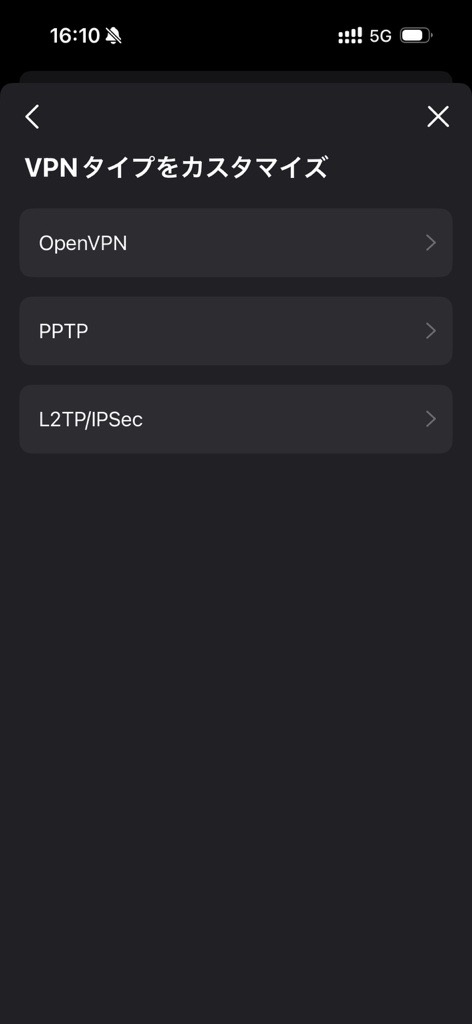
Deco App: In "Advanced" > "VPN Client" > "Add VPN Server" > "Custom", only OpenVPN, PPTP, and L2TP/IPSec are listed. There is no "WireGuard" option.
-
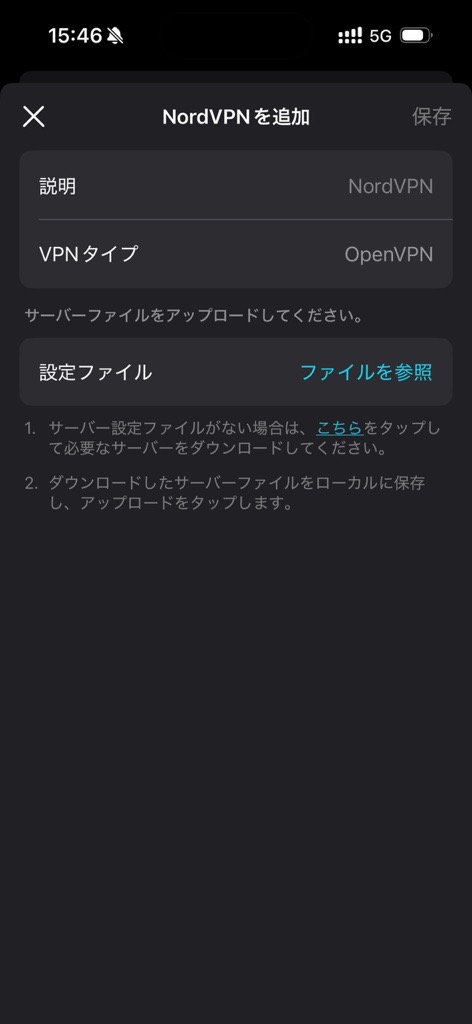
NordVPN Token: I tried using the NordVPN access token method, but it only showed OpenVPN as the default type and cannot be changed manually.
-
Web Interface: I logged into the web management page (192.168.68.1), but the VPN Client setting option is absent.
BE65-5G should support WireGuard VPN Client. Is this a known issue with the UK firmware, or is there a specific setting I need to enable to see the WireGuard option?
Any advice would be greatly appreciated. Thank you!
<Screenshots>
1. - OpenVPN is selected by default and it prompts to upload config files - this should be unnecessary if VPN Type is WireGuard
2. In Custom settings, there is no WireGuard option.