
Archer Adapter Bluetooth driver failing to install

Issue:
Unable to install bluetooth driver getting Error message "Unable to find you adapter"
Details
Device - Archer TXE72E
Version - Suspect V2 due to UN/2.0 printed on device
Progress
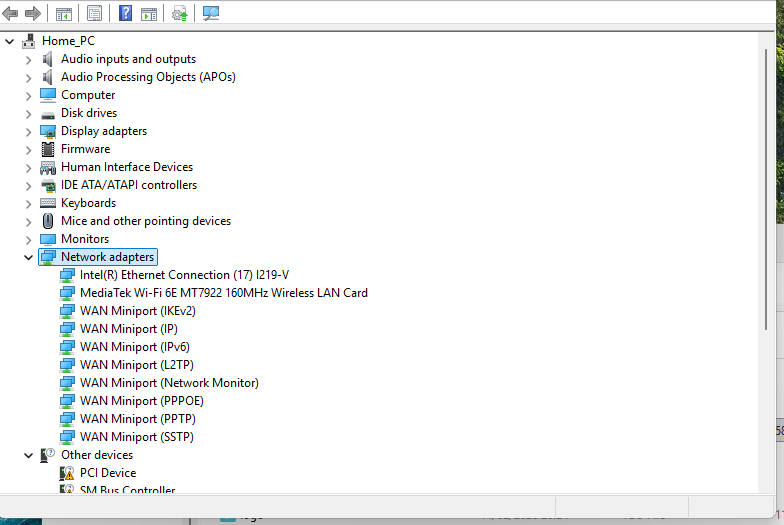
I've successfully installed the wifi driver from the V2, W11X64 install.
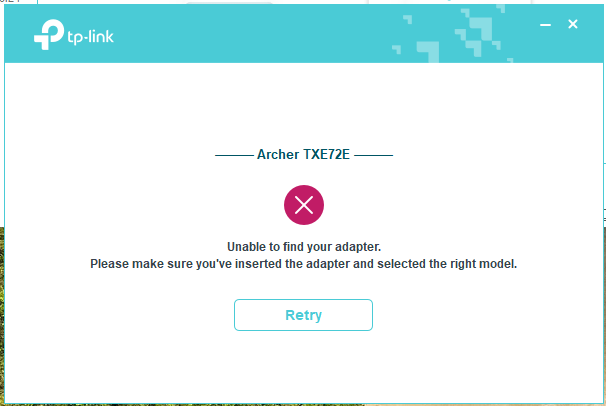
Device manager at point of error
- Copy Link
- Subscribe
- Bookmark
- Report Inappropriate Content

The USB connectors don't need to be specifically labelled "F_USB". Any 9-pin USB motherboard connector will do, like the blue ones visible in the picture below.
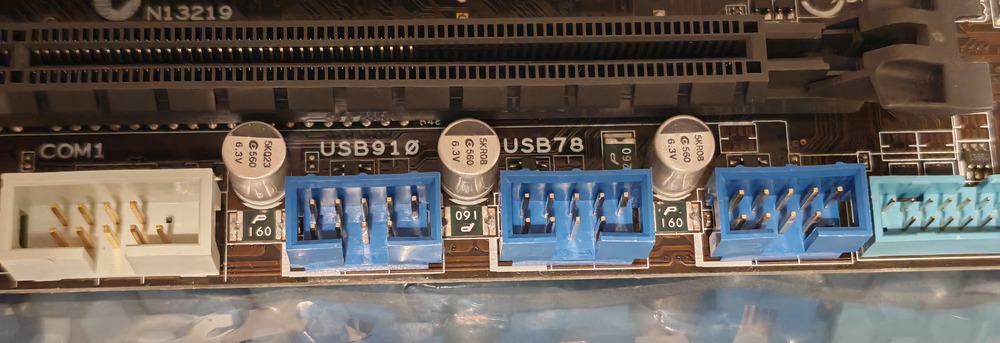
Some motherboards allow the on-board USB connectors to be enabled or disabled in the BIOS setup. Perhaps verify they are indeed all enabled.
- Copy Link
- Report Inappropriate Content
Hi,
Note that the Bluetooth of the Archer TXE72E is a USB device.
Make sure you have correctly connected the special cable that should have been included in the retail box to a USB connector on your PC's motherboard.
- Copy Link
- Report Inappropriate Content
@woozle I'll double check the connections are secure. Is it correct to connect it to a USB 2.0 header on the motherboard? The set up guide suggested F_USB but that's taken by the case power button.
- Copy Link
- Report Inappropriate Content
@woozle I've double checked and everything is connected securely, adpater -> USB 2.0 header
- Copy Link
- Report Inappropriate Content
The USB connectors don't need to be specifically labelled "F_USB". Any 9-pin USB motherboard connector will do, like the blue ones visible in the picture below.
Some motherboards allow the on-board USB connectors to be enabled or disabled in the BIOS setup. Perhaps verify they are indeed all enabled.
- Copy Link
- Report Inappropriate Content
Information
Helpful: 0
Views: 526
Replies: 4
Voters 0
No one has voted for it yet.