
Parental control malfunction

I have this setup 3 pack x60 1 is main
1 x20
1 m5
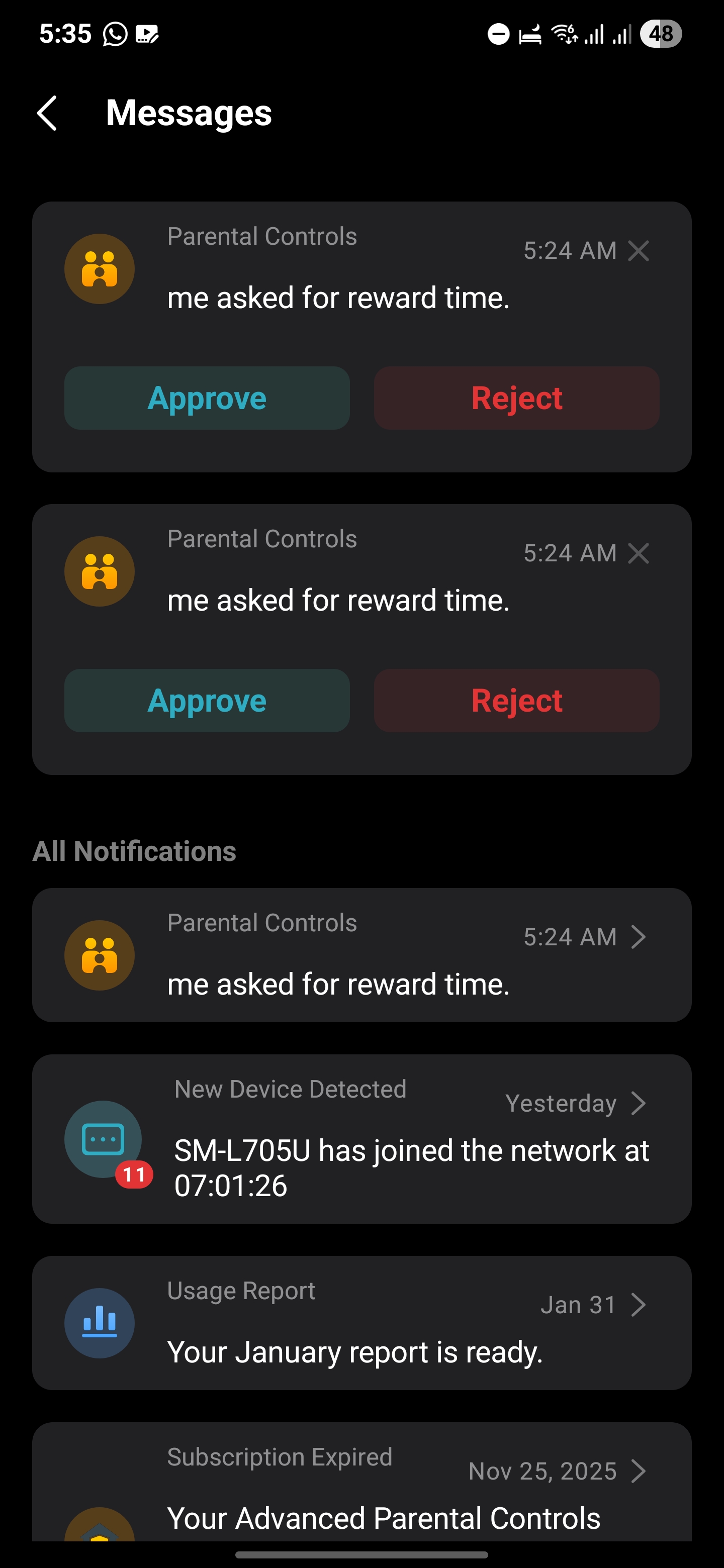
In my house and i have this weird issue were the deco choose one random
Device and put it in " time is up" ask for more time
Even tho i dont have any profiles created
And i can't create any profile it says try again
Each time i solve it by stopping mesh or changing priority time
And it choose it by random each time a different device from phones to smart tv
- Copy Link
- Subscribe
- Bookmark
- Report Inappropriate Content


Hi, thank you very much for the feedback.
Did the issue start recently?
Could you please refer to this link to help me submit the Deco App log:
"Each time I solve it by stopping the mesh or changing priority time "
-"Stopping the Mesh", do you mean disconnecting from the Mesh WiFi?
-How about setting the "priority time"? I didn't recall there was such a feature on the Deco App.
Have you tried to factory reset the Deco X60 once before?
Wait for your reply.
Best regards.
- Copy Link
- Report Inappropriate Content
Hey David
It has been like this for the last 18 months almost
After an firmware update
- no what i meant is the only way to fix the issue when it happens
Is to change something major for the client like block and unblock or change qos option
High priority option and mesh option
After that the deco stops the parental for and after a random day choses another device
I delete the network and it factory reset all decos
And it didn't work actually it did it even faster and chose one phone 30 minutes after
- Copy Link
- Report Inappropriate Content
- Copy Link
- Report Inappropriate Content
Thank you very much for the update.
How about the firmware versions on the Deco X20 and Deco M5?
If the issue was after the firmware upgrade on Deco X60, maybe we can try to set a different model as the main Deco to see whether it helps:
How to replace the main Deco with another Deco
Best regards.
- Copy Link
- Report Inappropriate Content
The x60 hasn't have any update for a while
2 were for the m5 and x20
I dont think this as a good idea
The would be a downgrade right ?
X20 1.5.5 Build 20240718 Rel. 44414
M5 1.9.1 Build 20250909 Rel. 37570
- Copy Link
- Report Inappropriate Content
Hi, thanks for the quick reply. When you mentioned "After firmware upgrade", I thought it started after the firmware upgrade. Sorry for the misunderstanding.
Actually, I think Deco X20(EU) 4.0_1.5.5 Build 20240718 Rel. 44414 might be a better choice serving as the main Deco than Deco X60_V2.
Its Parental Control service uses the HomeShield kit, and the firmware supports VPN Server/Client.
Deco X20 is still a gigabit model. While its WiFi specification is indeed not as high as that of Deco X60.
Deco X60_V2 is AX3000(4 * 4 MIMO on 5GHz) while Deco X20_V4 is 2*2 MIMO. Most mobile devices are 2*2MIMO on 5GHz. So I think the wireless performance on the mobile clients would not be affected.
Best regards.
- Copy Link
- Report Inappropriate Content
So do you belive the x20 is better
I need it to have 2 ports i have one linked with a wire not wifi
Can someone report the log to tplink and ask them to issue an update to fix
This bug
- Copy Link
- Report Inappropriate Content
Information
Helpful: 1
Views: 81
Replies: 7
Voters 1