Deco X50 app hangs all the time after last firmware update

Deco X50 app hangs all the time after last firmware update

Deco X50 app hangs all the time after last firmware update
a week ago - last edited a week ago
Model: Deco X50  
Hardware Version: V1
Firmware Version: 1.8.0 Build 25102213 Rel. 43970

I have 4 X50 units with the main one running in router mode.  Since the recent firmware update that added the traffic usage stats the Deco app now runs much slower than before and often just hangs and will not open certain pages (most noticeably the VPN client page and advanced settings such as Address Reservation/WAN Port etc will hang for over a minute before displaying or will not display at all).


Rebooting sometimes fixes the issue for a few days but the issue comes back.  I don't like rebooting as it takes ages for all of the Deco units to come back online (longer than it should really as routers I had 10 years ago would reboot far quicker than this).


Hopefully there can be a fix developed for this (or perhaps a roll back to a firmware version without the traffic stats that worked better?).  I did not really need traffic stats but I do need the management app to be at least as responsive as it was previously and work properly.


Hope someone can help as this situation is rapidly becoming unworkable.

  1      
  1      
#1
Options
4 Reply
Re:Deco X50 app hangs all the time after last firmware update
a week ago

  @Deanosaurus 

Hi, could you please refer to this link to help me submit the Deco App log:

How to submit Deco APP log


Are all satellite Deco X50s connected via WiFi Backhaul?

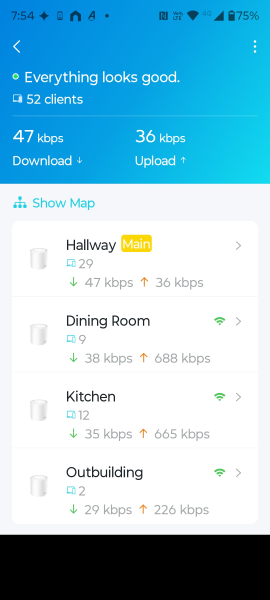
How many online clients do you have in total?

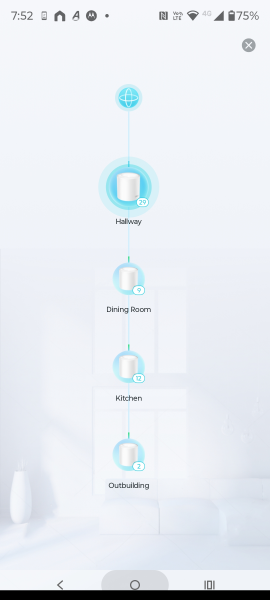
Can you also add some screenshots of the network map on the Deco App, such as:

Best regards.

  0  
  0  
#2
Options
Re:Deco X50 app hangs all the time after last firmware update
Thursday

  @David-TP Thank you for the reply.  I have 4nr X50 units all connected in a daisy chain all using WiFi backhaul.  I have around 50 online clients at any given time.  12 of these are hard wired back to the main deco via network switches.  Only about 8 clients use 5GHz so I have around 30 clients on my 2.4GHz wireless network (most of these are just Tapo smart plugs/other Tapo devices.


I have uninstalled the Deco app and re-installed it and rebooted the main Deco again.  I have also disabled the new 2.4GHz backhaul feature as I never had an issue with backhaul before this was introduced and as there are very few 5GHz clients in my network anyway the backhaul demand is not competing much in this space.


After making these changes the app performance is considerably improved - I can again access advanced settings and the VPN client screen quickly without minutes of hanging.  The traffic usage feature is still very slow to display in the app but this is not something that I need anyway (hopefully this new traffic logging feature does not continuously use background resources CPU/memory on my main Deco and/or fill up cache files as this could clearly cause the poor performance issue to repeat).


I will monitor the situation over the next week to see if the poor app performance issue repeats and update this thread again.


Thank you.

  1  
  1  
#3
Options
Re:Deco X50 app hangs all the time after last firmware update
Thursday

  @David-TP  screenshots as requested...


  0  
  0  
#4
Options
Re:Deco X50 app hangs all the time after last firmware update
Saturday

  @Deanosaurus 

Thank you very much for thedetails.

I'll wait for your further update then. Hope the Deco App could maintain optimal responsiveness.

Best regards.


  0  
  0  
#5
Options