
NX200 and reversed (?) WPS - Wifi on/off - reset buttons

Hi to all!
I bought last days the NX200 5g modem/router and it works very well except for one problem:
I need the possibility to turn on/off the wifi by button and I red that it should be possible by pressing about 2 seconds the wps button: it not works for me.
I tried all but nothing, also with the firmware Archer NX200(EU)_V2.2_250725
My last attempt was to reset all and I pressed with a clip the "reset" switch (is just nearby the wps button): well by pressing this button the wifi turn on or off (!)
(It could by well, but I need one clip everytime and it's not fine).
Question: it's a firmware issue or it's a hardware problem and I should return my NX200 to the seller?
Thanks and cheers from Italy
Lorenzo
- Copy Link
- Subscribe
- Bookmark
- Report Inappropriate Content


Hi, welcome to the community.
I checked the UG of NX200_V1( the button rules also work for V2 and V2.2):
https://static.tp-link.com/upload/manual/2025/202503/20250324/Archer%20NX200_UG_REV1.0.0.pdf
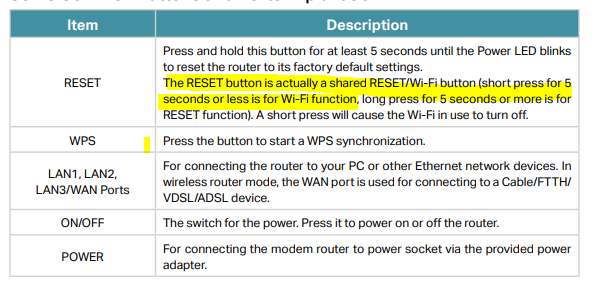
I think the current reported issue is expected.
Best regards.
- Copy Link
- Report Inappropriate Content
Hi, welcome to the community.
I checked the UG of NX200_V1( the button rules also work for V2 and V2.2):
https://static.tp-link.com/upload/manual/2025/202503/20250324/Archer%20NX200_UG_REV1.0.0.pdf
I think the current reported issue is expected.
Best regards.
- Copy Link
- Report Inappropriate Content
@David-TP Hi and thank you a lot for the answer!
I made of course research in the web before to post here but I found answers like this:
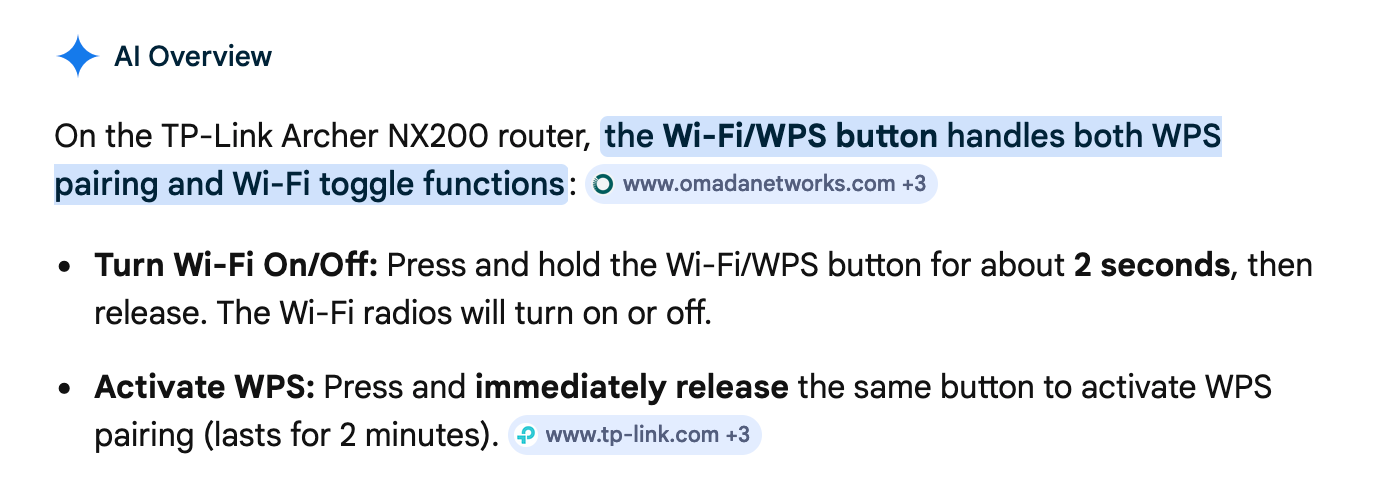
or like this:
https://www.tp-link.com/it/document/51091/


I think that's a strange decision to make this differences for the same model (NX200)
Since I would like to have the "easy" possibility to turn on/off the wifi (without the clip) what I can do?
I guess that to install the 3.0 firmware on my V2 version will be a big fail (anyway if possible to try to do it) and when I buy a NX200 router (I'm in Italy) I can't choose (or see in advance) which version it will be...
What is the situation with the other models (like NX210, NX500 or NX600)? Will I have the same "Version's problem" or one model of these has the wps/wifi button who works in the same way in all the versions?
Thank you a lot for the time,
should you come to the Dolomites you will find beer free here :o)
Lorenzo
- Copy Link
- Report Inappropriate Content
Hi, I didn't realize there was such a difference . Thank you very much for the feedback.
Archer NX500
V2 has the same button rule as NX200_V3:
- Reset Button: A tiny recessed hole (needs a pin to press). To reset the router to factory default settings, press for 2 seconds and release. Then wait about 2 minutes for it to restart.
- Wi-Fi/WPS Button: A small round protruding button. To connect via WPS, press and immediately release the button, then press the WPS button on your device to connect via WPS. Press and hold the button for about 2 seconds, then release the button to turn the router’s Wi-Fi on or off.
NX600 V1/V2 is also the same as NX200_V1/V2.
I further checked with the engineer. He explains that the early WiFi/Reset button rule is indeed suboptimal, so it was updated later on the subsequent production models.
Best regards.
- Copy Link
- Report Inappropriate Content
@David-TP Hi and thank you again.
So the NX200 is not for me and I started the refund procedure.
I was going to buy the NX500 but take please a look what I did find accidentally about it....I'm getting crazy
https://www.tp-link.com/it/document/53668/


https://www.tp-link.com/it/document/53669/


And unfortunately both models are for the European market. So Isn't possible for me to know in advance which model will buy...
The crazy thing is that all the models have the same case with the same buttons.
Any suggestions will be heartily appreciated.
Thank you and greetings
Lorenzo
- Copy Link
- Report Inappropriate Content
Yes! Sorry, my eyes must get blurry when viewing the Setup guide about NX500_V1.
And I checked with the senior engineer about the button rules on Archer NX210. Unfortunately, it is also "Wi-Fi/Reset Button".
Then I'm afraid you might need to consider purchasing a 5G router from the local store. The hardware version can be found on the product label of the box.
Thank you very much for your understanding and support.
Best regards.
- Copy Link
- Report Inappropriate Content
HI and thank you so much for your time. I guessed it was one hard research and so I started meantime to search for alternative ways to manage it.
One way is to use the wifi scheduling but I guess I found one bug about the management system:
the system is setting by hours (one hour step on or off). If you set the wifi on all the day and in this time you turn it off with the button (pressing the reset button for about 1-2 seconds) the system turn it alone on (I turned it off, I went out and when I arrived home it was turned on).
I guess because every hours's change the system checks and force it depending on the timetable settings.
I had the MR550 and it was not so: if you had the scheduled wifi and you turned the wifi on or off by the button, the button's setting won on the scheduled one.
.
Thank you again
Cheers Lorenzo
- Copy Link
- Report Inappropriate Content
Hi, you have found one more suspending issue on some of the 5G routers .
.
You can view the following discussion here:
MR600 V2 & Wireless Schedule. Bug?
5G network keeps getting enabled
They all highlighted that WiFi Schedule rules beat the button setting.
It is planned to be optimized, but I'm not sure when the relevant firmware will be released.
Thank you very much.
Best regards.
- Copy Link
- Report Inappropriate Content
Information
Helpful: 0
Views: 567
Replies: 7
Voters 0
No one has voted for it yet.