
NAT loopback/hairpinning broken
 This thread has been locked for further replies. You can start a new thread to share your ideas or ask questions.
I find v1.31 firmware breaks the function of NAT loopback/hairpinning on X55 US version 1.30 hardware.
Would anyone advise?
- Copy Link
- Subscribe
- Bookmark
- Report Inappropriate Content


Hi All,
Update:
I'll lock this post for now. Please refer to Fixed the Abnormal NAT Loopback Behavior on Deco X50/X55_V1.3_V1.3.1 for more suggestions.
Best regards.
- Copy Link
- Report Inappropriate Content
Hi, is the current firmware 1.3.1 Build 20251122 Rel. 36074?
Are the satellite Deco units connected via Ethernet Backhaul?
-Can I have some screenshots of the network maps on the Deco App:
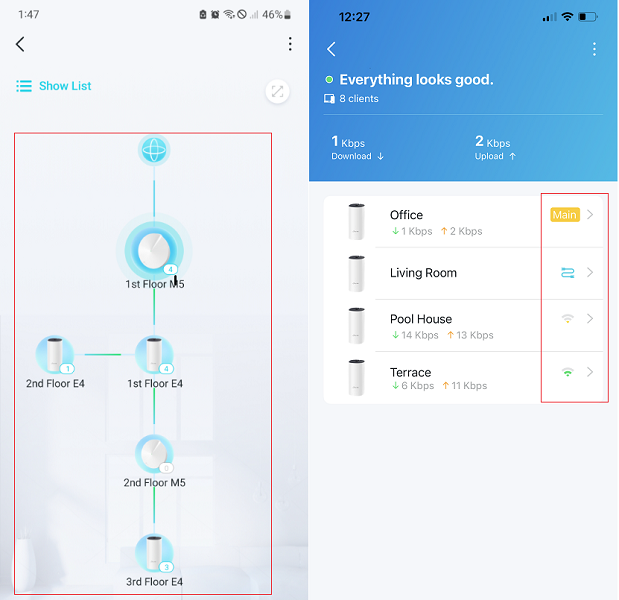
By the way, what are the local servers that you plan to access locally via the public IP/domain?
Wait for your reply.
Best regards.
- Copy Link
- Report Inappropriate Content
Thanks for your quick reply.
The firmware version is v1.3.1 Build 20251122 Rel. 36074
Satelite Deco connected via Ethernet Backhaul as attached in the jpeg.
Nginx Proxy Manager was installed in a server of my local network.
Public ip and domain of the all services cannot be accessed by local devices via Local Network Wi-Fi but they can all be accessed via mobile network.
Local ip of all services can all be accessed.
I think the reason is that NAT loopback/haripinning does not function anymore after the update of the firmware.
Any idea?

- Copy Link
- Report Inappropriate Content
Hi, thanks for the update.
I saw a similar feedback a few days ago on another model, but I'm not sure why it was triggered after the firmware upgrade.
I'll follow up on your case via email and ask the senior engineer for further assistance.
Please check whether you can receive my email.
Best regards.
- Copy Link
- Report Inappropriate Content

@David-TP I have a satellite deco connected via wireless backhaul and have the same issue. It is a real pain and one expects TP link would resolve it quickly. I just bought the Decos 2 weeks ago. Can I receive assistance from a senior eng too?
- Copy Link
- Report Inappropriate Content
Yes, could you please send an email to support.forum@tp-link.com with the following details:
- What is the local server/device that you plan to access locally via the Public IP/domain?
- How is this device connected to the Deco? to the main or satellite X55, by WiFi or Ethernet(if so, via a network switch)?
Wait for your reply.
Best regards.
- Copy Link
- Report Inappropriate Content
Hi All,
Update:
I'll lock this post for now. Please refer to Fixed the Abnormal NAT Loopback Behavior on Deco X50/X55_V1.3_V1.3.1 for more suggestions.
Best regards.
- Copy Link
- Report Inappropriate Content
Information
Helpful: 1
Views: 183
Replies: 6
Voters 1