
TPLink Aginet Router page hanging

I am facing an ongoing issue with my TP-Link Aginet router interface. The router configuration page frequently hangs, becomes unresponsive, and often time out, preventing me from making any modifications.
I have contacted my ISP regarding this issue, but the only solution provided so far is to restart the router, which is not a permanent fix.
To troubleshoot on my end, I have already performed a full router reset; however, the issue persists.
Kindly assist in resolving this problem or advise on any further steps that can be taken.
- Copy Link
- Subscribe
- Bookmark
- Report Inappropriate Content


Hi, have you tried to manage the HX510 via the Aginet App?
By the way, how many HX510 units do you have?
Did the web admin UI behave the same if the device is connected via an Ethernet connection?
Thank you very much.
Best regards.
- Copy Link
- Report Inappropriate Content
Thanks for your reply
I have two HX510 routers, the Aginet app is not able find the device.
Both Ethernet and wifi web admin has same problem.
- Copy Link
- Report Inappropriate Content
Thanks for the quick reply. May I know your ISP? Did you receive the HX510 from the internet service provider?
I didn't find any record about the current firmware version "0.7.0.3.0.0 v6065.0 build 250724 rel.15176n"?
Is it the factory firmware on the HX510, since you had the router?
Best regards.
- Copy Link
- Report Inappropriate Content
- Copy Link
- Report Inappropriate Content
Hi, thank you very much for your time and patience.
I find there is a slightly newer firmware-0.7.0 3.0.0 v6065.0 Build 250808 for HX510(ACT). I left a message about this version.
Could you please help me test whether it made any difference?
Best regards.
- Copy Link
- Report Inappropriate Content
Thanks a lot for your continuous support in resolving this issue.
may i know from where i can download this firmware to test it.
Thanks
- Copy Link
- Report Inappropriate Content
@Racing2012 Thanks for the quick reply. I suddenly realize that on some ISP-customized firmware versions, the web admin UI might not have a local upgrade entry.
Could you please help me check if that is the case:
If yes, I'm afraid you might need to contact the ACT to see if they can help you to push the firmware via OTA cloud directly.
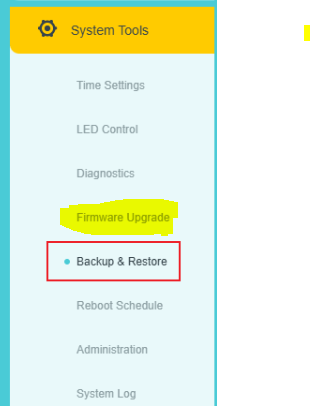
Best regards.
- Copy Link
- Report Inappropriate Content
Information
Helpful: 0
Views: 103
Replies: 7
Voters 0
No one has voted for it yet.