
Satellite issue

Hi,
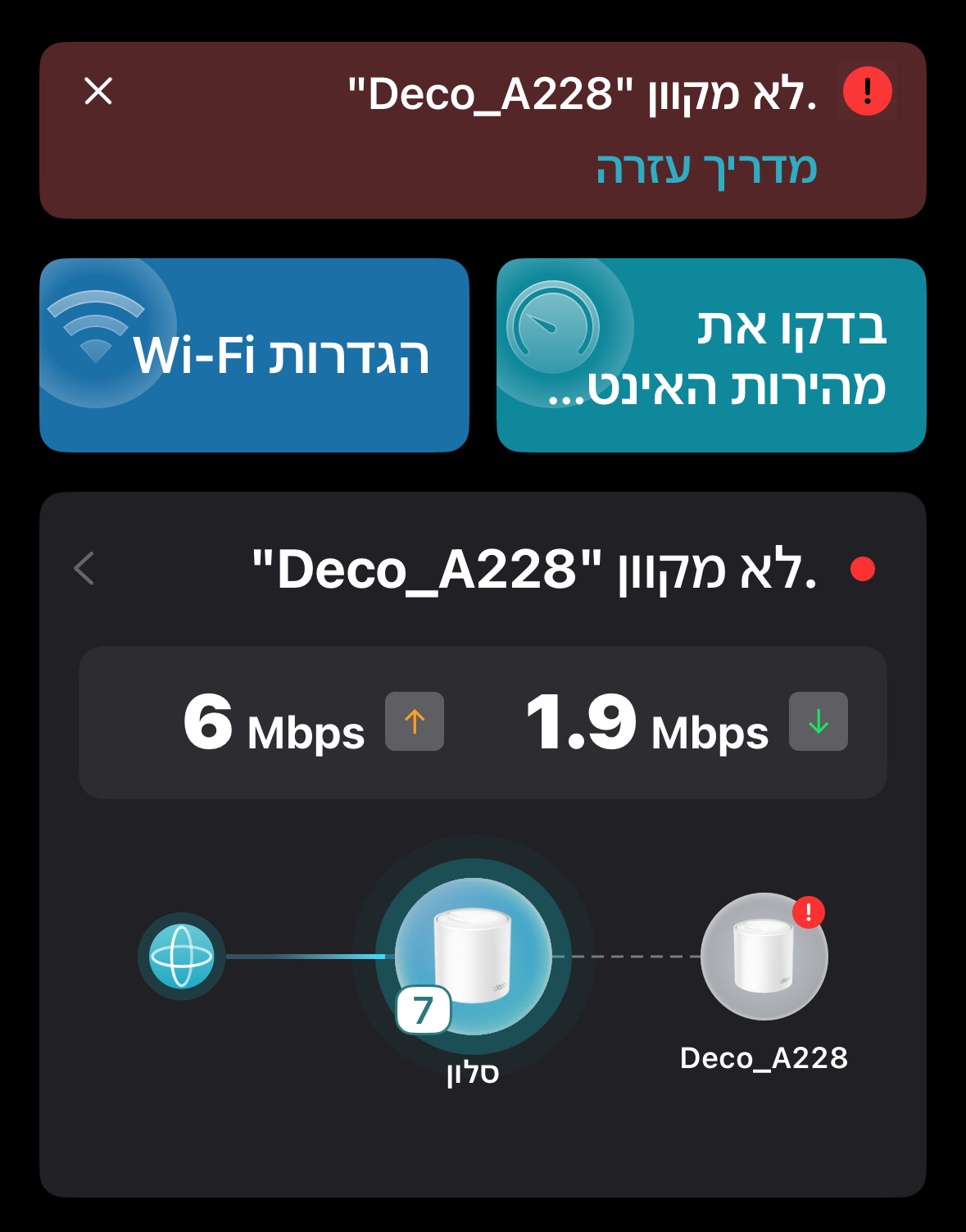
Upon opening the app, I immediately see that the remote satellite is disconnected and greyed out, even though the device LED is green.
If I wait in the app for a few minutes, the satellite appears to reconnect and then disconnects again intermittently.
Has anyone encountered this issue or can provide guidance on a fix?
It's worth noting that the distance between the units is approximately 5-6 meters.
- Copy Link
- Subscribe
- Bookmark
- Report Inappropriate Content


Hi, thank you very much for the App logs. They've been forwarded to the senior engineer for further analysis.
By the way, I noticed you have the Deco for a while. Did the issue start recently?
Have you ever removed the satellite X20 and added it again to the Deco App to see whether it helps?
Best regards.
- Copy Link
- Report Inappropriate Content

Welcome to the community!
Can you please provide us with the following.
1. Hardware version of your X20. You can find this on the bottom of your X20
2. Firmware version of your X20. This can be found in the deco app by going to More > System
3. Model of your phone and deco app version. You can find your app version in the app by going to Network > Click the menu button at the top left > App Settings > About
Looks like a display issue with the app?
- Copy Link
- Report Inappropriate Content
@HelpFixDecoApp It is very likely to be.
@Shay80 Hi, please also help me submit the Deco App log here: How to submit Deco APP log
Thank you very much.
Best regards.
- Copy Link
- Report Inappropriate Content
Hi ,
thanks for replying
The sticker on my deco x20 EU show ver 1.20
I am using iPhone 15
app ver 3.10.62
fw build 20250910 rel 1.6.1 43292
- Copy Link
- Report Inappropriate Content
The instructions provided do not align with my app's current menu. I was unable to locate the specific section you referred to. Could you please verify this for my version of the app?
3.10.62 iOS
- Copy Link
- Report Inappropriate Content
Hi, how does your App UI look?
It doesn't need to look for the exact same FAQs, and you can pick any FAQ, then scroll down to the end, and click "No, I need more help.".
Best regards.
- Copy Link
- Report Inappropriate Content
- Copy Link
- Report Inappropriate Content
Thanks for rep. I’ve added the log as requested. I also included the link to this support thread in the description so you can easily reference the details
- Copy Link
- Report Inappropriate Content
- Copy Link
- Report Inappropriate Content
Hi, thank you very much for the App logs. They've been forwarded to the senior engineer for further analysis.
By the way, I noticed you have the Deco for a while. Did the issue start recently?
Have you ever removed the satellite X20 and added it again to the Deco App to see whether it helps?
Best regards.
- Copy Link
- Report Inappropriate Content
Information
Helpful: 1
Views: 460
Replies: 9
Voters 1