
Issue with VPN routing on Archer AX73 v2

Dear helpdesk,
I am experiencing an issue with my TP-Link router and hope you can assist me.
Here are the details:
- Model: Archer AX73 v2
- Firmware version: Archer AX73(EU)_V2_1.1.2 Build 20250210
- VPN service: CyberGhost VPN
- Configuration: custom .ovpn configuration file
The VPN appears to start correctly on the router, but the assigned client device is not being routed through the VPN tunnel. In the interface everything seems to be configured properly, and the .ovpn file has been adjusted correctly.
Could you advise what might be causing this issue or which settings I should check to get this
- Copy Link
- Subscribe
- Bookmark
- Report Inappropriate Content

Bartp61 wrote
Is there a log in the TP‑Link that shows what’s going wrong?
No, there isn't. The "System Log" doesn't include VPN-related messages, which makes it very difficult to troubleshoot VPN problems on TP-Link routers.
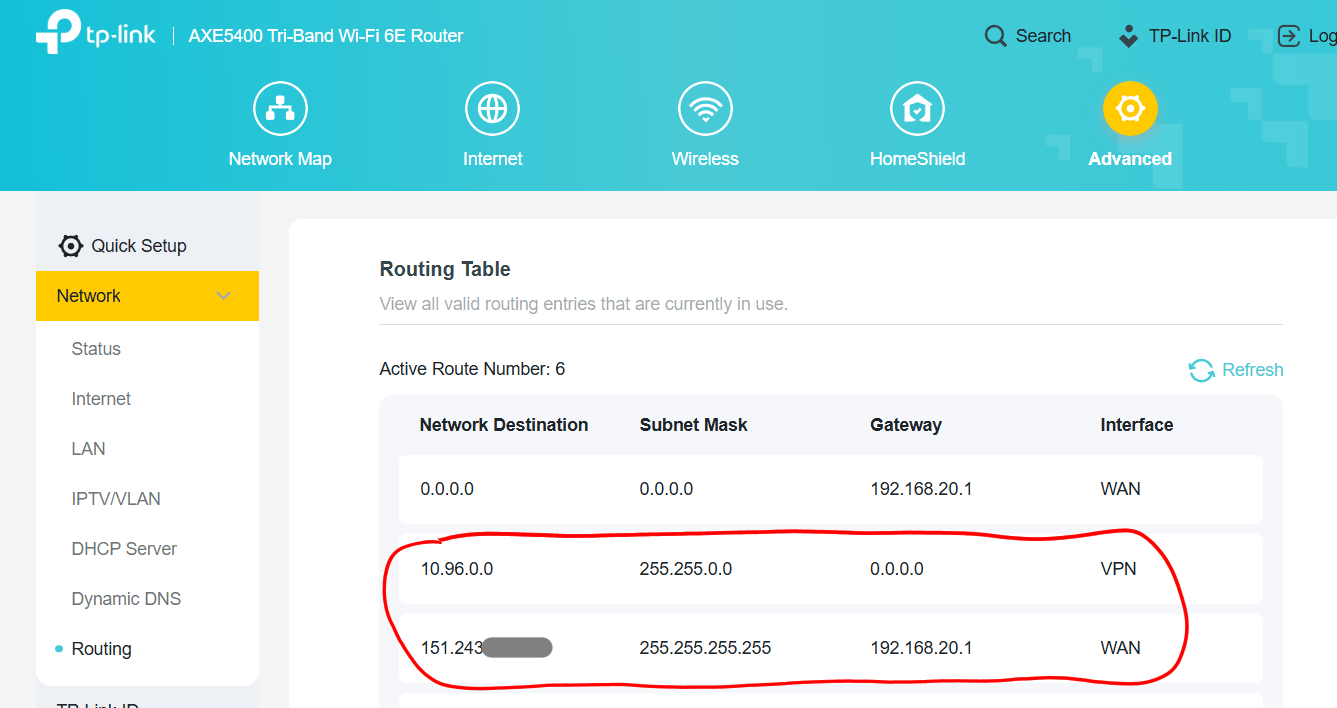
Have you by any chance manually added custom entries in the "Static Routing" section of the menu "Advanced" -> "Network" -> "Routing"?
Also, on another router model I have here I see that the router creates two additional routes after the VPN client connects (see picture below). Do you see similar entries once the VPN client is connected? (of course the actual IP addresses will be different for you)
- Copy Link
- Report Inappropriate Content
Hi,
Please double-check that the MAC address of the client device you chose in the VPN Client's "Device List" is indeed the true MAC address of the client device. (look it up on the client device itself)
By the way, what exactly do you mean by "the .ovpn file has been adjusted correctly"? Other than copy&pasting keys and certificates there shouldn't really be need for adjustments.
- Copy Link
- Report Inappropriate Content
The MAC address is correct, I also tested it with my laptop. The config file provided by CyberGhost comes in a zip file; it includes the CA and user certificate separately, and they need to be added manually.
woozle wrote
Hi,
Please double-check that the MAC address of the client device you chose in the VPN Client's "Device List" is indeed the true MAC address of the client device. (look it up on the client device itself)
By the way, what exactly do you mean by "the .ovpn file has been adjusted correctly"? Other than copy&pasting keys and certificates there shouldn't really be need for adjustments.
- Copy Link
- Report Inappropriate Content
Ok.
How have you determined that the clients aren't routed through the VPN connection? By using some website like ipchicken . com ?
- Copy Link
- Report Inappropriate Content
- Copy Link
- Report Inappropriate Content
Bartp61 wrote
Is there a log in the TP‑Link that shows what’s going wrong?
No, there isn't. The "System Log" doesn't include VPN-related messages, which makes it very difficult to troubleshoot VPN problems on TP-Link routers.
Have you by any chance manually added custom entries in the "Static Routing" section of the menu "Advanced" -> "Network" -> "Routing"?
Also, on another router model I have here I see that the router creates two additional routes after the VPN client connects (see picture below). Do you see similar entries once the VPN client is connected? (of course the actual IP addresses will be different for you)
- Copy Link
- Report Inappropriate Content
- Copy Link
- Report Inappropriate Content
Proton VPN offers a truly free VPN service that you could try. The "free" servers aren't very fast, but for the purpose of testing that's acceptable.
- Copy Link
- Report Inappropriate Content
Information
Helpful: 0
Views: 490
Replies: 7
Voters 0
No one has voted for it yet.