
MacBook Air M4 Packet Loss
MacBook Air M4 Packet Loss

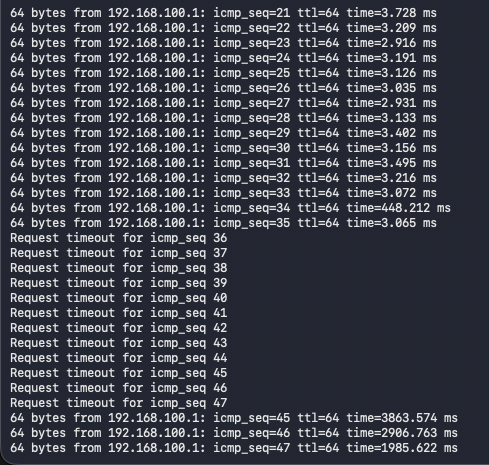
Have a problem with packet loss from my MacBook Air M4 to Deco BE68.
I've got two Deco BE68 units one downstairs living room at the front of the house connected to my ONT seconds upstairs in read office\bedroom. Deco units are connected via Ethernet backhall 10G (house is wired with Cat6 from office to living room).
Networks configured are:
IOT - 2.4Ghz
Primary network - 2.4Ghz, 5Ghz, 6Ghz
Second Network - MLO only 5Ghz and 6Ghz
I've multiple devices in my house, Asus PC's, MacBook Pro M1, iPhone 17 pros etc and they all connect to either the Primary or Secondary network fine with no issue, not packet loss. Speed tests show 500Mb (max internet speed) on speeds tests.
Just my Mac Book Air drops packets no matter which AP its connected to or which network its connected to.
I've tried an unsecured guest network, connecting to the IOT 2.4Ghz network, turning off Mac Privacy mode, disabling QoS, Enabled and Disabled Fast Roaming just still getting this problem.
Mac works fine on other Wifi networks (at my companies office, Tethered etc).
I've upgraded Deco's to most recent firmeware on the support pages and then on the automated update online option from the Deco App.
Any ideas as just struggling to work out what the problem is.
- Copy Link
- Subscribe
- Bookmark
- Report Inappropriate Content

@marksmith85 Hello, I'm having the same problema with my Macbook Air M4, and M4R Tp link. At home my device is the only one with problems. every 20 minutes more or less i have some packet loss. At the office It works OK.
Tell me if I can add more debug info to the case, and how to do it. Thanks
- Copy Link
- Report Inappropriate Content

@rs001 Hi, Not sure if there is a way to add onto the Ticket I have with TP Link Support but I'll pass on your also having a problem as does add its not a one off case of something not working right.
There currently trying to replicate the error to find a fix for the problem was my last update from Support.
Thanks for the info.
- Copy Link
- Report Inappropriate Content


Hi,
Please provide more details about the reported phenomenon for analysis.
1. How many Deco nodes do you have? What are Deco's hardware and firmware versions?
2. Please describe your network diagram. Does the MacBook Air M4 have the same phenomenon when connected to each Deco node?
3. Please provide us with your MacBook's detailed model information.
Best Regards
- Copy Link
- Report Inappropriate Content
Information
Helpful: 1
Views: 444
Replies: 13
Voters 1
