
Unable to connect PS5 to BE25
Unable to connect PS5 to BE25

Having Trouble With PS5 Connection on Deco BE25 Mesh Router
I've been having frustrating issues with keeping a stable internet connection on my PS5 that is wired directly to my TP-Link Deco BE25 mesh router system. I keep getting the NW-102265-6 error code which indicates a network connectivity problem.
I've tried everything found to troubleshoot and fix this:
- Wired vs Wireless - My PS5 is connected via ethernet cable directly to one of the Deco router nodes. I tried connecting wirelessly as well and still experienced connection issues and error codes.
- Router Restarts - I've tried restarting both the PS5 and rebooting the Deco router multiple times. The connection seems to work for a while but then ends up dropping out again after a period of time.
- Changed DNS for the Google ones (8.8.8.8 and 8.8.4.4)
- Changed MTU: In Advanced Settings, change the MTU setting from Automatic to Manual and set it to 1473Change MTU: In Advanced Settings, change the MTU setting from Automatic to Manual and set it to 1473
- Changed mesh from access point to router and vice versa
- Changed Frequency Bands: Switch from 5 GHz to 2.4 GHz (and vice versa) in network settings.
- Reset PS5 setting.
It’s really frustrating because none of my other wireless devices at home have this issue—only the PS5 keeps running into constant connection problems. I’m not sure whether it’s a configuration problem with the Deco BE25 mesh system or some kind of incompatibility with the PS5.
If someone has run into this problem and managed to fix it, I’d really appreciate hearing about it. My mesh router is already updated to the latest firmware, and I’ve tried adjusting every setting I can think of with no success. Any tips on how to keep a wired PS5 connection stable would be greatly appreciated!
- Copy Link
- Subscribe
- Bookmark
- Report Inappropriate Content
The main deco ip address is 192.168.1.3
The 2 satellites are 192.168.1.6 & 192.168.1.7.
Subnet Mask: 255.255.255.0
As the deco is running on AP mode, I can not change the ip address of it.
- Copy Link
- Report Inappropriate Content

@Gabi-Argy Have u set the static ip on PS5 after connected to Deco? Maybe static ip on PS5 will fix your issue.
- Copy Link
- Report Inappropriate Content
I was able to change the IP address, but the issue remains the same. The PS5 successfully gets an IP assigned, but it cannot access the internet.
There seems to be something else going on here. Is there a way to contact specialized support from TP-Link? The Deco BE25 is not working as expected—this might be an incompatibility issue.
I checked deco logs and I got this:
ai-center: eth_get_linkrate: Unknown Duplex! (255)
Maybe the port negotiation is failing? (cable is not the issue, I already replaced and the same happens on wifi). As I was able to get another ip, it is not likely to be a DHCP issue any more (DHCP do not cause ioctl failures).
Issue resume:
- Connects initially (gets partial connectivity)
- Then the Ethernet link becomes unstable
- Router fails to maintain proper communication
- Session drops → PS5 appears “not connected”
I’m getting quite frustrated, as I’ve already tested everything I can think of.
- Copy Link
- Report Inappropriate Content
@David-TP the only way to temporary restore connectivity on the PS5 is:
- Turn OFF PS5
- Power off Deco
- Power off ISP modem
- Wait 2 minutes
- Power ON modem → wait fully up
- Power ON Deco → wait fully up
- Power ON PS5
Please find the screenshots requested attached:
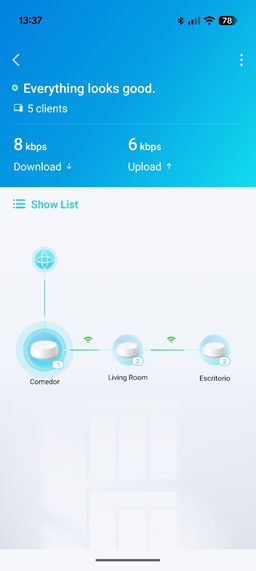
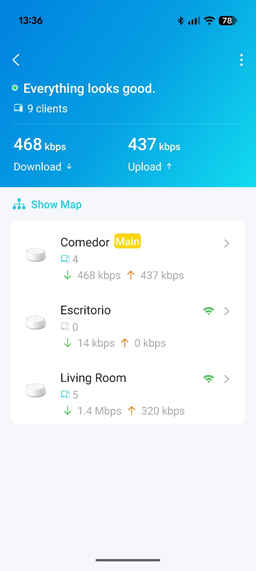
ISP Modem:
ZTE
Product: GPON ONT
Model: ZXHN F6600P
(same happens with the previous ZTE modem, this one is newer than the previous one that the ISP changed). I do not have the info of that one.
- Copy Link
- Report Inappropriate Content
@Gabi-Argy You have to change it to Router Mode and use the Fixed WAN Port option from Deco App. Because Deco got confused between WAN and LAN port on auto mode.
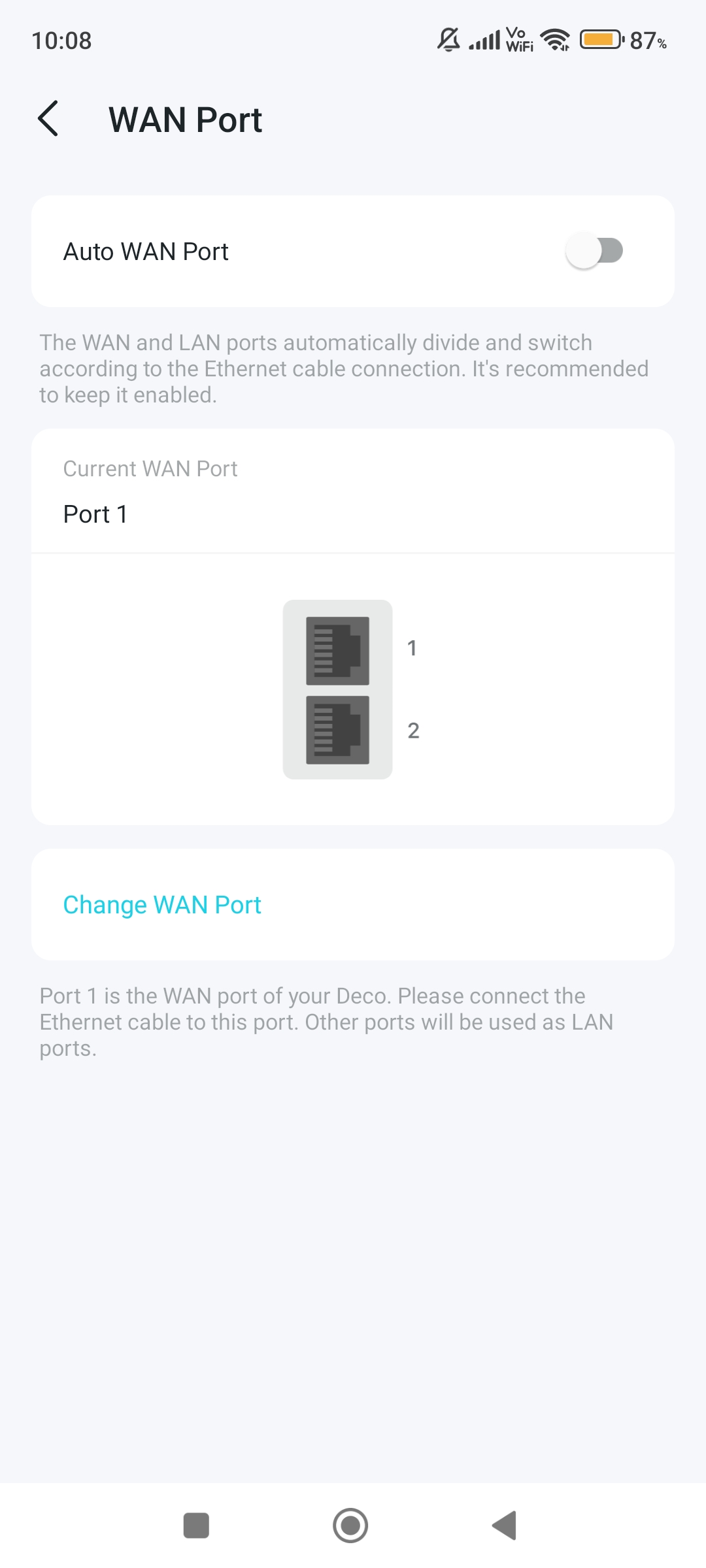
- Copy Link
- Report Inappropriate Content
@ARGamingPK1 I tried that but it is still the same. I also configured the deco back to AP mode after switching that and it is not working.
- Copy Link
- Report Inappropriate Content
@Gabi-Argy Have u tried after downgrade to older firmware?
- Copy Link
- Report Inappropriate Content

Hi, thank you very much for the update.
The support ticket# TKID260412907 has been forwarded to the senior engineer for further assistance.
Please check this email later for more suggestions.
Thanks a lot.
Best regards.
- Copy Link
- Report Inappropriate Content
Information
Helpful: 1
Views: 1100
Replies: 18
Voters 1
