
ethernet connection speed for Powerlink devices

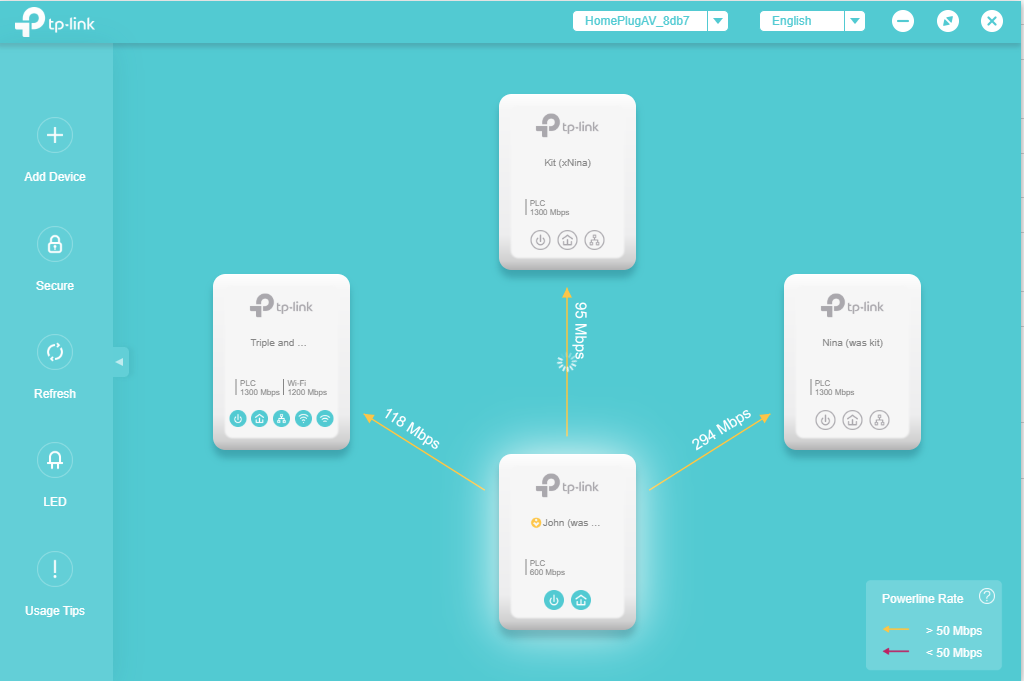
so, home feed is 300Mb; if I connect a laptop to unit labelled Triple via Ethernet cable, broadband speed test comes back as 30mb. Via unit labelled Kit, it is also 30mb.
is that normal, or am I missing something.
- Copy Link
- Subscribe
- Bookmark
- Report Inappropriate Content


Hello @JohnofYork ,
Welcome to our community.
It's important to know that the actual internet speed you get through powerline adapters is typically 20-30% of the powerline rate shown between the adapters. For more details on speed expectations: Explanation about the Powerline Rate and Actual speed of the Powerline Adapters
Troubleshooting Steps:
1. Check powerline adapter placement: Ensure both powerline adapters are plugged directly into wall outlets, NOT into power strips, surge protectors, or extension cords, as these can significantly reduce performance.
2. Test different electrical outlets: Try plugging the powerline adapters into different wall outlets. For comparison, temporarily move them into the same room to see if speeds improve.
3. Check the powerline rate: Use the tpPLC utility or app to check the powerline rate between your adapters. If the powerline rate is very low (much lower than expected), refer to this FAQ for optimization tips: What can I do if my powerline rate is very low?
4. Update firmware: Ensure both powerline adapters are running the latest firmware, as updates often improve performance and stability.
- Copy Link
- Report Inappropriate Content
Hello @JohnofYork ,
Welcome to our community.
It's important to know that the actual internet speed you get through powerline adapters is typically 20-30% of the powerline rate shown between the adapters. For more details on speed expectations: Explanation about the Powerline Rate and Actual speed of the Powerline Adapters
Troubleshooting Steps:
1. Check powerline adapter placement: Ensure both powerline adapters are plugged directly into wall outlets, NOT into power strips, surge protectors, or extension cords, as these can significantly reduce performance.
2. Test different electrical outlets: Try plugging the powerline adapters into different wall outlets. For comparison, temporarily move them into the same room to see if speeds improve.
3. Check the powerline rate: Use the tpPLC utility or app to check the powerline rate between your adapters. If the powerline rate is very low (much lower than expected), refer to this FAQ for optimization tips: What can I do if my powerline rate is very low?
4. Update firmware: Ensure both powerline adapters are running the latest firmware, as updates often improve performance and stability.
- Copy Link
- Report Inappropriate Content
Information
Helpful: 0
Views: 244
Replies: 1
Voters 0
No one has voted for it yet.