
TP Link Archer AX12 QoS Problem

So my bandwidth ISP had 100mbps i really want to set it qos on 90mbps both download and upload. Then, another client is downloading some game, so the ping suddenly goes high when another client is downloading. Is this really qos issue on ax12 ? I really want all clients to have equivalent bandwidth, so it's not affected by gaming performance. At least I also try the latest beta firmware from @Joseph-TP seems it's just same thank you for the attention.
- Copy Link
- Subscribe
- Bookmark
- Report Inappropriate Content
Nevermind, QoS got better in the last update firmware 1.5.0. Why did you guys take so long to deploy the firmware update? It's been a while. I was getting heavy packet loss and really bad bufferbloat when other clients were getting full download speeds ever since I bought this router, SMH.
Btw, thank you for the update. Hopefully TP-Link listens carefully to their consumers.
- Copy Link
- Report Inappropriate Content

QoS is a gimmick, it doesn't work properly on any router, you won't notice any difference even if it worked properly, the only time it might work is if you had say 100 clients and you selected 1 or 2 to be favoured, I suspect when the normal amount of clients are used say 10 the router isn't under enough strain to bother dishing out rations.
- Copy Link
- Report Inappropriate Content

Hello @Skye-Kyou ,
Welcome to our community.
What if you disable the QoS? Will the ping also suddenly go high when another client is downloading? What is the client?
If the device is removed or not actively downloading, will the ping increase?
QoS (Quality of Service) is designed to prioritize specific devices rather than distribute bandwidth equally. When properly configured, QoS should actually help your gaming by giving your gaming device high priority.
Please set your "Total Bandwidth" in QoS to match your actual subscribed Internet speed (100 Mbps in your case) for better performance. Then set your gaming device as a high priority in QoS settings so it gets bandwidth preference when other devices are downloading.
- Copy Link
- Report Inappropriate Content
@Joseph-TP ofc it's getting worse if i turn off the qos when some other client is downloading because it will consume all bandwidth making ping goes 999ms, the problem is i don't wanna use all bandwidth that why i set the qos into 90% of my actual speed internet because it will consume my all bandwidth if i set 100mbps also why tp link removed bandwidth control on latest device ? i just hope it getting back on update firmware please :(
or maybe if you don't wanna bring back bandwidth control on update firmware atleast fix this qos issue. Thank you
- Copy Link
- Report Inappropriate Content
@Bogle for real man qos is really worse rather than bandwidth control because qos system actually cant manage the bandwidth idk why they are keep adding it on latest router device :/
- Copy Link
- Report Inappropriate Content
Hello @Skye-Kyou ,
Thanks for getting back to us.
How QoS actually prevents bandwidth consumption? QoS doesn't work by limiting your total bandwidth • instead, it prioritizes specific devices. So when you set it to 100Mbps and configure your gaming device as "High Priority," the router will ensure your gaming traffic gets bandwidth preference even when other devices are downloading, without consuming all available bandwidth.
In addition, we need to clarify an important point about how QoS works. According to the QoS documentation, you should set the "Total Bandwidth" in QoS to match your actual subscribed Internet speed (100Mbps) for best performance, not 90%.
Here's why: The router needs to know your actual maximum speed to properly manage and prioritize traffic. When you set it to 90Mbps, the router thinks that's your maximum capacity and manages traffic based on that incorrect ceiling, which can actually cause the performance issues you're experiencing.
For high ping, please refer to the suggestions in What should I do if I get the high ping value from TP-Link Wi-Fi router?
- Copy Link
- Report Inappropriate Content
Joseph-TP wrote
Hello @Skye-Kyou ,
Thanks for getting back to us.
How QoS actually prevents bandwidth consumption? QoS doesn't work by limiting your total bandwidth • instead, it prioritizes specific devices. So when you set it to 100Mbps and configure your gaming device as "High Priority," the router will ensure your gaming traffic gets bandwidth preference even when other devices are downloading, without consuming all available bandwidth.
In addition, we need to clarify an important point about how QoS works. According to the QoS documentation, you should set the "Total Bandwidth" in QoS to match your actual subscribed Internet speed (100Mbps) for best performance, not 90%.
Here's why: The router needs to know your actual maximum speed to properly manage and prioritize traffic. When you set it to 90Mbps, the router thinks that's your maximum capacity and manages traffic based on that incorrect ceiling, which can actually cause the performance issues you're experiencing.
For high ping, please refer to the suggestions in What should I do if I get the high ping value from TP-Link Wi-Fi router?
The current QoS implementation fails to account for fluctuating line speeds. My connection oscillates between 105 Mbps and 107 Mbps; because the QoS overhead is static, it doesn't stay 'ahead' of the bufferbloat when the ISP speed dips.
A robust QoS should strictly cap and manage the bandwidth to ensure fair distribution. Currently, when one client reaches full utilization, it still causes latency spikes for others. This suggests the scheduler isn't effectively catching packet bursts. The firmware needs a more adaptive algorithm or a stricter 'hard cap' to maintain stability regardless of minor ISP fluctuations, After using this router daily, it is clear that the current QoS implementation needs significant optimization. In real-world usage, the system fails to maintain stable latency under load, which indicates a flaw in how the bandwidth is being managed. I strongly recommend that the development team reviews and patches the QoS scheduler in the next firmware update.
- Copy Link
- Report Inappropriate Content
is this how AX-12 QoS works?
The firmware requires optimization as significant bufferbloat issues persist even over a LAN Ethernet connection. A firmware update is needed to address the queue management and stabilize latency under high load.
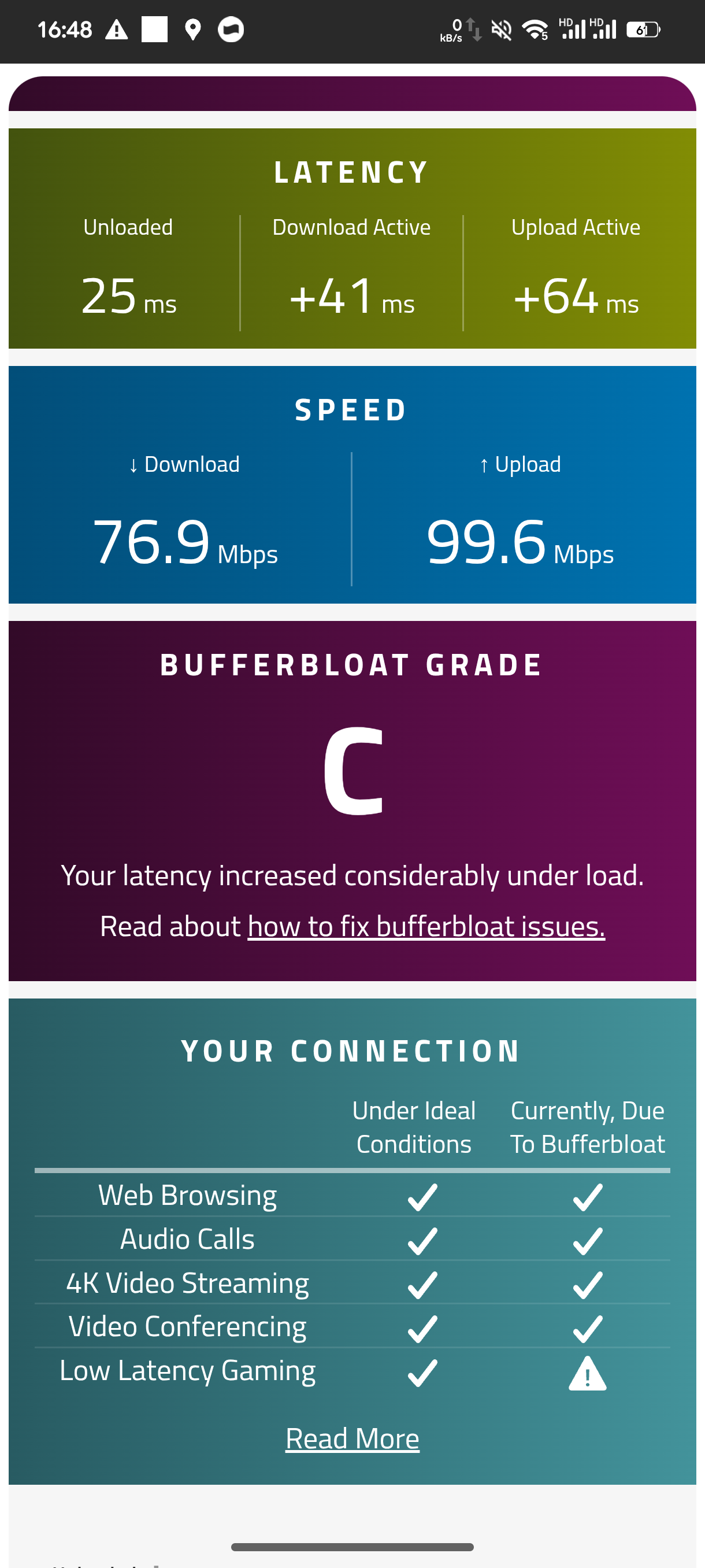
I’m going to keep speaking up until this issue is fixed
- Copy Link
- Report Inappropriate Content

Hello @Skye-Kyou ,
Could you please provide a complete network topology? For example, ISP modem—router )))((( client devices
(Note: — stands for wired connection,)))((( stands for wireless connection)
What are the models of your clients?
Specifically, regarding the point you mentioned, could you please tell us the exact model of the client device that was used to download the game?
Generally speaking, we require sufficient information to effectively reproduce your specific scenario. Based on the details you have provided so far, it appears highly likely that the current performance of the Archer AX12—specifically when QoS is enabled—is strongly correlated with your specific usage environment.
Additionally, could you please run separate tests to compare results with QoS enabled versus QoS disabled? This information would greatly assist us in determining whether the issue is directly linked to the QoS feature itself.
For instance, did the screenshot you previously provided represent the results obtained *after* enabling QoS? If so, the findings can be summarized as follows:
With QoS enabled:
Actual speeds 76.9 Mbps (download) / 99.6 Mbps (upload).
Latency was: +41 ms (download) / +64 ms (upload).
Therefore, please disable QoS, rerun the aforementioned tests to capture the corresponding data, and send the results (including screenshots) here.
Thanks.
Skye-Kyou wrote
So my bandwidth ISP had 100mbps i really want to set it qos on 90mbps both download and upload. Then, another client is downloading some game, so the ping suddenly goes high when another client is downloading. Is this really qos issue on ax12 ? I really want all clients to have equivalent bandwidth, so it's not affected by gaming performance. At least I also try the latest beta firmware from @Joseph-TP seems it's just same thank you for the attention.
- Copy Link
- Report Inappropriate Content
Nevermind, QoS got better in the last update firmware 1.5.0. Why did you guys take so long to deploy the firmware update? It's been a while. I was getting heavy packet loss and really bad bufferbloat when other clients were getting full download speeds ever since I bought this router, SMH.
Btw, thank you for the update. Hopefully TP-Link listens carefully to their consumers.
- Copy Link
- Report Inappropriate Content
Information
Helpful: 35
Views: 1266
Replies: 9
Voters 0
No one has voted for it yet.