
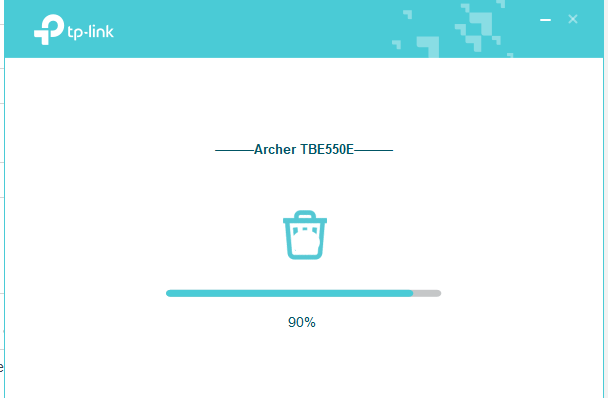
Drivers for Archer TBE550E pcie stuck on 90%

Was trying to update my drivers for it so i clicked on the delete old drivers and reinstall new ones but it gets stuck and 90% i also lost the tiny usb stick thaat comes with it
- Copy Link
- Subscribe
- Bookmark
- Report Inappropriate Content


Hello @wunkspell ,
Welcome to our community.
If you've lost the USB stick, you can download the driver directly from the TP-Link website instead. Here's what you should do:
First, let's get the correct driver:
1. Visit https://www.tp-link.com/support/download/ and search for your adapter model number.
2. On the Download page, select your hardware version and download the appropriate driver for your operating system under the Driver section.
3. Extract the downloaded file.
To fix the stuck installation anomaly, try these troubleshooting steps:
1. Uninstall any existing adapter driver and anti-virus software, then disable the firewall on your computer.
2. Try installing the driver in safe mode (refer to How to get into Windows safe mode for instructions).
3. Try to manually install the adapter following the guide at How to manually install adapters on windows 10 & windows 11
4. Run the "Setup.exe" file from the extracted driver folder you downloaded.
- Copy Link
- Report Inappropriate Content
Hello @wunkspell ,
Welcome to our community.
If you've lost the USB stick, you can download the driver directly from the TP-Link website instead. Here's what you should do:
First, let's get the correct driver:
1. Visit https://www.tp-link.com/support/download/ and search for your adapter model number.
2. On the Download page, select your hardware version and download the appropriate driver for your operating system under the Driver section.
3. Extract the downloaded file.
To fix the stuck installation anomaly, try these troubleshooting steps:
1. Uninstall any existing adapter driver and anti-virus software, then disable the firewall on your computer.
2. Try installing the driver in safe mode (refer to How to get into Windows safe mode for instructions).
3. Try to manually install the adapter following the guide at How to manually install adapters on windows 10 & windows 11
4. Run the "Setup.exe" file from the extracted driver folder you downloaded.
- Copy Link
- Report Inappropriate Content
Information
Helpful: 1
Views: 247
Replies: 1
Voters 1