trafiic generation on ax53

trafiic generation on ax53

trafiic generation on ax53

a week ago - last edited Monday
Model: Archer AX53  
Hardware Version: V1
Firmware Version: 1.5.4 Build 20250926 rel.87654(4555)
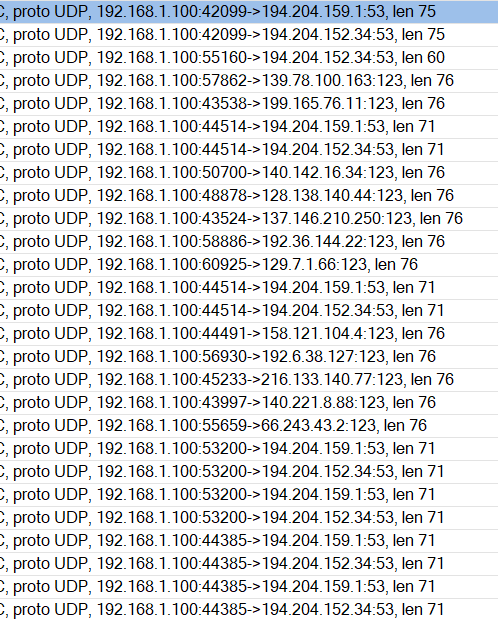
Gentlemen, I have an AX53 as an AP, connected to a MikroTik router... I dropped it's internet connection and it turns out the router is generating over 1 MB of traffic per hour... What's wrong? The re605 is also set to drop in the firewall and doesn't generate anything, the re305 doesn't generate anything either, and two AX53s with the same hardware revision and the same software are sending large amounts of data. 1.100 and 1.19 are ax53...  time synchronization is off ,  what generates traffic there?
 
 
  0      
  0      
#1
Options
14 Reply
Re:trafiic generation on ax53
a week ago

  @BartekBB please fix firmware, 

  0  
  0  
#2
Options
Re:trafiic generation on ax53
Monday
194.204.159.1 and 194.204.152.34 are ip-addresses of Orange PL Others are ip of some Universities. Did you check clients on AX53?
  0  
  0  
#3
Options
Re:trafiic generation on ax53
Monday
The ax53 is working as an AP, so I don't think the clients have anything to do with it... The ax53 is set to AP mode, where I've removed the ax53's IP address from the firewall on the router (MikroTik) and created a log using the drop rule. It's clearly trying to query DNS almost constantly. In my opinion, this is a software bug.
  0  
  0  
#4
Options
Re:trafiic generation on ax53
Monday
Even if no client is connected to this access point, DNS queries are still generated.
  0  
  0  
#5
Options
Re:trafiic generation on ax53
Yesterday
up
  0  
  0  
#6
Options
Re:trafiic generation on ax53
Yesterday

Hello @BartekBB ,

After confirmation, your description appears to be normal, as these queries are used for network status checks.

Range Extender also checks the network status every 30 seconds with a ping. The difference is that Range Extender uses ping for checks, while the router uses DNS checks.

  0  
  0  
#7
Options
Re:trafiic generation on ax53
Yesterday - last edited Yesterday

Thank you for your answer Im sure that : a) youre not right becouse i get more than 1700 package ( 150KB) on evry hour b) or both of my accesspoint are infected In my opinion there is to much dns requests
Could you tell me please how to disable dns request on ax53 ?

  0  
  0  
#8
Options
Re:trafiic generation on ax53
20 hours ago
updated fw to latest 1.6.2 Build 20260119 rel.87654(4555) still dns burst :(
  0  
  0  
#9
Options
Re:trafiic generation on ax53
16 hours ago - last edited 16 hours ago

  @BartekBB 


You can't disable these DNS checks. This is a known behaviour when a TP-lin router is configured in AP mode - details.

To mitigate this constant DNS queries, usually setting AX53 IP address to Static IP, and turning its DHCP OFF helps.

If this was helpful click on the arrow pointing upward to make it blue. If this solves your issue, click the star to make it blue as a "Recommended Solution". Tips:149wubkkfoLmNDjDbiTxx4ZU8mpcMA5CJt
  0  
  0  
#10
Options
Re:trafiic generation on ax53
16 hours ago

  @terziyski and type non valid ipadres for dns.. It's a bit of a workaround, not a solution to the problem.

  0  
  0  
#11
Options