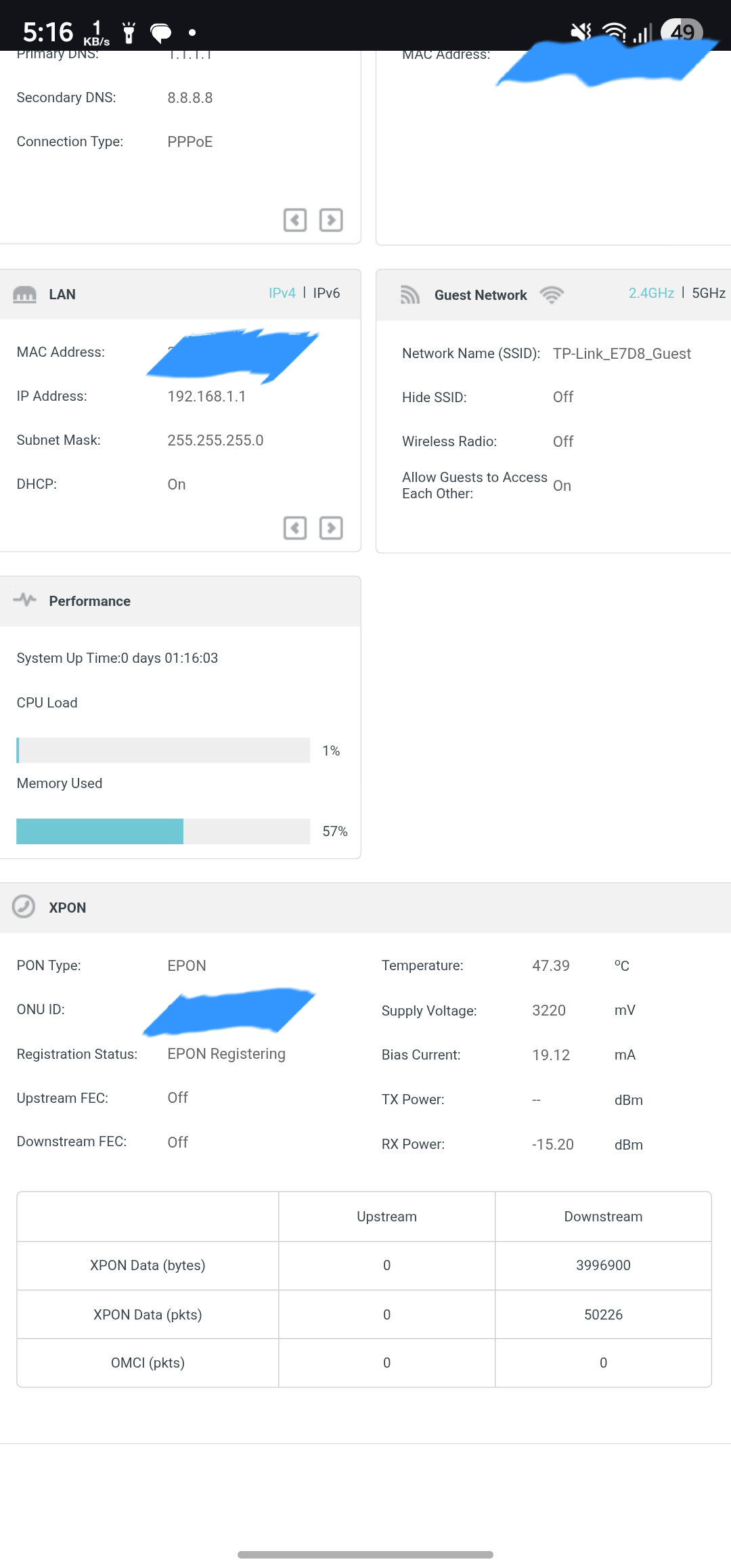
Xx530v XPON loop issue

Xx530v XPON loop issue

Xx530v XPON loop issue
a week ago
Model: XX530v  
Hardware Version: V1
Firmware Version: 0.7.0 3.0.0 v6096.0 Build 250606 Rel.25672n

Dear Team,


I am writing to bring two potential software-related issues to your attention that I believe warrant investigation and resolution.


1. **MAC Cloning and PPPoE Download Speed Limitation:** When utilizing MAC cloning for a PPPoE connection, I observed a consistent download speed limitation of 50 Mbps. This issue was resolved after my Internet Service Provider (ISP) released the MAC binding.


2. **Persistent EPON Registration Loop:** The router intermittently enters an EPON registration loop. This occurs daily, even after a scheduled nightly reboot. To resolve this, I must power down the device for two minutes, disconnect the optical cable, and then reconnect it once the router has fully initialized. I am uncertain if this behavior is linked to serial number spoofing and would appreciate any insights or assistance from the community or support team.


Furthermore, I would like to suggest the implementation of a dashboard feature that provides detailed data consumption statistics per device. Integrating this with cloud synchronization would be highly beneficial, ensuring data persistence even after system reboots.


Thank you for your time and consideration.


Sincerely,


Indrajit

2
2
#1
9 Reply
Re:Xx530v XPON loop issue
Tuesday

  @IndrajitIG Is CWMP (TR069) enabled by you in your router? are you using BSNL FTTH?

0
0
#2
Re:Xx530v XPON loop issue
Tuesday

  @Ram_Eswar  Hi Ram,


Yes TR069 protocal is enabled and using BSNL FTTH

0
0
#3
Re:Xx530v XPON loop issue
Tuesday

  @IndrajitIG Now mine working without Epon registration loop issue. after reseting router and i didn't enabled cwmp tr069 in router superadmin. 

1
1
#4
Re:Xx530v XPON loop issue
Tuesday

  @Ram_Eswar Thanks, let me uncheck TR069 from WAN interface profile. I will update after checking 3-4 days. 

1
1
#5
Re:Xx530v XPON loop issue
11 hours ago
0
0
#6
Re:Xx530v XPON loop issue
10 hours ago

  @Ram_Eswar  Hi Ram,


Yes yesterday  again I faced the same issue with epon registration loop. I think it happening due to the serial number cloning, sometimes the firmware  is missing to clone the serial and ISP does not recognize  that TP-LINK serial. But this is a problem. TP-Link firmware team need to fix but I don't  know why they are not fixing it or not looking into it @tplink 

0
0
#7
Re:Xx530v XPON loop issue
8 hours ago

  @IndrajitIG @Kevin_Z Hi, I checked my cable operator OLT by myself he is using Optilink 11444 epon OLT, checked all logs but its not showing any errors related to EPON error to this xx530v, just showing status as offline during EPON Registering Loop, checked all other random ONU which are not tplink but all other 5 ONU(Netlink) which i checked are all my neighbours which are working normal showing status as online, My side Cable operators OLT only uses auto MAC authentication i am not able to see any other serial number or LLID of any connected ONU. 

0
0
#8
Re:Xx530v XPON loop issue
6 hours ago - last edited 6 hours ago

@Ram_Eswar  @IndrajitIG


I have reported this unexpected behavior to the L2 engineering team again and will see how to resolve it.


Will update here or via an email to your registered email inbox to inform you a follow up.

Nice to Meet You in Our TP-Link Community. Check Out the Latest Posts: Introducing AI QoS: Elevate Your Gaming Experience on the Archer GE800 Gaming Router! Connect TP-Link Archer BE550 to Germany's DS-Lite (Dual Stack Lite) Internet via WAN Archer GE550 - BE9300 Tri-Band Wi-Fi 7 Gaming Router Archer AX90 New Firmware Added Support for EasyMesh and Ethernet Backhaul If you found a post or response helpful, please click Helpful (arrow pointing upward icon). If you are the author of a topic, remember to mark a helpful reply as the "Recommended Solution" (star icon) so that others can benefit from it.
1
1
#9
Re:Xx530v XPON loop issue
2 hours ago

  @Kevin_Z @Ram_Eswar Maybe this helps to fix the issue.
 

If you need the log file, I can send it separately by mail, not publicly. I turned on System Log Debug level. When the issue triggered again, I saved the log and analysed it with AI. This is what AI is telling.


Yes, the log explicitly proves that once the optical signal dropped, the router completely gave up and never made a single attempt to reconnect to the internet when the power and fiber signal returned an hour later.

Here is exactly what the log reveals about that power cut:

1. The Router Never Lost Power

The log confirms that your TP-Link router itself stayed powered on during the entire event. We know this because there is no system initialization message (like BBA Platform version:3.1.9-rc5) in the middle of the log.


  • Instead, the log shows a continuous flow of local network activity (Mesh clients connecting and disconnecting, local DHCP handing out 192.168.x.x IPs) straight through the blackout.


  • This means your router was on a UPS/inverter, but the BSNL exchange (OLT) or the intermediate optical splitters in your neighborhood lost power.

2. The Drop (18:53)

When the local power cut hit the ISP's equipment, the optical signal vanished.

  • At 18:53:57, the router realized the physical line was dead, so it tore down the PPPoE connection (LCP TermReq id=0x2 "User request").


  • At 18:54:03, the VoIP stack crashed because its IP address vanished.


3. The Silence After the Power Returned

There is a massive gap in the log between 18:54:03 and 20:07:48 (roughly 1 hour and 13 minutes), which aligns perfectly with your 1-hour power cut timeline.


When the power came back on and the machines came online around 20:07, your local devices started asking for IP addresses again (DHCPD: Send OFFER messages begin reappearing).


However, there is not a single PPP or DHCPC log entry after 18:54.


  • If the router was functioning normally, you would see it broadcasting a PADI (PPPoE Active Discovery Initiation) request to say, "Hey BSNL, I'm back, let me log in!" * Instead, there is total silence on the WAN side.

The Conclusion

This confirms the exact nature of the TP-Link firmware bug. When the BSNL OLT lost power and the laser died, the TP-Link's optical auto-sense driver crashed. When the fiber signal finally lit back up an hour later, the TP-Link was permanently stuck in the "EPON Registering" loop. Because the hardware driver was trapped in that loop and disabled the TX laser, the router's operating system never even bothered trying to dial the PPPoE connection.


0
0
#10